


Unsolved
1 Rookie
•
8 Posts
0
601
December 8th, 2023 11:25
G15 5530 Backlight bleed issue
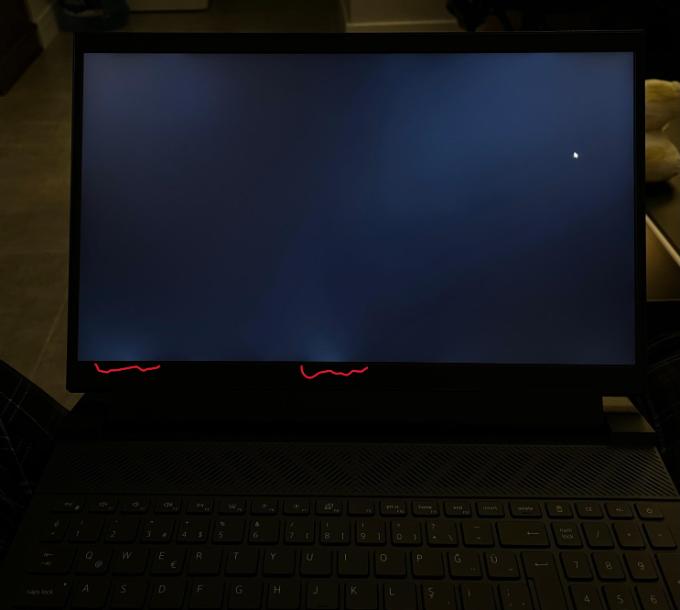
I bought my computer a week ago, I noticed that there is light leakage. I contacted the service for this, but they said that the repair cannot be done, we do not think it is enough for this level of discomfort to be repaired.
I have the chance to return/exchange, but could the screen of my future computer be worse if I exchange it? Are these images at an acceptable level? What do you think?


No Events found!
ejn63
10 Elder
•
30.2K Posts
1
December 8th, 2023 12:08
Only you can decide whether the screen is acceptable, but rather than take a chance on another unit of the same model, a refund and selecting a different model system may be a better idea.
ugcn
1 Rookie
•
8 Posts
0
December 8th, 2023 12:39
@ejn63
You are right, but it is my first ips panel laptop.
I need advice, I have two 27" ips panel external monitors and one 27" va panel monitor with no problems.
I bought it at a good price with a discount and I don't have a budget to go higher, if I want to switch to another model, I would have to go one model lower in gpu and cpu and I don't want that.
ejn63
10 Elder
•
30.2K Posts
1
December 8th, 2023 15:26
The display technology isn't an issue -- it looks like when the screen was assembled, there's more pressure on the bottom of the screen, which causes the liquid crystal to migrate away from the edge, revealing more of the backlight.
I suspect Dell will tell you the display is acceptable by its standards. The important thing is that it's acceptable to you.
That said, just as you likely won't find finely finished leather and metal surfaces in the interior of a Toyota Corolla where as you expect them in a Mercedes-Benz, the Corolla comes with half or less the price of the Mercedes. Same goes for notebook computers: you expect a high level of assembly quality from an Alienware system, and have to accept some tradeoffs for a budget system like a G-series.
ugcn
1 Rookie
•
8 Posts
0
December 8th, 2023 19:49
@ejn63
I agree with you that it's not a technological problem, it's due to poor manufacturing/assembly quality.
I contacted Dell service and sent them the same images via e-mail and the technical service employee commented that "it is only acceptable if it is a bit more and visible in a daylight room".
I definitely agree with your toyota-mercedes comment, but I already bought this computer accepting the low quality parts of this computer.
For example, the computer itself is very heavy and gets hot on the lap,
The charger is very big and heavy, as if it was made using technology from the 90s.
The touchpad is hard and small.
Speaker sound quality is average,
The camera quality is quite poor... and so on.
But I'm a designer and I'm obsessed with visual perfection. While I can accept the minuses, it is very difficult to accept a situation that makes me visually unhappy.
ejn63
10 Elder
•
30.2K Posts
0
December 8th, 2023 22:25
Return the system for a refund -- you're never going to be happy with it.
You also need to recognize that there are limitations on any system -- this is designed as an economy gaming system, so weight, battery runtime and the size and weight of the power adapter go along with these de-prioritized design goals.
Adharsh.c
1 Message
0
February 22nd, 2024 16:59
i am using d15 5530 gaming laptop in that my keyboard backlight is not working. I did so many method to on the backlight but it was not on. give me some solution for this
ejn63
10 Elder
•
30.2K Posts
0
February 22nd, 2024 17:28
If the backlight does not illuminate briefly at powerup, either the cable connecting the keyboard to the mainboard is faulty or detached, the backlight has failed, or there's a problem with power to the backlight. If the keyboard does illuminate at POST but won't under Windows, you may have a driver problem.
If the system is in warranty, call Dell for repair.
If it's out of warranty, note that the keyboard itself cannot be changed -- you must replace the entire palmrest assembly, which requires a compete system tear down. Service manual link is below, which details what is involved to check/replace the keyboard-palmrest assembly.
https://www.dell.com/support/manuals/en-us/g-series-15-5530-laptop/dell-g15-5530-owners-manual/specifications-of-dell-g15-5530?guid=guid-7c9f07ce-626e-44ca-be3a-a1fb036413f9&lang=en-us