


Unsolved
1 Rookie
•
7 Posts
0
15258
February 12th, 2021 08:00
Can't install PCI Data Acquisition and Signal Processing Controller for Dell Latitude 7420
Unable to find drivers for the PCI Data Acquisition and Signal Processing Controller on the Dell Support site. I even went to Intel website to see if there was a Intel Dynamic Platform and Thermal Framework Driver, from my hours of research.
No Events found!
ieee488
4 Operator
•
11.1K Posts
0
February 12th, 2021 12:00
Is there an error in Device Manager?
reddog1014
1 Rookie
•
7 Posts
0
February 12th, 2021 14:00
Yes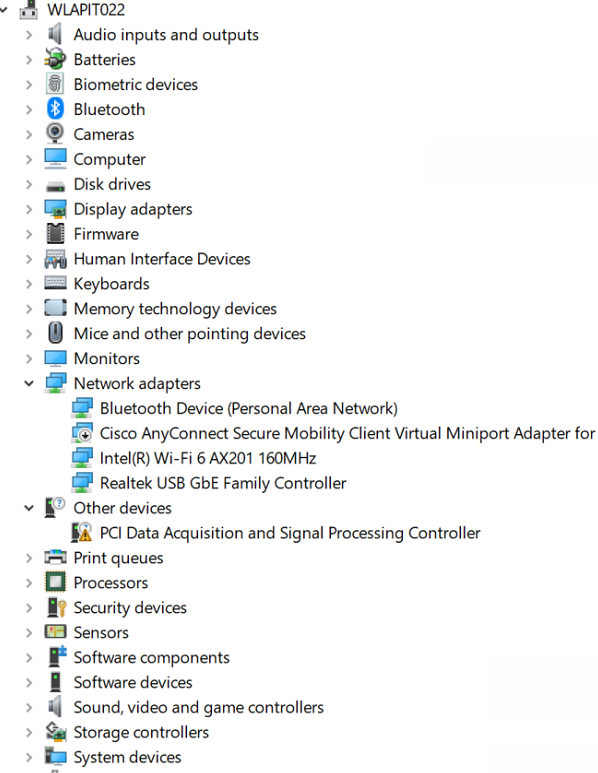
ieee488
4 Operator
•
11.1K Posts
0
February 12th, 2021 15:00
Did you install all the chipset drivers on Dell.com for 7420?
reddog1014
1 Rookie
•
7 Posts
0
February 15th, 2021 17:00
jddfw
1 Rookie
•
87 Posts
0
March 8th, 2021 07:00
We received our first 7420 and had to set it to AHCI in order to apply our image to it. When that process was said and done, I found that we were also missing drivers for the PCI Data Acquisition and Signal Processing Controller.
PCI\VEN_8086&DEV_9A0D...
I seem to recall encountering this once with one of the previous models, and that the "Tuning" and/or "Sensor" drivers took care of it. That hasn't been the case here, and after throwing nearly everything else at this device, I still can't get it resolved!?
reddog1014
1 Rookie
•
7 Posts
0
March 8th, 2021 09:00
We use KACE System Deployment Appliance. I had to end up installing the original OS and then harvest the driver from the laptop. Uploaded the corresponding folders and the System Folder to resolved my issue with our deployment tool, but it should not be that way.
jddfw
1 Rookie
•
87 Posts
0
March 8th, 2021 10:00
Is it still using Microsoft's storahci.sys? If so, would you mind sharing the file's date and size? If it's using a driver from another manufacturer, would you share the same details?
reddog1014
1 Rookie
•
7 Posts
0
March 9th, 2021 09:00
Not really sure on you first question, I just used the Driver Feed Builder Tool from KACE 2000. Here is a screenshot of the folders.
jddfw
1 Rookie
•
87 Posts
0
March 11th, 2021 12:00
I took your advice, brought another 7420 up on its own, and copied off the following folders.
I then brought these in to the imaged 7420 I was working on, and successfully located (and installed) the missing Intel Tigerlake Telemetry Aggregator drivers. Note: Doing this required me to disable the "driver signature verification."
Looks like we need to work on getting these injected, up front...
reddog1014
1 Rookie
•
7 Posts
1
March 11th, 2021 13:00
That is great, but Dell needs to provide this driver. It does not even show on the Dell Support website.
DELL-Cares
Moderator
•
27.4K Posts
0
March 11th, 2021 13:00
Hi,
I have replied to you from a private message.
-Gautam.
jddfw
1 Rookie
•
87 Posts
0
March 15th, 2021 05:00
I was able to narrow this down to the following (which I copied off the system, out-of-the-box).
Windows > System32 > DriverStore > FileRepository > intelta.inf_amd64_ba962d801a22973c
I installed it by starting Windows in the Startup Repair mode and opting to disable the Driver Signature Enforcement.
petermuss
2 Intern
•
162 Posts
0
March 15th, 2021 07:00
You will find all drivers for your device here, using the "Deployment CAB" for W10
https://dl.dell.com/FOLDER06950731M/1/7420-win10-A01-Y9JTN.CAB
Latest release is 1.0, A01.
Download, unpack to a temp dir using 7wip, winzip, winrar...
Inject all drivers to your delopyment image and you are good to go!
Best regards
Peter
jddfw
1 Rookie
•
87 Posts
0
March 16th, 2021 13:00
Peter, turns out this is the CAB my Admin used to prep our image for the 7420...and I just attempted to use this against the PCI controller, post-imaging, to no avail. "Windows could not find the drivers for your device." And a manual search confirms the absence of the intelta.inf & IntelTA.sys files that I found with the OEM image.
alexzaleski
1 Rookie
•
4 Posts
0
March 17th, 2021 11:00
Having this exact issue. Looks like there just isn't a Intel Dynamic Platform and Thermal Framework driver for 7420 Latitude yet.