

2 Posts
0
500
June 9th, 2023 13:00
Latitude 5500 Power Issue
I bought 2, out of warranty Dell Latitude 5500 laptops from a company that had gone out of business for my kids to use for school work. The battery on my son's laptop seemed to be dying and got to the point where he could only use the laptop while it was plugged in. Recently, however, it has stopped powering on at all. The orange/yellow light on the front bezel comes on for as long as you hold down the power button, but the laptop doesn't actually do any normal startup procedures--no fans, other lights or post beeps.
I tried using my son's power adapter on my daughter's laptop and it worked. I then tried using my daughter's power adapter on my son's laptop and got the same response (orange/yellow on the front bezel stays on solid for as long as you hold the power button down, but then goes out as soon as you let go of the button), so I don't believe the issue it the power cord/adapter.
I did notice that the DC jack on my son's laptop appeared to be damaged (it was missing the plastic piece that surrounds the metal prongs). I ordered a replacement DC power jack and performed the swap myself. However, this does not seem to have resolved the issue.
Since I had the laptop open and the battery disconnected during the DC power port swap, I took the opportunity to try to reset the laptop by holding the power button down for 30 seconds while I had the laptop unplugged and the battery out. I then put the battery back in, put the bottom cover back on and tried to power it up again. I got the same result (orange/yellow on the front bezel stays on solid for as long as you hold the power button down, but then goes out as soon as you let go of the button).
Any thoughts on what else I might try to get my son's laptop up and running again?
Thank you,
Z
ejn63
12 Elder
•
31K Posts
•
153.7K Points
0
June 9th, 2023 14:00
Unplug the system and disconnect the battery from the mainboard. Then hold the power button for 30 sec. Remove and reinstall the memory module(s) and the storage drive.
Verify that the LED on the DC side of the adapter is ON before you plug in the notebook end. If it is not, replace it.
If it is, connect it to the system with the battery disconnected. If the system powers up, you're set. If not, replace the system board.
Zilonox
2 Posts
0
June 9th, 2023 15:00
Since a picture is worth a thousand words, here's a novel...
 Old, damaged DC jack
 Replacement DC jack
First up are photos of the old and new DC jack
Next, I did as ejn63 suggested by unplugging the system, disconnecting and removing the battery, holding the power button for 30 seconds and then removing the memory and SSD.
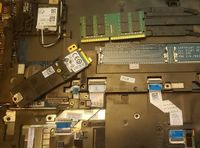
Next, I reinstalled the memory and SSD, but left the battery out. I also verified that the LED on the DC side of the adapter was lit.

Then I connected the power cord while the battery was still out. Unfortunately, I have the same symptom--the orange/yellow LED on the front bezel remains steady lit for as long as I hold the power button down, but the laptop doesn't seem to respond at all (e.g. no fan, no other lights, no post beeps, etc).


So, I guess it's a motherboard issue (as per ejn63's post)? I don't suppose it's as simple as swapping the board though--if I recall correctly, windows 10 does some sort of key generation based off hardware and replacing certain bits requires a re-install of the OS, no?
Anyway, thank you for the pointers!
Z