

Unsolved
2 Intern
•
48 Posts
0
2873
July 10th, 2024 20:58
Webcam on Latitude 3550 getting marked Unknown USB Device (Device Descriptor Request Failed)
Our org is having a problem with some brand new 3550's we are adding into our workforce.
The webcams on several of the devices (but not all) are getting flagged/marked Unknown USB Device (Decvice Descriptor Request Failed). Resolutions have varied, and for some users it has returned.
Our current most useful solution is to remove the device from Device Manager, disable BitLocker, and re-run a Dell BIOS .exe file (even if it's the same version). Once the laptop reboots, the webcam is working again. We've had about 50 of these occur, and about a dozen user have returned and had to have the same 'fix' applied again.
We use Crowdstrike and block USB Storage -- but other USB Devices work fine as designed.
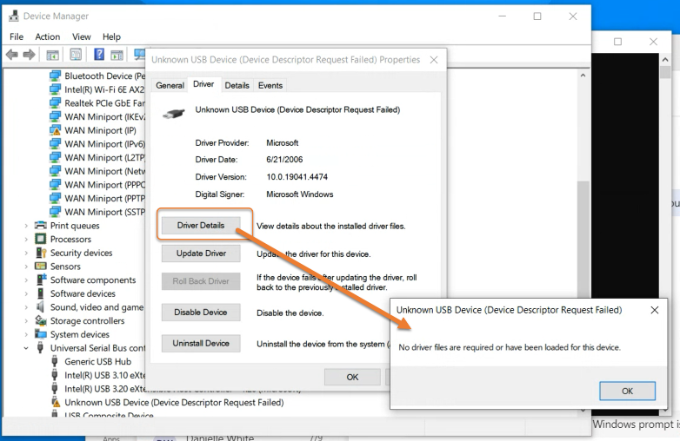
When we look at the Driver File Details (when not working) it is showing up as seen in the image here...
However, we have tested removing Crowdstrike as well -- then rebooting, and the device still does not work until we re-run the BIOS .exe. (see next screenshot, that DOESN'T Show up as Crowdstrike driver).
We have hundreds of Latitude 3500, 3510, 3520, 5511, etc...never had this occur. We still suspect something about Crowdstrike but having removed it on an affected device, and still running Firmware update again, we're running into a wall. Any help/ideas appreciated.
DELL-Chris M
Community Manager
•
56.9K Posts
•
232.1K Points
0
July 16th, 2024 12:43
Does your company have a Dell TAM (Technical Account Manager)? If yes, provide to the TAM 10 of the effected Latitude 3550 Service Tag numbers. If no, click DELL-Cares. On the right scroll down and click, "Send this user a direct message". In that direct message provide the 10 Latitude 3550 Service Tag numbers and link to this thread.
What is the BIOS and OS version on the failure units?
Is the issue happening out of box? Or only after you have installed Crowdstrike and blocked USB Storage?
Current workaround =
Our current most useful solution is to remove the device from Device Manager, disable BitLocker, and re-run a Dell BIOS .exe file (even if it's the same version). Once the laptop reboots, the webcam is working again. We've had about 50 of these occur, and about a dozen user have returned and had to have the same 'fix' applied again.
We use Crowdstrike and block USB Storage -- but other USB Devices work fine as designed. When we look at the Driver File Details (when not working) it is showing up as seen in the image here. However, we have tested removing Crowdstrike as well -- then rebooting, and the device still does not work until we re-run the BIOS .exe. (see next screenshot, that DOESN'T Show up as Crowdstrike driver).
thumper300zx
2 Intern
•
48 Posts
0
August 5th, 2024 17:57
@DELL-Chris M Thanks for your response, Chris.
We are still at a loss on this. It doesn't seem to depend on the BIOS version. Right now, something is just triggering some of these 3550's to do as described. It might be switching between apps that want to access the camera (as reported by users) -- but it's tough to know for sure.
What is certain is that though Crowdstrike is not explictly showing the block, their DeviceControl.sys is showing up for the camera in device manager when it happens.
We also have found that Dell 3550's using an alternate part # for the webcam (SunPlus) -- those are not having an issue. There is a DFU USB device on the ones having trouble -- we thought maybe that could be a clue, but we have not found any relation/how to avoid the Crowdstrike driver from marking as unknown device.
Users have reported inconsistent operation -- sometimes they just go out switching windows -- one has reported having it come back after it stopped working, which makes it seem like Windows is making access requests, sometimes CS blocks it, and other times no.
thumper300zx
2 Intern
•
48 Posts
0
August 14th, 2024 19:34
@DELL-Chris M I have submitted information to DELL-Cares -- Let me know if anything else is needed. Awaiting a response there.
RUinOhio
1 Rookie
•
1 Message
•
2 Points
0
September 3rd, 2024 15:37
Had the same issue with this same model of laptop. BIOS .exe solution worked, so appreciate that. We do not use Crowdstrike, we use ESET.
Envtest
1 Rookie
•
2 Posts
•
2 Points
0
September 17th, 2024 02:24
We have the same problem with Latitude 7450 with MS Defender. Flash BIOS solve the problem temporarily. All drivers/firmware is updated with Dell Command Update. Windows is deployed by SCCM.
Envtest
1 Rookie
•
2 Posts
•
2 Points
0
October 9th, 2024 18:43
Sorry not 7450 but Latitude 5450.
Someone have receive some news about this problem ?
Jeff.coleman
1 Rookie
•
2 Posts
•
2 Points
0
October 11th, 2024 21:05
We are now having the same issue with Dell 5450 machines. I think it may be the same issue as these are sister models with the 5 designating I5 chips
vagmoro
1 Rookie
•
1 Message
•
2 Points
0
October 22nd, 2024 11:05
We have received several 5450 Laptops in Brazil
Many cases occur with the camera and we noticed that there are 3 processes that consume almost all of the machine's processing (Windows Driver Foundation) and when we disable the camera and USB these processes stabilize.
Is anyone else experiencing this too? I believe it has something to do with the camera.
thumper300zx
2 Intern
•
48 Posts
0
October 30th, 2024 15:26
Replying to each message in this thread :) First my own...
I have not heard from Dell Cares. We ended up contacting a rep a different way. We were told we had to zero out our laptops in our organization to test, with nothing installed. This is not feasible. Laptops and hardware should work without having to do this -- it's a computer. We use them.
thumper300zx
2 Intern
•
48 Posts
0
October 30th, 2024 15:30
@RUinOhio Thanks for that information. We are still partly thinking this is Crowdstrike, but partly thinking hardware or some Windows quirk with power settings. However, we have tried many things and still have cameras going out.
We did a deep dive into Advanced Power options. In our current build of Windows 10, there is a setting hidden called USB Settings > USB Selective suspend setting. If you change a couple registry values, you can get it to display, then disable it (ours was enabled).
We haven't tried a ton of laptops, yet, but on our test user they had the camera cut out again.
One other 'solution' seems to be to shut down the laptop for the night, and power it back up the next morning. But our only 'only the fly' fix is still that we have to suspend BitLocker, then run the BIOS.exe from Dell, and restart the laptop.
This fixes it almost 100% of the time, but for an undetermined amount of time.
It seems like everything is halves -- half the Latitude 3550's, then half the people that report it once come back, then half of those come back again, and then half of those. We have had users come back as many at 15 times for camera fix.
thumper300zx
2 Intern
•
48 Posts
0
October 30th, 2024 15:33
@Envtest Thanks for that info Envtest. I absolutely promise if we find a solution we will get back in here to express that to everyone that has responded.
We have also had a few issues with Latitude 7450's -- but nothing near the scale of our 3550's.
We have also found, there is more than one model of webcam. There are three different combined ID's for Realtek, and each of those has failures.
But there is also a SunPlus webcam model, and that one we've never seen fail.
So, all other things being equal, there is a specific issue related to the Realtek models. The trigger, however, is still unknown.
thumper300zx
2 Intern
•
48 Posts
0
October 30th, 2024 15:33
@Jeff.coleman All of our Latitude 3550's have i7's (shrug)
thumper300zx
2 Intern
•
48 Posts
0
October 30th, 2024 15:34
@vagmoro interesting observation. We haven't seen anything specific to the cameras using resources, but it's still a possibility. Our ability to observe live is limited as everyone is remote and very busy. We want to bring some people in for observation, but it's tough in our parameters.
thumper300zx
2 Intern
•
48 Posts
0
November 9th, 2024 04:18
We have determined this is NOT Crowdstrike. We were finally able to replicate the issue after observing a user operating the webcam within Microsoft Teams. In a meeting with several breakout rooms, if switching quickly between breakout rooms, the camera eventually just 'breaks' and then suspending Bitlocker (manually), running Dell BIOS EXE, and Restarting, will resolve it for an indeterminate amount of time.
Then when back in Teams, switching around in meeting and breakout rooms, it will eventually happen again. We have now had over 1500 reported cases using the Realtek Integrated webcam in MS Teams. We have reset machines completely, removed them from the org completely, etc...on a completely fresh install of Windows, then only adding Teams and going through this practice, it will break the camera.
We have tried EXTENSIVE things -- I've been all over the web, reddit, Dell, MS Forums, using USB utilities, learning about USB Enumeration, trying old drivers, new drivers, new and old BIOS -- nothing has resolved the issue. AS A NOTE -- we have 3550 laptops with a different webcam (SunPlus) -- those don't break. It's only one of three different Realtek integrated webcams.
Rick Brayn
1 Rookie
•
1 Message
•
2 Points
0
December 17th, 2024 12:29
Hello, guys.
We’re facing the same problem in our environment. Our case is very simmilar (CrowdStrike and Bitlocker).
Any news?