


Unsolved
This post is more than 5 years old
1 Message
0
12225
June 3rd, 2014 09:00
My Dell Driver Install Issue
Hi,
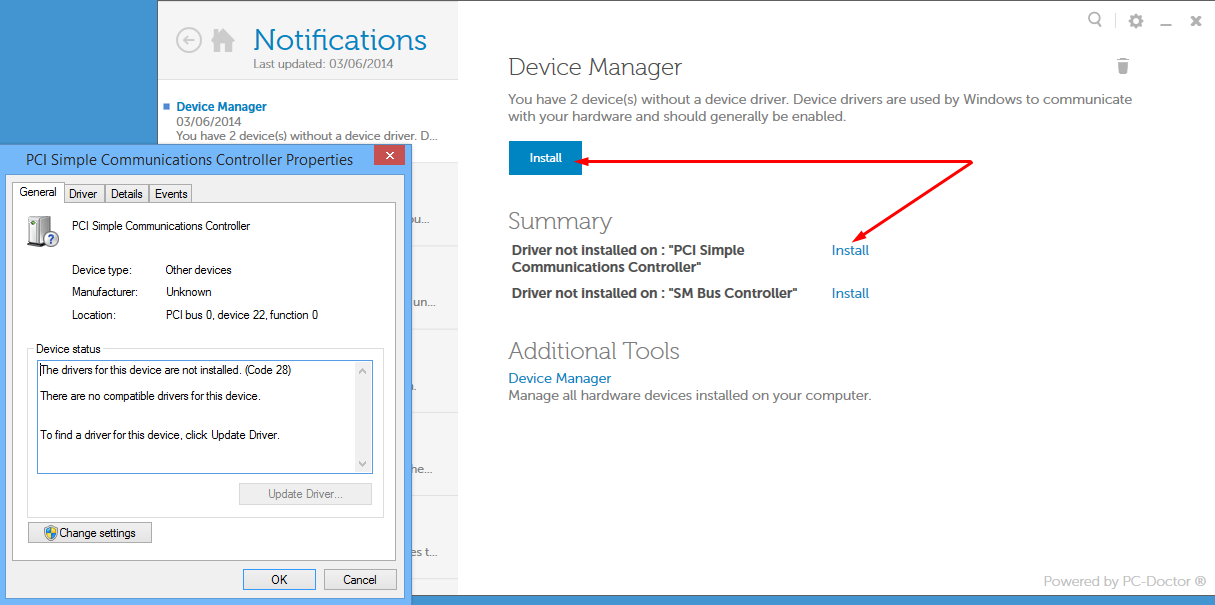
I have a couple of drivers that need to be updated. I downloaded the "My Dell" application and it immediately identified the driver issue.
However, whenever I click the "Install" button, or link, the hardware properties dialog appears, see attached screenshot.
I was kind of hoping that it would install the drivers for me. Please do you have any suggestions?
Thanks,
Kaine
speedstep
9 Legend
•
47K Posts
0
June 4th, 2014 08:00
You have improperly installed drivers and left out CHIPSET Drivers altogether.
The PCI Communications Driver is either AMT SOL HECI Driver OR an actual modem.
There isn't 1 driver for all os all dells all the time everywhere forever.
So unless you give more information about the EXACT Model of your dell along with the version of WINDOWS 7, 8, 8.1 etc and 32 bit or 64 bit then there is no help for this issue.
The "PCI Serial Port Driver is not actually a Serial Port" On Optiplex 755 for example.
Its the Intel AMT HECI & AMT SOL/LMS Hardware.
The Current Driver for this works with Windows 7, Vista, XP, 32 and 64 bit.
One Size Fits all.
Operating Systems
Windows 7 32-bit
Windows 7 64-bit
Windows Vista 32-bit
Windows Vista 64-bit
Windows XP
Windows XP x64
Chipset
ftp.us.dell.com/.../R174616.exe
AMT-HECI
ftp.us.dell.com/.../Intel_AMT-HECI_A02_R255437.exe
AMT-SOL
ftp.us.dell.com/.../Intel_AMT-SOL--LMS_A02_R255438.exe
Hard Drive Installation (via WinZip) with Setup.exe File for Intel_AMT-HECI_A02_R255437.exe
Download
1.Click Download Now, to download the file.
2.When the File Download window appears, click Save (Windows XP
users will click Save) this program to disk and click OK. The Save In:
window appears.
3.From the Save In: field, click the down arrow then click to
select Desktop and click Save. The file will download to your desktop.
4.If the Download Complete window appears, click Close. The file
icon appears on your desktop.
Install
1.Double-click the new icon on the desktop labeled Intel_AMT-HECI_A02_R255437.exe.
2.The Self-Extracting window appears and prompts you to extract or
unzip to C:\DELL\DRIVERS\R255437. Write down this path so the executable (I.e.
Setup.exe) file can be found later.
3.The Self-Extractor window appears.
4.Click OK.
5.After completing the file extraction, if the Self-Extractor
window is still open, close it.
6.Click the Start button and then click Run.
7.Type C:\DELL\DRIVERS\R255437 in the Open textbox and then click OK.
8.Follow the on-screen installation instructions.