


This post is more than 5 years old
1 Rookie
•
50 Posts
0
54732
September 12th, 2015 11:00
Updating Dell Drivers
Running on an Inspiron 3847 and Windows 10 Pro.
I was doing my monthly driver update and the following applications / drivers failed to install -
Dell Digital Delivery Application_2J26D_WN32_3.1.1002.0_A00.EXE
Dell Foundation Services Application_77P24_WN32_2.2.65.0_A00.EXE
Dell Update Application_1GN7H_WN32_1.7.1007.0_A00.EXE
RealTek High-Definition Audio Driver Audio_Driver_GH16Y_WN32_6.0.1.7509_A00.EXE
RealTek Card Reader Driver Storage_Driver_6MC2F_WN32_10.0.10125.31214_A00.EXE
Dell 1705 WiFi & Bluetooth Network_Driver_RX5J7_WN32_10.0.0.318_A00.EXE
RealTek Ethernet Controller Network_Driver_2TG4N_WN64_2.43.2015.609_A01.EXE
After failing to install after 'Run as Administrator', I extracted each download to a temporary directory and tried to install from there.
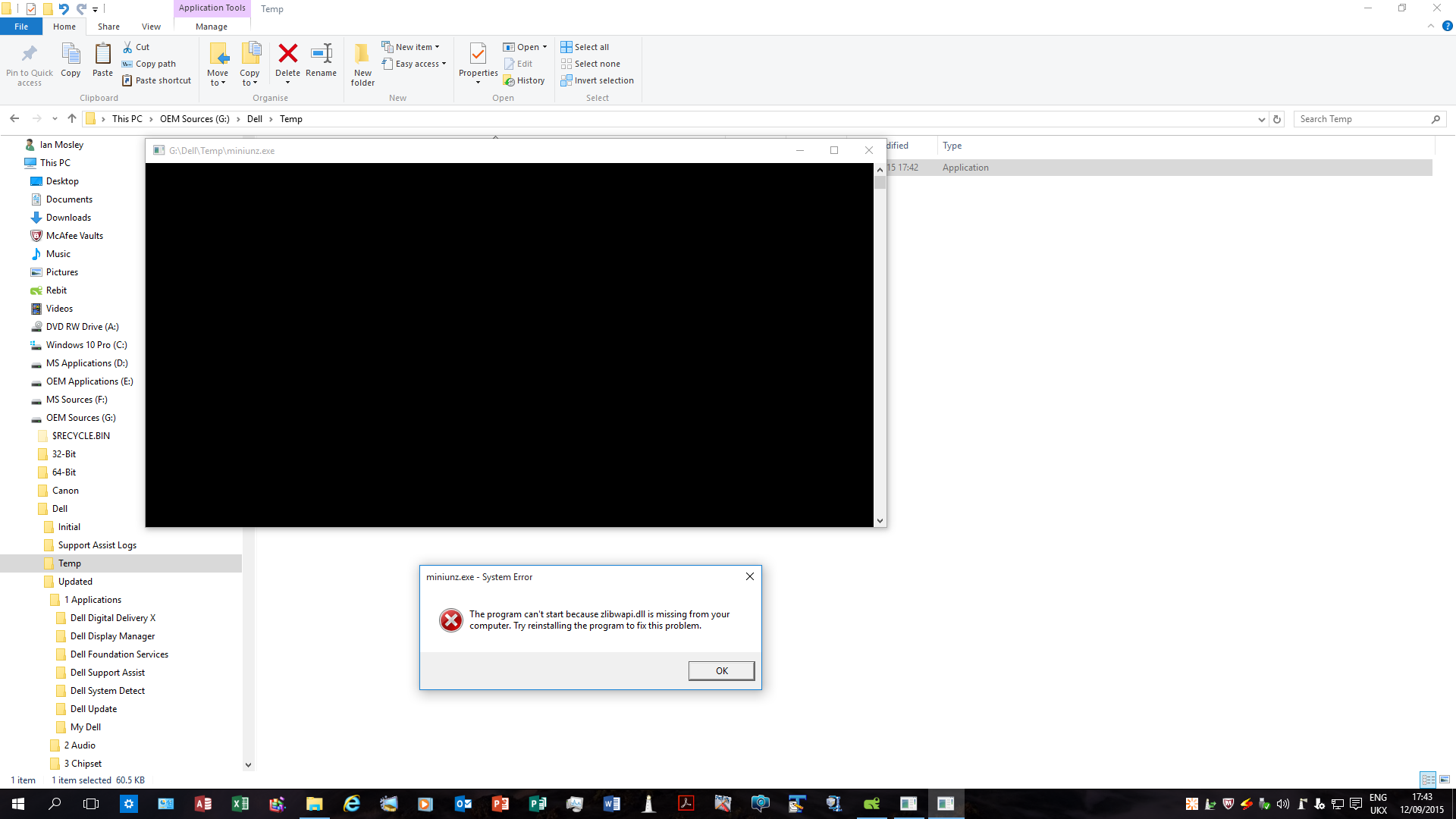
EVERY time the extracted file, 'miniunz.exe', failed reporting a 'System Error' with the message
'The program can't start because zlibwapi.dll is missing from your computer. Try reinstalling
the program to fix this problem.' See attached file.
There's obviously something very basic happening here and I would appreciate the forums help.
IanFM
1 Rookie
•
50 Posts
1
October 8th, 2015 08:00
It appears that if you download and select 'Run' ( as opposed to 'Save As' & then execute the saved file) these applications / drivers will install.
This OK for a work-around; however, it doesn't answer the question of executing a saved file.
lori8258
4 Posts
0
September 27th, 2015 20:00
IANFM, found your post after I received an error attempting to install:
Dell Wireless 1703/1705/1901 WiFi & Bluetooth Network_Driver_N80VN_WN32_10.0.0.0_A00.EXE
It was a return of code 7 that means ???? I noted that your update was a .318 so I thought should double check that the list I had of drivers needing installed was a couple of months old. Now Dell says my drivers are up to date. I find that interesting since at least one is 2 years out of date (ver 6.30.223.99 with a suggested update ver of 7.35.267.0)
After going back through the list I had, it seems that Dell runs fast and loose with the drivers they suggest. The above driver is an example - on my list were also drivers for the 1704 WiFi and a separate 1704 Bluetooth. When I was downloading the files, I thought that the 1703 etc. was weird but when I hover over the above driver it says it is appropriate for my Inspiron 3521. Additionally there is a driver for an AMD Radeon HD ... Video Driver. I have an Intel display adapter. I guess I could take the cover off and make sure there isn't a video card in there that I didn't know about:emotion-43:. BUT, since there is a video driver update for my Intel on the (formerly?) applicable list of recommended driver updates, I'm betting if I ran the AMD I'd get a code 7 that might just mean it isn't for my machine.
The only other suggestion I'd have is to check the check digits if you didn't do so already. Who know if we don't have the right WiFi drivers maybe the bits and bytes are floating around the house!
IanFM
1 Rookie
•
50 Posts
1
October 5th, 2015 17:00
The problem is to do with Windows Installer; my Dell tech 'fixed' it during a remote session. However, the problem has re-surfaced and further investigations are to take place later this week.
Kclewl
1 Message
0
October 18th, 2015 12:00
I've a new xps 8900 straight out of the box, and it won't allow me to download anything (photoshop, printer/scanner software from the cd,) or even update dell drivers. I keep getting the "Dell Digital Delivery Licence Agreement Has Stopped Working" on every reboot, any ideas?