

Unsolved
This post is more than 5 years old
7 Posts
0
22341
May 20th, 2013 18:00
PCI Express Status Test
I have recently bought Dell Inspiron 15r SE with Ubuntu.Anyway I uninstalled the ubuntu os and installed clean windows 7.In addition after installing windows i downloaded all the drivers from the dell website after entering my service tag.But after playing World of Warcraft my Laptop crashed twice showing blue screen.After windows scanned the laptop i showed there is some issue with the amd display adapter and on the blue screen I read that I should take the Laptop to a local shop for checking the issue.Anyway to be sure i performed dell full diagnostics and after it finished it showed this:
Tested and need attention: (1)
Video Card: AMD Radeon HD 7730M
PCI Express Status Test
 No Device
No Devices Found
Search Help and Support Center
I don't know what to do so before taking it to the local shop where I bought i thought to ask if there is some simple solution
No Events found!
sandeep_par
4 Apprentice
•
1.5K Posts
0
May 20th, 2013 23:00
Hi Garcia18,
Welcome to the community.
Please ignore this error message as PCI cards is only available in desktops. Kindly let us know the error code of the blue screen error you receive, so we can advise you accordingly.
If you have any further queries, please feel free to contact us.
Thanks and Regards
Sandeep P
#iworkfordell
Garcia18
7 Posts
0
May 21st, 2013 07:00
Thank you for your fast reply as soon as the blue screen appears I will make sure i put the error code here.
sandeep_par
4 Apprentice
•
1.5K Posts
0
May 21st, 2013 23:00
Hi Garcia18,
Please check the same at your convenience and let us know the results. If you have any further queries, please feel free to contact us.
Thanks and Regards
Sandeep P
#iworkfordell
Garcia18
7 Posts
0
May 22nd, 2013 09:00
So I played World of Warcraft the other day and the error happened again.A blue screen turned up;didn't manage to take a photo but I found the exact screen on google which looks like this http://i52.photobucket.com/albums/g16/lspdk/SatellitePro/IMAG0424.jpg
sandeep_par
4 Apprentice
•
1.5K Posts
0
May 23rd, 2013 02:00
Hi Garcia18,
I understand that you have copied this bluescreen error from somewhere else. According, to this error driver file for Nvidia Graphic card has failed.
However, it might not be the exact error as you don't have a Nvidia card on the system. You can disable automatic start on error following the steps below:
Click on the Start button and then on Control Panel.
Click on the System and Security link.
Click on the System link
In the task pane on the left, click the Advanced system settings link
Locate the Startup and Recovery section near the bottom of the window and click on the Settings button.
In the Startup and Recovery window, locate and uncheck the check box next to Automatically restart.
Click OK in the Startup and Recovery window.
Click OK in the System Properties window.
You can now close the System window.
After, this you would be able to make note of the exact error. If you have any further queries, please feel free to contact us.
Thanks and Regards
Sandeep P
#iworkfordell
Garcia18
7 Posts
0
May 26th, 2013 06:00
Thank you for that tip I have managed to take a picture from the screen and it looks like this: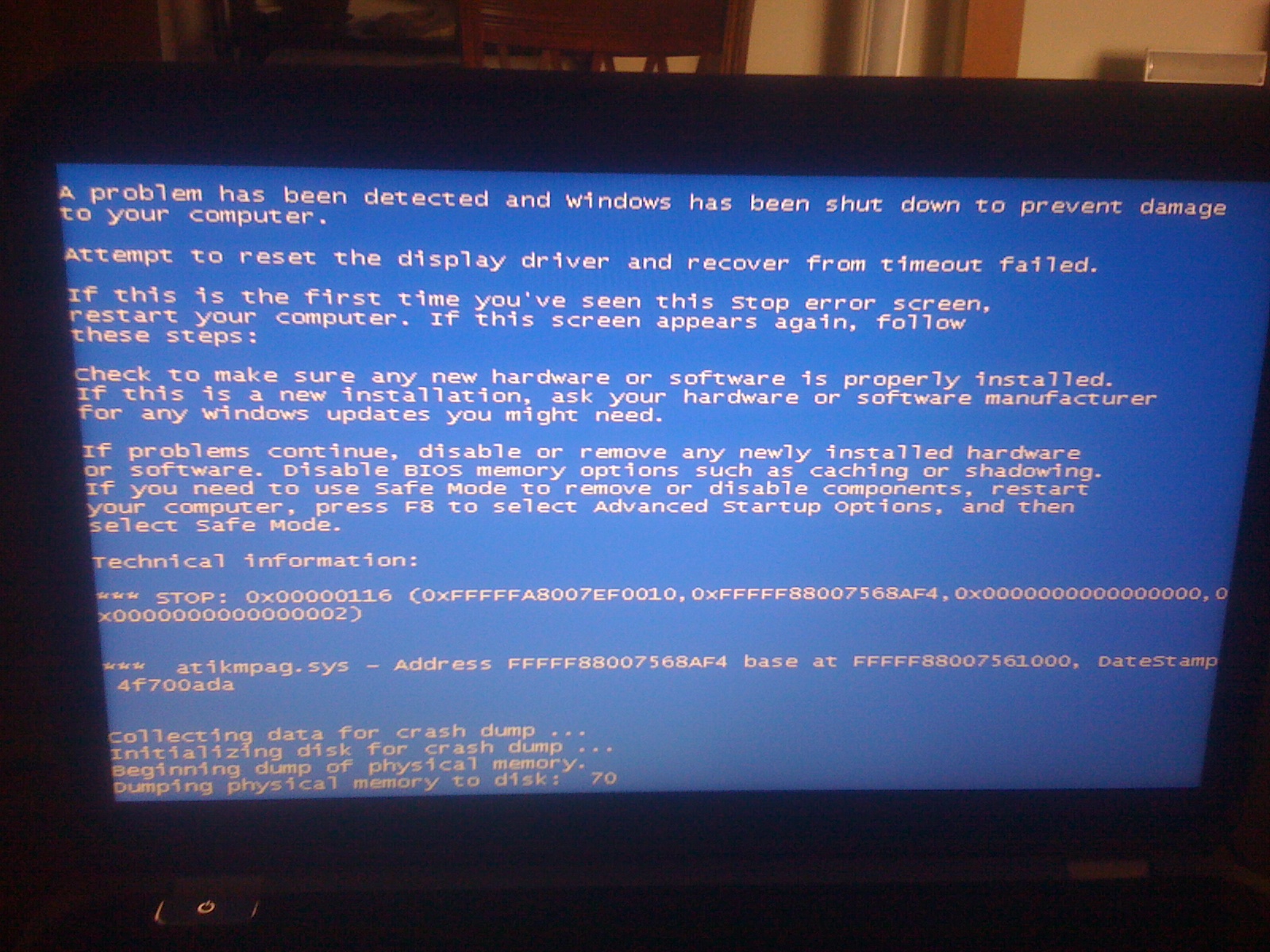
sandeep_par
4 Apprentice
•
1.5K Posts
0
May 26th, 2013 23:00
Hi Garcia18,
Thanks for providing us this information. I appreciate the time and effort that you took to troubleshoot the issue.
This error is related to the video driver failure on the system. Please check this link below which would help you resolve this issue:
http://bit.ly/1ap5Ltr
If you have any further queries, please feel free to contact us.
Thanks and Regards
Sandeep P
#iworkfordell
Garcia18
7 Posts
0
June 1st, 2013 07:00
I uninstalled the driver and then tried to install a driver that i downloaded from the ATI site.Unfortunately I could not install it because as I read from a thread I think I was able to download drivers only from the dell support site.So I reinstalled the same driver and realized that during installation an error show ups but still the installation completes.Thought this was making the problem so I uninstalled it again and installed an older version of the same driver that I downloaded it from the dell support site.Thought this will fix everything and it has been a while that I had no issues and some time before I wanted to post that it fixed my issues the same blue screen error while playing World of Warcraft appeared.
Maybe I should take it to the local shop it still has a warranty