Solved!
Go to SolutionSMART Short Self Test Failed - (Error code: WHD16-8NR)
HI all,
I have had my XPS L520X for 4 years 2 months. I've never had an issue with its operation till last week. It randomly restarted and came up with the Realtek PCI Issue when it rebooted.
To cut a very long story short to fault find what was happening, I re-installed the whole operating system including a formatting of the hard drive.
The problem of the laptop freezing/crashing and rebooting with various erros while doing usual tasks has not been solved.
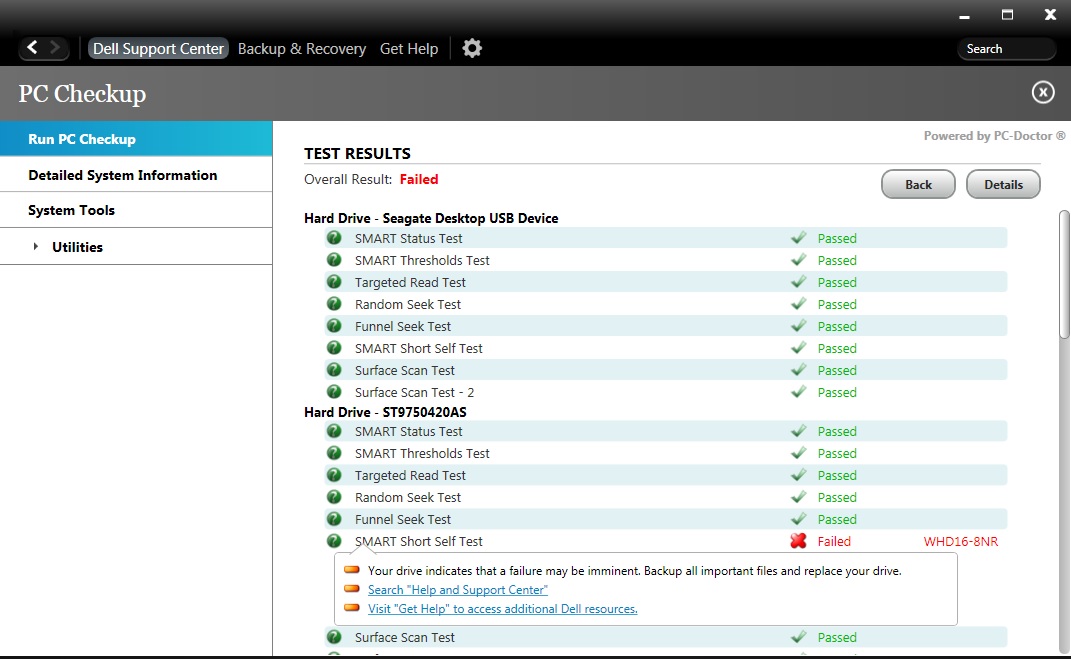
I ran the Dell support centre software and it shows the SMART self test has failed with the following code (Error code: WHD16-8NR).
Event Log:
Dell Support Center Log File
17 March 2016 16:53:55
Overall Result: Failed
-------------------------------------------------------------------------------------------------------------------------------------------
ST9750420AS [ATA:0:0\\?\ide#diskst9750420as_____________________________0005dem1#4&34e0611c&0&0.0.0#{53f56307-b6bf-11d0-94f2-00a0c91efb8b}]
-------------------------------------------------------------------------------------------------------------------------------------------
Vendor: Seagate
Model Number: ST9750420AS
Serial Number: 6WS100EG
Firmware Revision: 0005DEM1
Size: 698.6 GB
Rotation Rate: 7200 RPM
Cache Size: 16 MB
Temperature: 43 C
Physical Sector Size: 4 KB
Logical Sector Size: 512 B
Logical Sector Count: 1465149168
Supported Standards: ATA8-ACS, ATA/ATAPI-7, ATA/ATAPI-6, ATA/ATAPI-5
Specification Version: ATA8-ACS rev 4
----------------------------
OS - C: [PARTITION:C\\.\C:\]
----------------------------
File System: NTFS
Volume Serial Number: 5087-8802
Volume Capacity: 679.00 GB
Volume Free Space: 568.63 GB
Volume Used Space: 110.37 GB
SMART Status Test
Test Started - 17/03/2016 16:43:57
Test Finished: - 17/03/2016 16:43:59
Passed
SMART Thresholds Test
Test Started - 17/03/2016 16:43:59
Test Finished: - 17/03/2016 16:44:01
Passed
Targeted Read Test
Test Started - 17/03/2016 16:44:01
Test Finished: - 17/03/2016 16:44:05
Passed
Random Seek Test
Test Started - 17/03/2016 16:44:05
Test Finished: - 17/03/2016 16:44:54
Passed
Funnel Seek Test
Test Started - 17/03/2016 16:44:54
Test Finished: - 17/03/2016 16:46:14
Passed
SMART Short Self Test
Test Started - 17/03/2016 16:46:14
Error Message: - 17/03/2016 16:46:24
The device reported the following status: The previous self-test completed having the read element of the test failed.
Error Message: - 17/03/2016 16:46:25
The first failing LBA value is 121243744 and the failure occurred after the device had been operating for 8792 power-on hours.
Test Finished: - 17/03/2016 16:46:26
Failed (Error code: WHD16-8NR)
Surface Scan Test
Test Started - 17/03/2016 16:46:26
Test Finished: - 17/03/2016 16:47:25
Passed
Surface Scan Test - 2
Test Started - 17/03/2016 16:47:25
Test Finished: - 17/03/2016 16:48:58
Passed
I also went into the BIOS BOOT MENU by pressing F12 on start-up and ran the diagnostics which seemed to have said everything passed however I did see a faliure error during its process which was too quick for me to write down the error.
In a nut shell, my thought is that my hard drive is failing/ or is about to fail or is corrupt.
My simple question is, do I need a new hard drive with the information I have provided?
Many thanks!