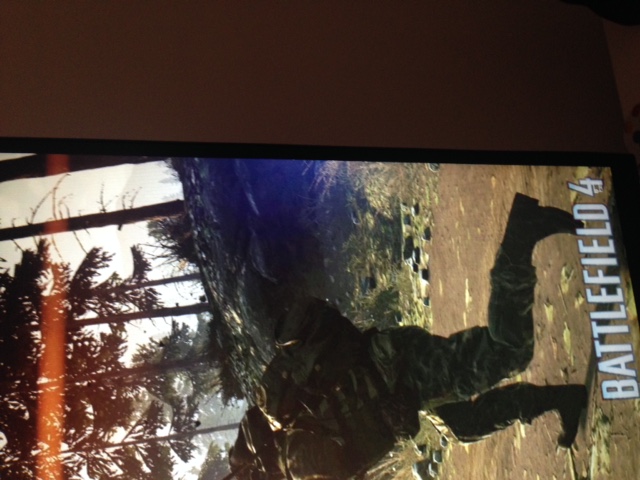
Is this within a reasonable level for a tn panel .. monitor is perfect apart from the washed out colour and whiteish blue hue of backlight bleed/glow right hand side edge mid screen level . Really distracting when gaming . picture attached
* Reset the monitor to Factory Defaults in the Menu OSD (On Screen Display) -Others * Take the computer and video cables out of the troubleshooting by then running the monitor BID (Built-In Diagnostic), page 39-40 * Post pictures of the colored screens in the BID showing the issue
They look far better than the image you posted from within windows. Boot into safemode which should load a generic video driver. If it looks as bad as normal windows, then you could exchange it. If not, then time to retest by connecting the monitor to a different port on the video card and also checking for the latest video card driver. I would also test the monitor on a different system.



DELL-Chris M
Community Manager
•
56.9K Posts
0
April 15th, 2016 07:00
* Reset the monitor to Factory Defaults in the Menu OSD (On Screen Display) -Others
* Take the computer and video cables out of the troubleshooting by then running the monitor BID (Built-In Diagnostic), page 39-40
* Post pictures of the colored screens in the BID showing the issue
pol38
6 Posts
0
April 15th, 2016 10:00
see following pics .. fyi not really a colour uniformity issue just that bleed on right hand side
1 Attachment
IMG_2875.JPG
pol38
6 Posts
0
April 15th, 2016 10:00
5/5
1 Attachment
IMG_2879.JPG
pol38
6 Posts
0
April 15th, 2016 10:00
2/5
1 Attachment
IMG_2876.JPG
pol38
6 Posts
0
April 15th, 2016 10:00
4/5
1 Attachment
IMG_2878.JPG
pol38
6 Posts
0
April 15th, 2016 10:00
3/5
1 Attachment
IMG_2877.JPG
DELL-Chris M
Community Manager
•
56.9K Posts
0
April 16th, 2016 14:00
They look far better than the image you posted from within windows. Boot into safemode which should load a generic video driver. If it looks as bad as normal windows, then you could exchange it. If not, then time to retest by connecting the monitor to a different port on the video card and also checking for the latest video card driver. I would also test the monitor on a different system.