

Unsolved
This post is more than 5 years old
4 Posts
0
1601
July 4th, 2016 15:00
U2414H, Optiplex 760, PSM issues
Just got a dell u2414h. Trying to connect it as an external monitor to my Hp elitebook 8440p which has vga and Dp connections.Monitor has no VGA ans as it came with Dp to miniDP cable I connected minidp to monitor and DP end to laptop. Monitor states that there is no signal comiing from the laptop and I should choose the correct input source.When I choose mini display port it enters powersave mode.
Not sure if I have my laptop set up wrong,have the wrong cable (Might need dp to dp) or whether there is something wrong with the monitor. Saw a post about going to menu and activating display ports or something but I cant bring a main menu up,just an input source menu.
Any help would be gratefully recieved!!
DELL-Chris M
Community Manager
•
56.9K Posts
•
232.1K Points
0
July 5th, 2016 16:00
The laptop is on, lid is open and you can see the windows desktop. The U2414H is on. Be sure that the cable is fully seated on both ends.
Laptop DP out port --> U2414H DP to mDP cable --> U2414H mDP in #4
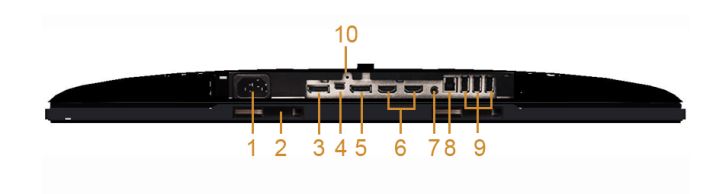
Choose Input Source -Mini DisplayPort
If still no go, read pages 26-27 on changing the DP1.2 setting. Change the setting from what it is set to now, then retest.
fromandan
4 Posts
0
July 6th, 2016 10:00
Hi,thanks for the answer. Yup everythng is switched on. White light coming from monitor power button. MiniDP connected to monitor, DP to the laptop. Also bought a DP to DP cable to see if that would sort it but no. My laptop is oldish, is it possible it doesnt support minidp...I dunno.
Tried the hold done tick suggested in the pages you suggest and have enabled displayport 1.2 and mini display port as well. Didnt seem to make any difference though. AT one point when i was pressing buttons the screen went completely red and evey time i pressed the menu button it changed colour to green white and blue but then stopped,no idea what that was about and how i managed to do it.
I cant do any thing in display settings as the only menu i get up whichever button i press on the monitor is input source. Only messages i get on the monitor are entering power save mode or there is no signal coming from your computer press any key etc... Maybe Im not doing something pretty simple but it aint happening.
Thanks for your help,
Dan
DELL-Chris M
Community Manager
•
56.9K Posts
•
232.1K Points
0
July 7th, 2016 06:00
Is there another computer there to test on the monitor? You got a DP to DP cable?
Laptop DP out --> DP to DP cable --> Monitor far left #3 DP in port
Did you then choose DP (not mDP) from the Input Menu?
fromandan
4 Posts
0
August 7th, 2016 17:00
Hi had this problem ages ago. Tried it on another computer and it worked and had a tech person look at my problem and it turned out my display port was faulty. In the end decided to get a desktop to connect to the U2414h.
First time I connected it to desktop it worked like a charm,but the next day when I turned it on I got the message entering powersave mode so I disconnected it all,reconnected it and it work again. However basically everytime i turn the computer on,or restart it to load updates it enters powersave mode. Sometimes I diconnect some cables,reconnect them again and it works but Ive got to a point tonight where whatever I try it goes to powersave mode and Ive pretty much lost my patience with it.
Im pretty sure its a faulty heap of junk and Ill have to return it but was wondering if anyone had any suggestions in case Im missing something very simple. The desktop is a dell optiplex 760,its connected to the monitor with a dp to mini dp cable as provided with the monitor.
DELL-Chris M
Community Manager
•
56.9K Posts
•
232.1K Points
0
August 8th, 2016 07:00
Is the U2414H connected to an onboard DP/mDP port on the Optiplex 760 or an added discrete video card DP/mDP port?
Did you disable DP 1.2 in the U2414H OSD (On Screen Display) Display Settings?
What is the U2414H serial number and A0x revision?
fromandan
4 Posts
0
August 8th, 2016 10:00
Hi, thanks for replying.
Dp cable connected straight into the back of computer. Im not sure what a discrete videocard dp would look like but the back of the computer looks exactly as the google images photo of the 760 does so assume its connected to the onboard dp port.
DP 1.2 was already disabled from when I was trying to make it work with the laptop but I enabled it and disabled it again to see if it would make any difference and no luck.
Not sure what A0x revision is but here are all the details from the back of the monitor.
S/N CN 09TG46 74261 52E 86ML
REV A03
90120 (in the corner)
DELL-Chris M
Community Manager
•
56.9K Posts
•
232.1K Points
0
August 8th, 2016 14:00
Built on February 14, 2015. Warranty ends on July 18, 2018. This Optiplex came out in 2008. You might try updating the Intel drivers from here.