


1 Rookie
•
7 Posts
3
1295
April 17th, 2025 11:46
U2725QE, MacBook Pro M1, USB hub recognized as 2.0

Dell UltraSharp 27 4K Thunderbolt Hub Monitor U2725QE
Hello, I have a the Dell UltraSharp 27 4K Thunderbolt Hub Monitor U2725QE that's connected via Thunderbolt cable (the one that was delivered with the monitor) to MacBook Pro M1 running MacOS 15.4.
Display works great without any problems at 4K 120Hz however USB hub and devices connected to monitor are sometimes recognized as USB 2.0 protocol, even though monitor is properly connected as USB4/Thunderbolt device. Even the Ethernet network adapter that's built into monitor is using 480mbps USB link which makes it's 2.5Gbps transmit rate useless. I sometimes, because sometimes (after reconnecting thunderbolt cable) it properly recognized as USB 3.1 (just reconnecting cable, nothing more). I tried all 3 thunderbolt ports in MacBook - all behave in the same way.
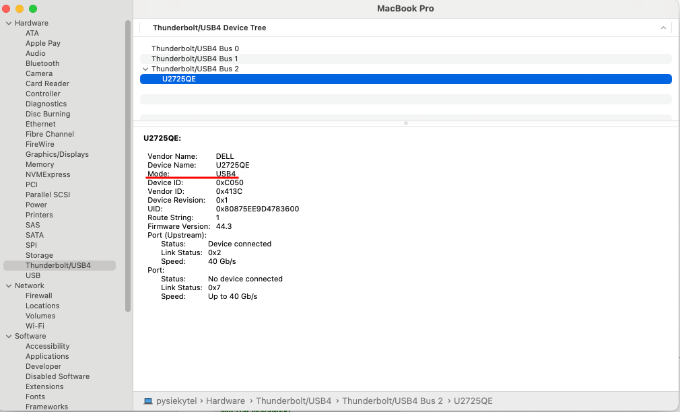
Please see attached screenshots from system info below.
How can I make the USB hub work as proper USB 3.1 device speed? It seems like a firmware bug in monitor for me
Proper USB 3.1 sync:


USB 2.0 sync:


b8xter
1 Rookie
•
4 Posts
0
August 21st, 2025 03:25
Thank you @krzysiexp and all those involved in this post. Yes i can now confirm that the new firmware have fixed my daisychain issues, remember main display, reosltuion, maintaining 120hz, high speed data hub on my backbook pro m2 max
DELL-Chris M
Community Manager
•
56.9K Posts
1
April 17th, 2025 12:03
The U2725QE 140 W TB4 port power delivery may not be enough power for the U2725QE, MacBook Pro M1, and all of your peripheral devices.
Connect the Apple AC adapter to the MacBook Pro M1 and retest.
Change the U2725QE Menu OSD- Display- USB-C Prioritization from High Resolution to High Data Speed. Then retest.
(edited)
krzysiexp
1 Rookie
•
7 Posts
1
April 17th, 2025 12:36
As agreed with Dell support representative I'm checking with Apple support if everything is fine with my MacBook (link to the thread)
krzysiexp
1 Rookie
•
7 Posts
1
April 17th, 2025 12:57
@DELL-Chris M hello, thanks for repsonse.
This has been also suggested by person on Dell support chat - it does not help, it's still the same.
Moreover power delivery from U2725QE works well and also keep in mind that this MacBook has been factory equipped with 65W charger, so 140W is more than enough
The monitor U2725QE is able to charge MacBook without any problems all the time:
krzysiexp
1 Rookie
•
7 Posts
1
April 18th, 2025 05:59
So today I updated the MacOS to latest 15.4.1 (that included restart of MacBook) - problem still persists.
I also found two opinions on the official Dell page saying that firmware is most likely faulty since the uses had problems with resolution handling and hub connection. So I'm not the only one person reporting problems with the hardware.
On the same mentioned page I found beautiful banner:
with [4] saying: Based on internal testing of Dell monitors connected to devices on macOS via Thunderbolt, June 2024. Some features may not be supported.
I would understand if the features "would not be supported" for all the time - not only when I have enough luck to make the proper protocol work for USB.
krzysiexp
1 Rookie
•
7 Posts
1
April 18th, 2025 06:08
There are also two other problems with this monitor:
pizzapartyab1d7d
1 Rookie
•
1 Message
1
April 19th, 2025 00:26
I just ordered a replacement U2725QE after arranging to return my first one as it seemed that it was faulty due to problems with the USB hub.
I am connected to an M2 MacBook Air via the included Thunderbolt cable and the USB hub is pretty much useless when trying to connect anything via the USB 3 ports on the montior. A small external SSD (that will work properly on my iPhone) fails to mount half the time and when it does, it disconnects as soon as initiate a file transfer. My Sony camera (battery powered) says "Check the connected device" on its display when trying to use it to transfer photos from the SD card. My phone will charge, but not mount half of the time. And I've even tried connecting an external HD that has its own power supply, but it fails to be seen by the system.
This does not seem to be an issue with power via the USB hub, but the hub just not functioning properly on a Mac. This is my first Dell product, and although the panel in the display is nice (thanks LG), the rest of the monitor, and the level of expertise of the tech support that I've interacted with is not leaving me with a good first impression.
krzysiexp
1 Rookie
•
7 Posts
1
April 22nd, 2025 06:39
Well after reading all the comments and complains from other users I'm not going to wait till Dell will repair the firmware - I will return the display.
ip75
1 Rookie
•
12 Posts
1
May 8th, 2025 12:39
I see exactly the same thing, hub is sometimes recognised as 2.0. Additionally, the Ethernet port is sometimes not recognised. When either happens I can resolve it by unplugging the monitor from the mains for a few seconds and plugging it in again. I am hoping/assuming this will be resolved by a firmware update soon.
smorebelt
1 Rookie
•
2 Posts
1
May 9th, 2025 20:15
Hello Dell Support and Community,
After extensive troubleshooting with ChatGPT, I’ve identified a reproducible issue affecting the Dell U2725QE monitor’s USB hub functionality when connected via USB-C or Thunderbolt to a 2024 Apple MacBook Pro M4 Max running macOS Sonoma 14.4.1.
Observed Behavior:
When the Mac is connected to the U2725QE and then restarted or cold-booted while the USB-C/Thunderbolt connection remains in place, the monitor’s internal USB hub consistently fails to negotiate at USB 3.x speeds. In this degraded state:
USB 3.x controllers (such as USB7206 and USB7216 from Microchip/SMSC) are missing from macOS System Information.
All USB connections fall back to USB 2.0 (480 Mb/s).
USB 3.x storage devices like external hard drives do not mount or are severely limited in speed.
2.5G Ethernet adapters connected to the monitor operate at USB 2.0 speeds, drastically reducing throughput.
Temporary Workaround:
To ensure the monitor negotiates USB 3.x correctly, the Mac must be powered on and logged in before connecting the USB-C/Thunderbolt cable:
Disconnect the USB-C/Thunderbolt cable from the Mac before restarting or powering on.
Log into macOS.
Reconnect the cable to the U2725QE.
Following this sequence restores proper USB 3.x negotiation. All hubs and connected devices reappear at their correct speeds.
Conclusion:
This appears to be a firmware-level issue where the monitor fails to present its USB 3.x capabilities correctly if connected before macOS is fully loaded. This results in fallback to USB 2.0 and prevents proper function of high-speed USB devices.
A firmware update is needed to ensure that the U2725QE’s USB hub initializes correctly and reliably negotiates USB 3.x, even when the monitor is already connected at system boot.
Thank you for your attention to this matter.
DELL-Chris M
Community Manager
•
56.9K Posts
1
May 10th, 2025 00:22
@smorebelt
Your results were after you did the following?
Change the U2725QE Menu OSD- Display- USB-C Prioritization from High Resolution to High Data Speed.
smorebelt
1 Rookie
•
2 Posts
1
May 10th, 2025 06:39
@DELL-Chris M
Hi Chris,
Thanks for your reply. Just to clarify the situation:
I’m using the U2725QE connected via Thunderbolt 4 to a MacBook Pro. In this configuration, macOS System Information correctly shows the display under “Thunderbolt / USB4,” but the monitor fails to negotiate proper USB speeds on boot. The USB hub falls back to USB 2.0 (480 Mbps), limiting peripherals such as 2.5 Gbps Ethernet adapters to ~200 Mbps, and in some cases, external drives fail to mount entirely due to insufficient bandwidth.
The “USB-C Prioritization” option is greyed out when using Thunderbolt, so I’m unable to switch it to “High Data Speed” — and I understand this setting is only accessible when connecting via USB-C Alt Mode (which I explicitly don’t want to use).
I specifically purchased this display to use the Thunderbolt upstream connection as an all-in-one solution: to drive the display, charge the MacBook, and serve as a reliable USB and LAN hub. This is exactly how Dell markets the display — as a streamlined, single-cable solution for modern Mac and PC users.
Unfortunately, this only works correctly if I unplug and replug the Thunderbolt cable after macOS has fully booted, which temporarily restores full USB 3.x performance. This workaround is not sustainable and strongly suggests a firmware issue in how the display handles USB device enumeration over Thunderbolt during boot.
I’d really appreciate it if this could be escalated to your firmware or engineering teams for further investigation and resolution.
Thanks again for your time,
Tom
DELL-Chris M
Community Manager
•
56.9K Posts
2
May 10th, 2025 13:52
@smorebelt The engineering team is aware of this thread.
b8xter
1 Rookie
•
4 Posts
1
May 12th, 2025 04:23
Thanks kry@krzysiexp for starting this thread and discussion. I can confirm i have the exact same issue and its extremely frustrating as I only just bought the monitors and sales team confirmed the above features worked prior to purchase.
@DELL-Chris M not sure if this helps but here are my specifications and use case.
b8xter
1 Rookie
•
4 Posts
1
May 16th, 2025 00:05
@DELL-Chris M checking in to see if Dell has an ETA on when they will release a firmware update for this monitor for this issue and general MacOS improvements