

Unsolved
This post is more than 5 years old
1 Message
0
17813
April 4th, 2015 09:00
Activate bluetooth using Wireless Switch?
I'm getting really frustrated now because my laptop seems to have forgotten that a thing called Bluetooth exists. I noticed the bluetooth wasn't working so I tried to install the newest driver but it fails to install saying I need to "Activate bluetooth using Wireless Switch". As far as I can tell this means pressing fn+f2 which turns on/off the wifi and blutooth but this does nothing and besides that is always on.
Next I went to mobility center and found this: http://i.gyazo.com/47a803cc2d725348f1cb87ded1f8dd19.png.
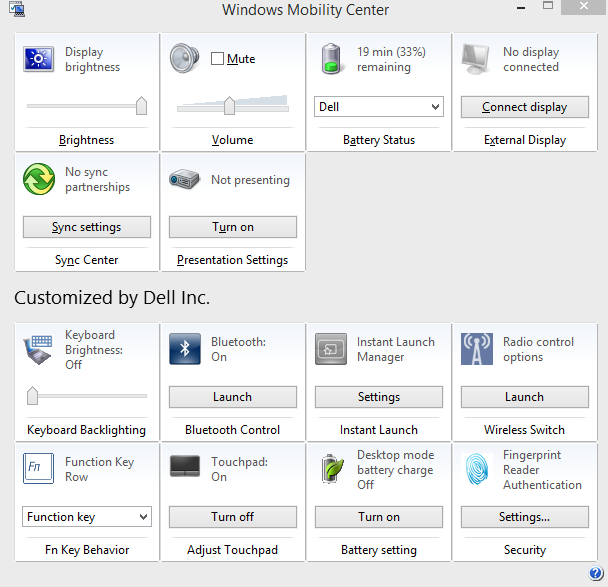
Bluetooth appears to be on but I still can't connect anything with it or install the latest driver. When I click launch it takes me to my PC settings in which there is nothing about bluetooth. Search bluetooth yields two results: set up a connection or network and turn on or off wireless devices. Under wireless devices there are only two settings, airplane mode and wi-fi. Under Set up a connection everything is related to LAN and Wi-Fi, nothing about bluetooth.
If I go to services.msc I find this: http://i.gyazo.com/99e145114b8a9f3cb76476a22c804afa.png So bluetooth defintiely exists in some form but for some reason I just can't access it and it can't pick up bluetooth devices. Someone please tell me I'm an idiot and I'm missing something obvious, please I've been at it for an hour.

DELL-Todd S
4 Apprentice
•
1.8K Posts
0
April 9th, 2015 09:00
Hi,
If you still haven't been able to resolve this, have you tried physically removing the card, deleting all the drivers, etc., rebooting the system, and after that shutting down. Then physically reinstall the card, either let Windows find the drivers or install them yourself, and see if it straightens out the issue?
You can also check Microsoft's article on troubleshooting bluetooth issues.
Other than that, honestly I'm not sure what you may have missed. Let me know if you've resolved the issue (and if so, how, so that others with the same problems can find your solution). If not, like I said, physically remove the card and uninstall the drivers to see what happens.
Hope this helps.
Todd