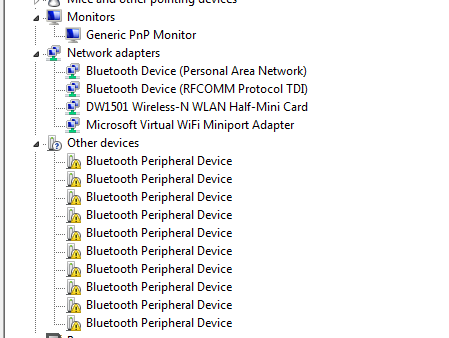
Could you please tell us what model of Dell system you're trying to resolve this network card issue on? And please let us know what version of Windows (or other operating system) that you have on that system. Once we have that we can probably provide you with more information and better ideas on what to do to help you.
Not sure we can help you set up ICS as that is more advanced software configuration than what we normally handle here on these forums, but we may be able to help with resolving problems with the NIC itself.
Also, did you reinstall the OS and tried to install all the drivers but found that the network driver wasn't working? Or were you trying to set up ICS and then found that the NIC wasn't showing up and that is why you tried to install the drivers?
Okay, that system has the Realtek integrated gigabit ethernet cards. You can try going to the Realtek support page to download the diagnostic tool they have and see if the network card passes diagnostics. You can also go to our Dell Support pages, input your service tag, and run diagnostics there as well.
What happens when you try to install that driver? Are you getting an error message that it can't locate the network card? Does it simply fail out? Or does the driver seem to install but you still don't see the network card in the list of adapters in Device Manager?
What happens when you physically plug in a network cable from an active router? Do you see the data transfer lights start to blink at all? What happens if you reboot the system with that network cable plugged in?
Try the diagnostics on that card (both with and without an active network cable connected) and let us know what you find.
I loaded the driver because I was told that would help this problem. I was trying to set up ICS but foundout I ony need to bridge however the ethernet option is not available for bridging.
I ran the diag but it only runs on the adapters visible. I think it is just a setting but not sure. So the diags pass but there is no ethernet adapter that show up. When I try to download the drive the error I get is
In all of this did you ever get the chance to go into the System Setup (BIOS) and confirm that the Integrated NIC is enabled? I believe in that model's BIOS you need to go to the Advanced Settings, then System Configuration to check the status of the NIC.
DELL-Todd S
3 Apprentice
•
1.8K Posts
0
July 10th, 2015 12:00
Hello,
Could you please tell us what model of Dell system you're trying to resolve this network card issue on? And please let us know what version of Windows (or other operating system) that you have on that system. Once we have that we can probably provide you with more information and better ideas on what to do to help you.
Not sure we can help you set up ICS as that is more advanced software configuration than what we normally handle here on these forums, but we may be able to help with resolving problems with the NIC itself.
Todd
garciem
5 Posts
0
July 10th, 2015 13:00
Vostro 3500 and Windows7
DELL-Todd S
3 Apprentice
•
1.8K Posts
0
July 13th, 2015 10:00
Also, did you reinstall the OS and tried to install all the drivers but found that the network driver wasn't working? Or were you trying to set up ICS and then found that the NIC wasn't showing up and that is why you tried to install the drivers?
DELL-Todd S
3 Apprentice
•
1.8K Posts
0
July 13th, 2015 10:00
Hi,
Okay, that system has the Realtek integrated gigabit ethernet cards. You can try going to the Realtek support page to download the diagnostic tool they have and see if the network card passes diagnostics. You can also go to our Dell Support pages, input your service tag, and run diagnostics there as well.
What happens when you try to install that driver? Are you getting an error message that it can't locate the network card? Does it simply fail out? Or does the driver seem to install but you still don't see the network card in the list of adapters in Device Manager?
What happens when you physically plug in a network cable from an active router? Do you see the data transfer lights start to blink at all? What happens if you reboot the system with that network cable plugged in?
Try the diagnostics on that card (both with and without an active network cable connected) and let us know what you find.
Todd
garciem
5 Posts
0
July 13th, 2015 17:00
I loaded the driver because I was told that would help this problem. I was trying to set up ICS but foundout I ony need to bridge however the ethernet option is not available for bridging.
garciem
5 Posts
0
July 13th, 2015 17:00
I ran the diag but it only runs on the adapters visible. I think it is just a setting but not sure. So the diags pass but there is no ethernet adapter that show up. When I try to download the drive the error I get is
garciem
5 Posts
0
July 13th, 2015 17:00
The amber light is flashing slowly on the ethernet port
DELL-Todd S
3 Apprentice
•
1.8K Posts
0
July 14th, 2015 13:00
Hello,
In all of this did you ever get the chance to go into the System Setup (BIOS) and confirm that the Integrated NIC is enabled? I believe in that model's BIOS you need to go to the Advanced Settings, then System Configuration to check the status of the NIC.
Todd