
UNSOLVED
B
blulegend2
1 Rookie
•
2 Posts
0
3676
January 25th, 2022 18:00
Adding a second 3.5" drive to 7050 Mini Tower.
Hi, I want to know if it's possible to add and mount a second 3.5" drive to the 7050 Mini Tower. I currently have one drive in the vertical slot. I see there is space for two 2.5" drives but can that be removed in place of an additional 3.5" mount?
Thanks
1221
0
Posted January 25th, 2022 20:00
you would not be able to install a second 3.5 hdd in the 2.5 cage bay. you would need a second 3.5 hdd cage bay to replace the 2.5 cage first. if you can not get such a cage, you may consider using velcro to secure a 3.5 hdd caddy to the chassis after removing the 2.5 cage.
1219
0
Posted January 25th, 2022 20:00
Thanks! Is there a way to replace the 2.5" cage bay?
1208
0
Posted January 25th, 2022 22:00
If the 2.5 cage bay is riveted to chassis then it would have to removed the hard way (hammer). not sure that is a great idea (rather a last resort). may be easier to use velcro to mount the second 3.5 in the blank chassis space btn the 3.5 and 2.5 cage, or piggy back two 3.5 hdd without caddy in the 3.5 bay. have to be flexible and creative since chassis is not designed to be user friendly for upgrade to dual 3.5.
0
0
Posted November 13th, 2024 22:03
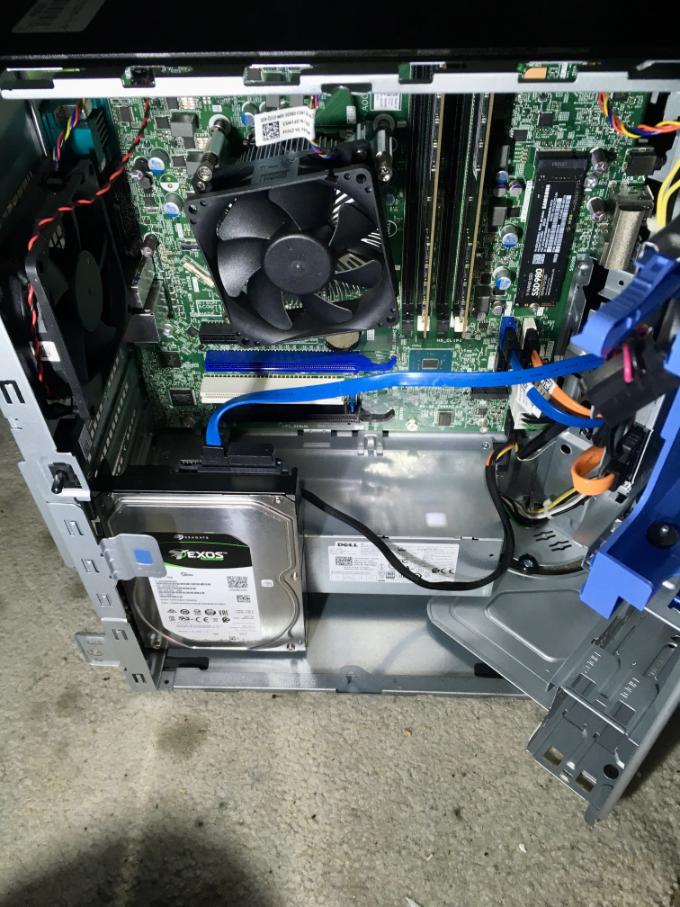
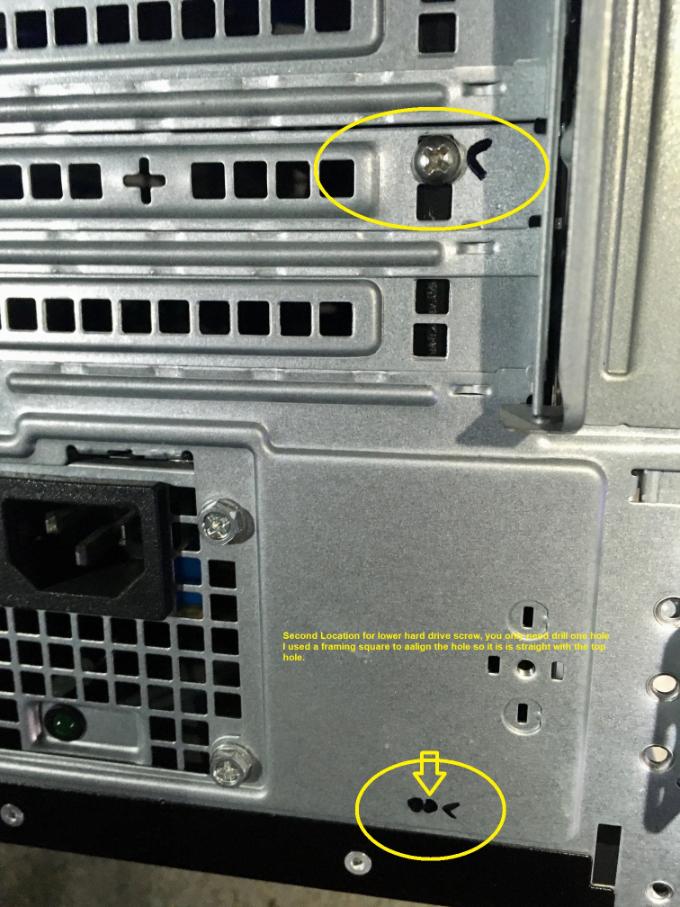
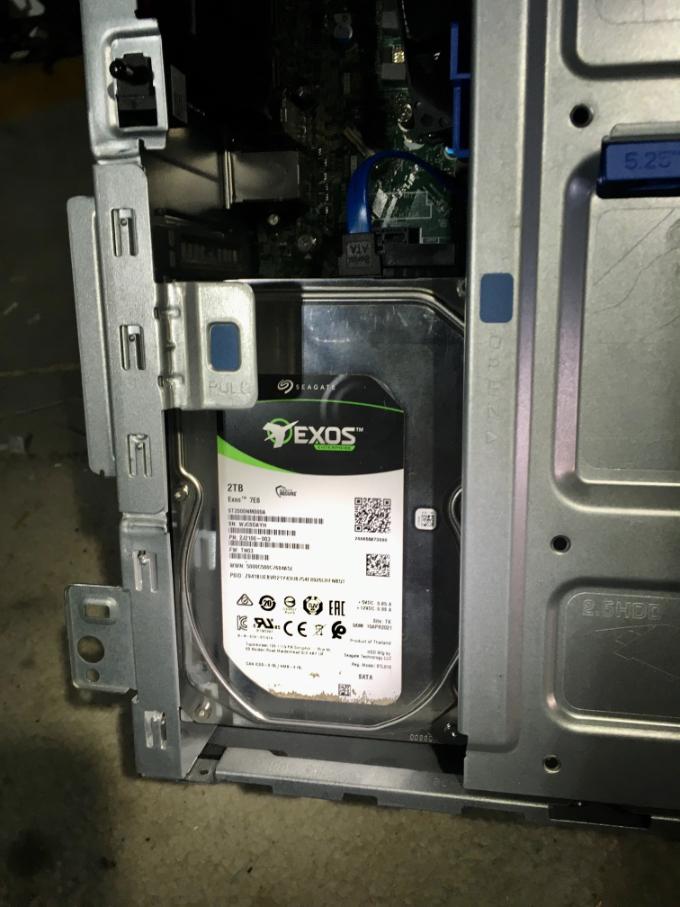
I installed a 2nd Sata hard drive in a Dell Optiplex 7070 Mini Tower, near the power supply, you may want to drill one hole for a 6-32 hdd mounting screw for the base of the hard drive. The first screw was inserted in the expansion bay backplane spacers, a square hole. This will cover all but the PCI-X1 slot so you will lose the ability to install cards into the expansion slot. Your use of the two 2.5" drive bays will be extremely limited, possibly unusable, I did not have to grind any of this riveted frame off, and the 2.5" cage assembly which folds out. It closes and locks in place properly. The second screw at the bottom requires drilling to help keep it stable and prevent rattles. Since the hard drive screw mounts are uniform between Seagate, WD, and Hitachi you can use any manufacturer hard drive. This is not the final drive I will use, since I'm syncing files from a cloud source the Internet speed will be the bottleneck so I'm inclined to use a Seagate 5400 rpm Ironwolf as it's power consumption is lower since the power supplies in these Mini Towers is only about 250 watt. The Exos hard drive is a full height hard drive, This means a slim 3.5" like you see in the SMR Seagate barracudas (not that I'm recommending using a SMR hard drive) should fit as they are not as tall since they have fewer platters. I didn't get the hole marked quite straight so you will have to line and mark this hole up as close as you can. I used a carpenter's framing square. This is a mod I was going to install in another used Dell Optiplex 3070 which is being shipped, so I'm not drilling a hole in this computer. You could test it with just the one screw mount just to make sure it works, I'm unsure if the hdd situated close to the switching power supply may induce any RFI into the hard drive from the power supply causing any unexpected malfunctions, so experimentation is necessary.
0
0
Posted November 13th, 2024 22:12
Sorry for the pics, I was working out of a storage locker without any electricity so the pics are a bit fuzzy as lighting wasn't very good. And yes you're only fastening one side of the hard drive so this may not work well in a warehouse or high vibration environment, perhaps a trip to the hardware store and obtaining a small "L" bracket fastened to the bottom of the case and to the right side of the hard drive may stabilize it a bit more, especially if it starts to rattle and shake loose. The screw through the square hole of the backplate isn't the most stable mount since it can be removed. The power supply shouldn't induce any magnetic currents into the hard drive.

DELL-Cares
Moderator
•
27815 Posts
•
652 Points
1232
0
Posted January 25th, 2022 18:00
Hello, I see you are looking for technical assistance. If you need our help, you can start a Private message with us and we will be happy to assist you.
#IWork4Dell
For all non-technical issues that require your private data, we must communicate via a private Direct Message
Dell Partner GEM Program, Out of Warranty Support Options, BIS (Bureau of Indian Standards) certificate, Get a copy of your Dell invoice