


Unsolved
9 Legend
•
15.2K Posts
0
183
February 19th, 2024 04:01
How to plug 8 pin eps psu connector in 4 pin cpu socket
I have a Dell 850w psu that has 8 pin eps connector (labeled “cpu PWR”), I wanted to test the psu using my opti 790 mt which has a 4 pin cpu socket.
Well, I first made an accident, I could not see the notch of 4 pin socket clearly due to poor lighting, so I accidentally plug the eps in a wrong orientation that is turned 90 degree. Plug in power cord, I got a flashing amber power button, pressed psu BIST, no green led, no fan, I thought the psu was a dud.
I reconnected the 790 stock psu, power button back to normal blue, but no VGA video. Tried reseat cmos battery and clear cmos by RTCRST jumper, no video.
I discovered the 850w psu EPS mistake or catastrophe. Tried reconnect the 8 pin in correct orientation in the 4 pin socket.
So when that is done, and if socket notch is facing north, you should have pin 5678 of EPS in the cpu socket, and pin 1234 to the left side of socket.
| 1 | 2 | 5 | 6 |
| 3 | 4 | 7 | 8 |
this socket diagram helps explain it
just remember that a 4 pin cpu socket is identical to the right half of 8 pin cpu socket. so in order to plug a 8 pin correctly in a 4 pin socket, just imagine it is like there were a cover on left half of 8 pin socket.
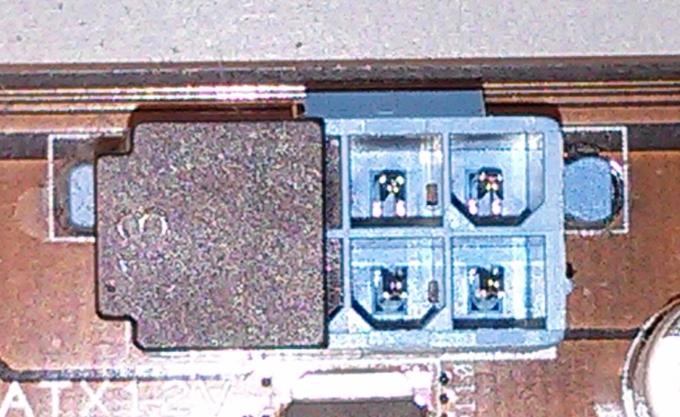
if you want to plug a 8 pin connector in a 4 pin socket, you need to plug in pin 5678 of the 8 pin.

PS What I did by mistake was plug pin 1234 of 8 pin into the 4 pin socket when the pins are rotated 90 degree clockwise.
apparently a wedged pin can still plug in the wedged socket without resistance when the pin is accidentally rotated 90 degree. that is incredibly dangerous.
redxps630
9 Legend
•
15.2K Posts
0
February 29th, 2024 15:15
Some motherboard is designed user unfriendly in the sense there is a capacitor or VRM to the left side of 4 pin cpu socket, such that it prevents a non-splittable EPS connector from installation.