


Unsolved
1 Rookie
•
36 Posts
0
2239
June 27th, 2023 13:00
Optiplex 7010 SFF (2023 edition) BIOS update stalls at 0%
I have an Optiplex Small Form Factor 7010 desktop, the current 2023 model (not the much older model by the same name). I am attempting to update the BIOS from version 1.3.1 to 1.4.1. I have tried both with Windows Update, and the Dell Utility (the second seemed more promising, as it prompted for me to provide the BIOS password and to allow Bitlocker suspend), however in both cases, the process stuck at 0% and hung there.
I was able to get around this by pulling the power cord (power-off by holding power did not work), holding the power button for twenty seconds, then re-inserting the cable. At that point I was able to boot to Windows and prevent the system from attempting the BIOS update again. However, I'd like to actually get the BIOS updated, as I'm hoping it will solve an issue I had with installing a low-profile Quadro P600 graphics card (the system would hang with what appears to be a PCIe error at POST), as right now I'm needing to daisy-chain my two DisplayPort 27" Ultrasharp LCDs. Any assistance would be appreciated.
Chino de Oro
9 Legend
•
8.1K Posts
0
June 27th, 2023 17:00
You can download the BIOS firmware to a FAT32 formatted USB drive and perform update outside Windows. Scroll down the linked page and you will find the instruction to update with BIOS menu.
bradthetechnut
7 Technologist
•
9.2K Posts
0
June 27th, 2023 18:00
@Chino de Oro was typing faster than me.
bradthetechnut
7 Technologist
•
9.2K Posts
0
June 27th, 2023 18:00
Dell BIOS Updates and scroll down to "How to update BIOS using a USB drive?" On the way down to scrolling there, be sure to heed any warnings, cautions, and notes along the way.
As for the Quadro P600 - Do you have the 180w or 300w PSU? A 40w card could even be a stretch for a 180w PSU. Dell suggests/recommends the 32w AMD Radeon™ RX6300, 2 GB, GDDR6.
If the 7010 SFF has the 300w PSU, then Dell lists the 107w AMD Radeon™ RX6500, 4 GB, GDDR6. And of course, that's more than enough for the P600.
1 Attachment
optiplex 7010 sff new model-spec-sheet.pdf
dterborg
1 Rookie
•
36 Posts
0
June 28th, 2023 09:00
I attempted to update from USB, and experienced the same thing. I hit F12 and tried to update from the drive (the new UEFI BIOS allows that), and experienced the same issue (note: It did ask me for the BIOS password and confirmed I entered it in correctly prior to update. Both of my monitors (daisy-chained through the display port) sit here; I've waited ten minutes. I'm able to recover back into the operating system, but the update never occurs.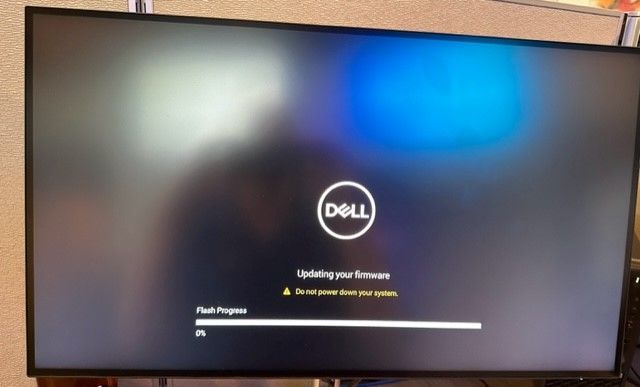
dterborg
1 Rookie
•
36 Posts
0
June 28th, 2023 10:00
@bradthetechnutI specified the wrong card (oops), it's a Dell-branded Quadro P400. The Quadro card is a low-profile with no power connectors; it was really because accounting, in their zeal to save money (without understanding the tech differences) downgraded my order order and purchased me the basic DDR4 Optiplex 7010 SFF instead of the 7010 Plus SFF (which comes with two DisplayPorts, among other niceties).
https://www.dell.com/en-us/shop/nvidia-quadro-p400-graphics-card-quadro-p400-2-gb-adapters-included/apd/a9592277/graphic-video-cards
I do only have the 180w power supply, I'd have gotten a Dell RX6500 but have not seen one listed as an optional part. However, this failure to flash the BIOS is making me think the issue with the card is related; when I plug it in the system, I get the following unusual error (the system fails to POST). My research indicates the error is related to some sort of UEFI issue.
dterborg
1 Rookie
•
36 Posts
0
June 28th, 2023 10:00
Also want to mention, I tried to update the BIOS over the internet from F12, but could not get an IP address for whatever reason (not a problem when the system is fully booted up). I was not given the chance to manually configure an IP address either.
Chino de Oro
9 Legend
•
8.1K Posts
0
June 28th, 2023 11:00
For hardware, keep it simple with just mouse, keyboard and one monitor on integrated video port.
For software, firmware, temporary suspend BitLocker if used.
Performing update again with USB method.
If the issue is persisted, try to downgrade to older 1.2.0 version and running update to 1.4.1 from there.
bradthetechnut
7 Technologist
•
9.2K Posts
0
June 28th, 2023 12:00
In agreement, @Chino de Oro suggested the same thing I was going to suggest - try updating BIOS without the GPU card installed. Some the notes suggested are also in the updating BIOS link I posted.
If still no luck - there's "better safe than sorry." If BIOS updates keep not working, it might be better to leave it for now than chance bricking the unit.
But I think better yet, if still no luck, use the "Get help now" button on the lower right of the screen.
dterborg
1 Rookie
•
36 Posts
0
July 5th, 2023 05:00
@bradthetechnut @Chino de Oro The BIOS updates were done without a graphics card present because the system would not accept the graphics card without the above error I pictured. The system would not POST past the error I pictured with the graphics card installed.
At the end of last week, I opened a ticket with Dell; after they and I went through multiple troubleshooting steps, the system board will be replaced (when one is available within the supply chain); I believe the graphics card issue may be related to the BIOS update issue in a roundabout way; that is, the graphics card issue is a symptom of something greater, and the BIOS update issue is closer to the heart of things. We will see if a board replacement resolves things.
Chino de Oro
9 Legend
•
8.1K Posts
0
July 5th, 2023 09:00
It's always better to get Dell support if machine is still under warranty, as in this case.
This user to user platform is a fallback option for out of warranty users and un-supported suggestions.
bradthetechnut
7 Technologist
•
9.2K Posts
0
July 5th, 2023 10:00
I'm glad you're getting a replacement MB. I Googled the error code. Definitely seems like a BIOS issue.
dterborg_fb63c8
1 Message
0
September 6th, 2023 18:23
Well, this was a fun saga.
Dell could not source the motherboard (at the time) due to supply chain issues. So they sent me a replacement Optiplex 7010 SFF (2023). I was able to complete the first BIOS update (at the time going to 1.3.1) without issue. It immediately went from 0% to 1% etc with no issues. I was happy.
Dell since released new BIOS versions. I have attempted to update. the system to these new versions. The system again sticks at 0%. I am now sad.
I've worked with Dells since the days of Pentium Pro PowerEdge servers and Pentium II desktops. Until this new generation of UEFI-interface systems in the past 1-2 years, I've never had a single BIOS issue. I've found the new UEFI interface to be far clunkier than the hundreds of Dell systems I've worked with prior to this, but it boggles my mind that this would ever happen, and searching the Internet, I'm not alone. I've found plenty of Reddit posts and several threads here indicating this same issue. Given that BIOS updates are now a regular requirement to mitigate CPU microcode vulnerabilities, this is concerning to me, as I work with financial clients with high compliance requirements. I'd love to see Dell come out with a "once-and-for-all" fix for this; this issue just shouldn't be occurring. I've also never seen this issue with another vendor.
(edited)
Chino de Oro
9 Legend
•
8.1K Posts
0
September 6th, 2023 19:16
@dterborg_fb63c8 , sorry to hear that the issue is persisted with the new machine. Fairness to say, you have done your diligence to find solution on your part. Dell also has fair share in warranty fulfillment obligation. It was a lose-lose situation.
I suggest that you can downgrade the BIOS firmware to previous version, which the machine was shipped with, then upgrade straight to the latest.
With your drives encrypted and layer of BIOS password, your machine is not as vulnerable as your concern to be.