


Unsolved
1 Rookie
•
14 Posts
0
439
February 5th, 2024 14:41
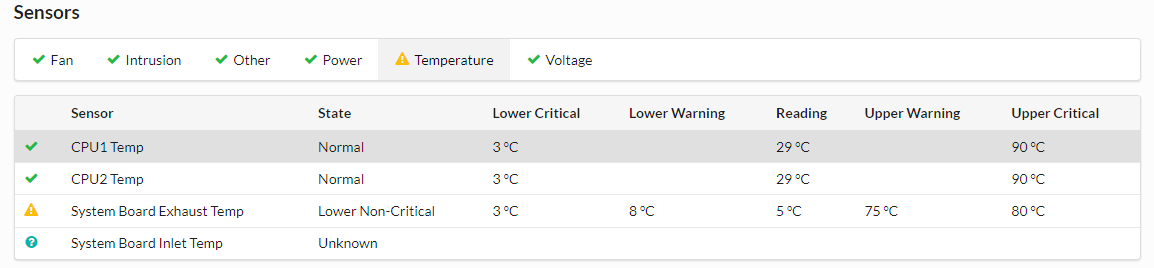
R540 Server show The Inlet Temp Sensor is not responding or is not working properly. The status of Sensor health is critical.
Hi All,
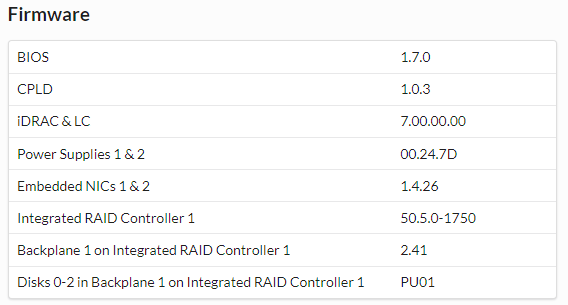
How can i fix this issue? iDarc already upgrade to latest version.
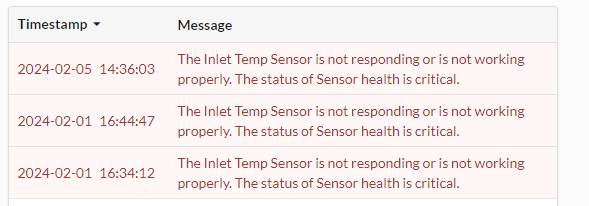
No Events found!
DELL-Charles R
Moderator
•
4.6K Posts
0
February 5th, 2024 19:25
Hello,
Was anything done on the system, that you know of, around the time this error started ?
Your image shows you are on BIOS 1.7.0. Could you update to BIOS 2.20.1 and check results.
https://dell.to/3OyZx78
Also try reboot the DRAC. In the DRAC on Maintenance tab > Diagnostics > Reboot iDRAC, yellow box, and check status of temp sensor.
Jay_Luk
1 Rookie
•
14 Posts
0
February 29th, 2024 09:01
@DELL-Charles R
Events is the start time. reboot the iDRAC still show error, and BIOS already up to date. finally we need to try replace the Mainboard.
DELL-Charles R
Moderator
•
4.6K Posts
0
February 29th, 2024 13:57
Hello,
Can you post your current iDRAC and BIOS firmware version?
Did the server ever function without these symptoms?
If so, was anything done on the server around the time this started?
Are there any Non-Dell PCI cards installed?
Is the server receiving proper airflow? Do you see anything blocking air flow?
What is the actual ambient temp in the data center?
Next I would recommend to drain the flea power and reseat the right ear cables (2 connections), see manual link below, and visually check for any socket or cable damage.
drain flea power (shut down, disconnect power cables and Network cables, hold in power button 20 seconds with cords removed). After flea power drain, system has to set for 3 minutes for DRAC to reset without any power plugged in,
You can reseat the right control panel cables now.
Reseat both cables from the right ear. Check for any cable damage or socket damage
R540 Installation and Service Manual
https://dell.to/431qiXY
right control panel page 126-128. Note the magnified circle also.
Then plug in NIC and power but wait 2 minutes before power on to give DRAC time to initialize