

Unsolved
2 Intern
•
17 Posts
•
14 Points
1
194
March 9th, 2026 08:03

Precision 7960 Tower, Artifact, glitches, flickering issue.
Hello there.
We have a client that purchased Precision 7960 Tower a total of 5units. These units are used for professional video editing, application like Adobe After Effects and others.
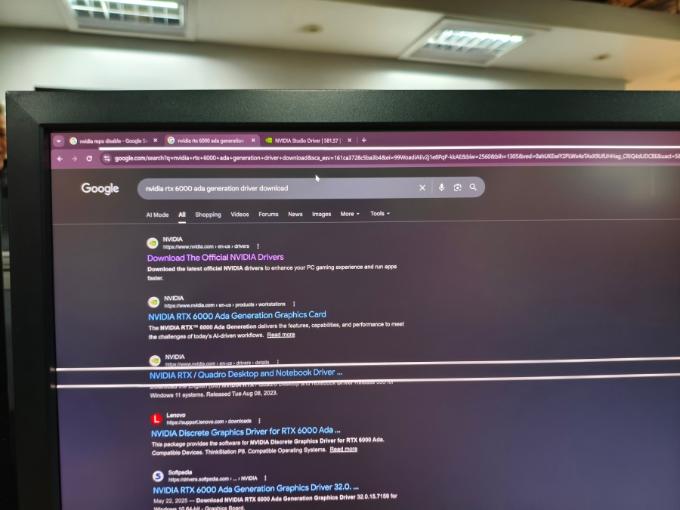
They are experiencing an artifact while working on After Effects, sometimes flickering display, glitches on web browser and unreadable text.
Every possible solution have already performed, like bios updates, gpu driver update and so on yet the issue persist.
There is also an event where the unit experienced a sleep mode and unable to display no matter what the end user do like pressing any keys on keyboard, moving the mouse and pressing the power button.
Also ran diagnostic, EPSA and all test were passed.
Here's the general machine details
Dell Precision 7960 Tower
Processor: Intel Xeon w7-3445 (52.5MB cache, 20 cores, 40 threads, 2.6ghz to 4.8ghz turbo 270w)
Memory: 1TB, 8x128gb ddr5 4800 mhz, rdimm ecc memory
Storage: 2TB 3.5" 7200rpm SATA AG-Enterprise HDD
SSD: 1TB Performance SSD, SED Ready
GPU: Nvidia RTX 6000 ADA Generation, 48gb gddr6
PSU: 2200 watts 80 plus platinum
Hoping someone can help to this issue.
Pls refer to the attached file for reference.



mazzinia_
6 Operator
•
1.5K Posts
•
6.2K Points
0
March 9th, 2026 14:58
Hello,
among the attempts, changing bios settings was also tried (and I assume you are also in contact with nvidia and adobe) ?
Since in one case the sleep mode also acted bad, maybe disabling S3 ( and / or S2 ) state could be a valid test.
A few questions :
- are the computers shut down after work , or hibernated / put to sleep ?
- are they put to sleep during the day, normally ?
- are the issues showing up before , after , or both before and after sleeping ?
- are the computers ever rebooted ? if yes are they displaying issues from the reboot to the shutdown (assume NO sleep or hibernation between the reboot and the shutdown )
- Nvidia control panel > Workstation > manage gpu utilization : Enable error correction code
Eajc
2 Intern
•
17 Posts
•
14 Points
0
March 9th, 2026 22:26
Hi @mazzinia_
Please see response.
- are the computers shut down after work , or hibernated / put to sleep ? SHUTDOWN
- are they put to sleep during the day, normally ? NO, it just happened randomly
- are the issues showing up before , after , or both before and after sleeping ? AFTER RANDOM SLEEP, THE UNIT NEVER WAKE UP not after 2-3hours RANDOMLY
- are the computers ever rebooted ? if yes are they displaying issues from the reboot to the shutdown (assume NO sleep or hibernation between the reboot and the shutdown ) NO
among the attempts, changing bios settings was also tried (and I assume you are also in contact with nvidia and adobe) ? NO WE HAVEN'T CONTACTED ADOBE OR NVIDIA SINCE THE UNIT IS UNDER WARRANTY BY DELL
Given the specification of the unit, the client assumes that everything runs smoothly, now it can't even handle the web browser due to the issue encountered.
I'll ask the client to reformat the unit if it is possible.
mazzinia_
6 Operator
•
1.5K Posts
•
6.2K Points
0
March 10th, 2026 01:59
@Eajc If the computers are never rebooted : reboot one, and see if things stay the same ( reboot = clean slate . Shutdown = any lingering os issue in windows will be preserved )
Point 2, check the ecc setting of the gpu
Point 3, seriously test on one unit disabling S3 and S2 states in the bios ( disable sleep and hibernation states at bios level )
(and check if Resizable bar is turned on in bios)
mazzinia_
6 Operator
•
1.5K Posts
•
6.2K Points
0
March 10th, 2026 02:06
Add on : you should also speak with nvidia because I'm reading that some of those rtx 6000 required a newer vbios and that was obtained by contacting the nvidia support ( and rma'ing the cards )
Would also recommend to contact Dell Pro Support. You mentioned being under warranty ...
(edited)
bradthetechnut
9 Technologist
•
9.5K Posts
•
40.2K Points
0
March 10th, 2026 04:35
I'm wondering if it's electrical glitches. Are they plugged into a UPS? If so, plug one straight into the outlet and check results.
Are they all on their own 20-amp circuit?
I'm also with mazzinia on contacting Dell Pro Support.
(edited)
Eajc
2 Intern
•
17 Posts
•
14 Points
0
March 10th, 2026 05:03
@bradthetechnut
Hi, they were all connected directly to power outlet, not using any UPS or any protection appliance.
Also, I'd like to clarify the customer's current connection from GPU to monitor if they are using any adapter like DP port to HDMI adapter.
I'll get back to you once clarified.
Thanks.
Eajc
2 Intern
•
17 Posts
•
14 Points
0
April 20th, 2026 06:14
Hi @all
We have an update:
We have replaced the motherboard of the unit, yet the same problem exist.
Before replacing the motherboard, we have replaced a GPU with the same problem.
We also re-install the Operating System and update everything, yet the same problem encountered.
The artifact, glitching and lines on the monitor still the same despite the replacement of the parts.
We have supplied a display port to display port cable end to end, GPU to monitor still the issue manifesting.
S3 ( and / or S2 ) (sleep) is also disabled, yet this features happens randomly and frequently resulting the unit to considered as decommissioned and unreliable to use.
The unit will be pulled out to customer.
Hoping Dell would pinpoint the root cause of the issue.
As of the moment, no clear solution is provided, the customer refuse to have another replacement parts.
mazzinia_
6 Operator
•
1.5K Posts
•
6.2K Points
0
April 20th, 2026 12:59
Sad to hear. I guess that trying a different monitor didn't help too.
I know this is probably weird as a question, but has it been tried to operate the unit in a totally different place ? ( any room where people are operating computers without suffering issues )... just saying to eliminate another factor.
And 2ndly, maybe somehow there's something that causes a small short inside the chassis... you changed the mb, if the old one is still in your possession or you want to use a little time to do a test, maybe keep the mb out, add the gpu like if being on a bench, extend the power cable outside and see what happens ?
Eajc
2 Intern
•
17 Posts
•
14 Points
0
April 20th, 2026 13:22
Hi @mazzinia_
Since this unit is a problematic one, yeah we did bring it to other room and sadly it exhibit the same issue.
There are about atleast 20 I guess workstation in that room that is used to edit videos since this customer is a big time local tv station, (5 of them are this model, and other 15 are other brand) with the same monitor and just works fine except this Dell brand and model.
We are being pressured every time we support this customer so no, we didn't try take out everything out of the chasis to test whether the issue exists or not out of the chasis.
I said there where 5 of this Dell model in that room that exhibits same exact issue, however one of them is very problematic. There are times that after logging in the Windows, everything you see is like pixelated, unreadable texts and unrecognisable icons. This one is already pulled out today and to be handed over to Dell to further isolate the issue where we can't perform under customer premises due to pressure. And the other 4 of them though exhibiting some issues still usable.
Take note that there are 2 monitors connected to the unit, when you dragged the window to other monitor, what you see in the main monitor still visible to the secondary, so i don't think replacing monitor will help so as the display cable.
I'll keep you updated once we have new updates.
Thanks.
mazzinia_
6 Operator
•
1.5K Posts
•
6.2K Points
0
April 20th, 2026 13:28
Well, it's definitely a migraine level of issue. Before giving it to dell, isn't that you have maybe an old quadro nvs or a p600 or anyway any other simple card to swap in place of the current gpu ?
Just to see if something changes
Eajc
2 Intern
•
17 Posts
•
14 Points
0
April 20th, 2026 13:50
Sad to say that we don't have any GPU laying around for testing purposes. To be honest I am very much challenged to settle this issue, however due to a tension rising up we have no choice. This unit is not a single dollar value workstation, imagine how much it costs just a single stick of memory and with a total of 1TB of it added with a very high end GPU. We put ourselves in customer's shoe and we get this kind of performance and imagine there were 5 of it, it is very frustrating on customer's side, resulting their production on delay. We just nod out heads whenever the customer bad-mouthing on us hahaha.
If only we have spare gpu we'll be gladly test it to see if anything changes, like I said we were unlucky to have one.
Well let's see what happens this coming following days or weeks.
mazzinia_
6 Operator
•
1.5K Posts
•
6.2K Points
0
April 20th, 2026 13:58
@Eajc oh yes, i can fully understand. A base configuration is already having a cost, add the extras and the fact that now ram is also affected by shortage... it's a major investment, and indeed multiplied by 5...
I would have another test idea, but it would be more for fun since it would add more annoyance "if" working ( idea being lower the ram to 32 gb or the minimum allowed by the dimms installed ).
Eajc
2 Intern
•
17 Posts
•
14 Points
0
May 21st, 2026 01:43
Hi @mazzinia_
Just to give you an update on this case.
We have pulled-out the unit out of customer's premises.
As discussed between the customer and Dell, once pulled out, the unit will be handed over to Dell for further checking. To my surprise, it was handed over to our custody for further checking.
This is what I have observed.
I am puzzled with this issues and this unit, so I'm seeking recommendation from you guys, If you have recommendation I really appreciate it.
We have email thread together with Dell, yet I did not receive any recommendation. Customer now is really really annoyed.
I believed customer and Dell have agreement of whole unit replacement after replacing the mainboard and if the issue persist they will proceed WUR, yet Dell don't like to proceed the WUR.
Here's what I encountered during the dual monitor setup. Note that I am using Dell monitor which Dell provided for testing purposes.
mazzinia_
6 Operator
•
1.5K Posts
•
6.2K Points
0
May 21st, 2026 11:32
That's a lot of debug. And shows how things are complicate when there are multiple issues mixed together.
The monitor is peculiar, feels like an overlay layer causing it. Could the gpu firmware be partially involved maybe ? Can you try one thing with the monitors ?
Set both of them at FullHD , 100% as scale.... is the issue still present or stops ?
Eajc
2 Intern
•
17 Posts
•
14 Points
0
May 21st, 2026 23:47
Hi @mazzinia_
Everything about this unit and issue is very strange.
As of this writing, no issues were observed, CPU, GPU, Memory stress test were all passed.
GPU drivers were already updated using Dell update.
One more week to observe this unit, hoping no more issue exhibits.