

Unsolved
1 Rookie
•
41 Posts
0
3173
April 12th, 2023 13:00
Precision 3470, WD22TB4 intermittently drops connection
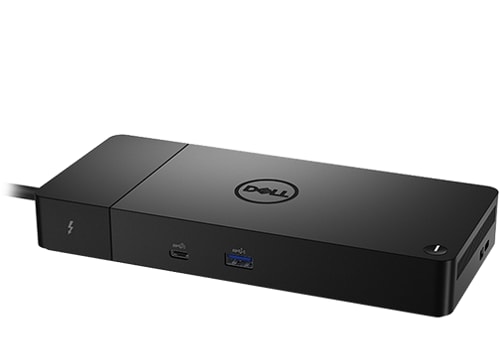
Dell Thunderbolt Dock – WD22TB4
I have a Dell WD22TB4 Thunderbolt dock that is connected to a Precision 3470 Laptop. I have had the laptop/dock combo since December and have had no issues until now.
Last week the dock randomly loses its connection to the laptop. My monitors go into sleep mode and the light on the thunderbolt USB cable goes out (the light on the power cable brick stays on) . I have to disconnect the power supply from the dock and reconnect it and then the monitors etc. come back on. I have gone hours and even whole days without this occurring but once it does begin it happen it will do it literally every couple of minutes.
I've tried restarting my laptop and had it disconnect almost immediately. I tried a full shutdown and restart and again within minutes it disconnects.
I thought maybe it was an issue with the USB port on the laptop and tried plugging the cable to a different port but that did not fix the issue.
I also tried plugging the docking station power supply into an entirely different power outlet but that had no impact.
What I have found is that if I shutdown my laptop at the end of the workday that when I start it back up the next morning is that I can go several hours before it starts disconnecting and a couple of occasions where I make through the entire day.
Anyone have any idea what's happening? Do I have a defective dock or is it an issue with the laptop? The dock seems to be behaving as if the laptop has been disconnect or powered downs (although the usb Thunderbolt cable light should still be on).
Connect4u
1 Rookie
•
2 Posts
1
April 19th, 2023 15:00
Me Too!
I just experienced the issue 100% the same as you experienced and found. My WD22TB dock had been working perfectly with my MBP for more than 7 months since last Aug, 2022.
tested/validated on any macOS platform. If you want Dell support, you will have to test the dock on a Windows OS PC. DELL-Admin>
Just started yesterday (4/18), it became randomly disconnected from the MBP laptop. I did not change any of my setups with it. At first, I thought it might be caused by the quality of type-C-to-DP cables connected on it to the monitors. And I had the cables connected directly from the MBP to my monitors to confirm the cables were not the sources of issues found.
I don't know if Dell just updated the firmware of the WD22TB or driver recently. or know how to solve the issues of randomly disconnected (drops connections).
DELL-Jesse L
Moderator
•
17.9K Posts
•
69K Points
0
April 20th, 2023 03:00
RayBuechler,
Update the system bios along with the other drivers as well as the dock firmware.
raybtwo
1 Rookie
•
41 Posts
0
April 20th, 2023 09:00
I just updated the bios and various drivers that had available updates. The firmware on the dock was up to date. Unfortunately after updating the BIOS and drivers the issue is still occurring.
Danny Miller
1 Message
0
May 11th, 2023 12:00
Where i am, our users use WD19, WD19tb and wd22TB4's. we have had issues were the USB on the dock stops working, although the video still transmits through... rebooting the dock sometimes solves the problem, but it will rear its ugly head again. On my laptop, an XPS 9520, with a WD22TB4, the usb just stops working randomly, and requires a reboot of the dock, this is more than once daily.
We probably have 150-200 of these docks and most of them need to be rebooted frequently. It is a problem, and unacceptable.
WA_DON
1 Rookie
•
1 Message
0
May 15th, 2023 07:00
I have a similar problem. I can also see reports of this going back several years, Specifically, usually my keyboard stops responding, less common the mouse seizes up, sometimes both. They connect through the same wireless USB connector. When it happens, the problem may go away after a minute or two, but unplugging and then reattaching the dock's power supply generally fixes the issue for a time. All drivers are up to date according to Dell's tools.
mrklaxon
20 Posts
0
June 1st, 2023 07:00
We have been fighting dock issues for some months now. Multiple brands - most of which use the same chipset. One of them pointed to a known issue with the USB chipset and frequency interference with its clocking. We noted the issue increasing as we changed our cube layout to a tighter arrangement and increased WiFi lending credence to that theory. There is a Dell USB fix but we found that less helpful over time - this is not a Dell only issue, it is seen in HP, Lenovo, etc.. USB C is not a fix either. We have found the Dell docks to be a little better for the KYBD/Mouse lag issue but show more issues with video and reset as noted above.
Zunair.Rocks
1 Message
0
September 13th, 2023 22:43
Found this to be inserting and matches my issue. Low powered devices does not drop connection, most powered devices does.
https://www.dell.com/support/kbdoc/en-us/000207819/dell-thunderbolt-wd22tb4-docks-may-have-usb-ports-fail-when-a-powered-device-is-connected
For flashing display issue - I am using a powered DisplayPort 1.2 Splitter, DisplayPort to 3x - and using 2 ports.
Flashing display disappears but when the machine goes to sleep or hibernate, my monitors flashes lol - It says signal lost every 10 seconds or so. Sounds like a dock driver issue to me.
Using WD22TB4 with XPS 9520
(edited)