I'm kevinf80 and I will be helping with any issues you may have. Please be aware that some of the logs I may ask for can be very complex and can take a long time to decipher. I am a volunteer here with a job and family so I ask that you be patient when waiting for replies. Please DO NOT run any scans/tools/fixes on your own as this will conflict with the tools we are going to use. Please Print or Save to Notepad all instructions and please follow them carefully and if there's something you don't understand or that will not work please let me know and we will go through it together. Malware is often buggy and can be very unstable, with that in mind it is advisable to backup any important data before we begin. If you do not reply within 72 hours the thread will be closed, if you need more time let me know. Likewise if I do not respond within 48 hours feel free to PM me.
* If you are using any cracked software, please remove it. In addition to being illegal, when you install cracked software, you are running executable files from dubious, unknown sources. You are giving these sources access to information on your hard disk, and potential control over operation of your computer. Definition of cracked software HERE
** If you are using any P2P (file sharing) programs, please remove them before we clean your computer. The nature of such software and the high incidence of malware in files downloaded with them is counter productive to restoring your PC to a healthy state. That includes BitTorrent and similar programs. There is a partial list HERE
Please proceed as follows :-
Step 1
Please re-open HiJackThis and scan only. Check the boxes next to all the entries listed below.
R1 - HKCU\Software\Microsoft\Windows\CurrentVersion\Internet Settings,ProxyServer = http=127.0.0.1:5577 O3 - Toolbar: (no name) - {2318C2B1-4965-11d4-9B18-009027A5CD4F} - (no file) O4 - HKLM\..\Run: [ddfgrwlf] C:\Documents and Settings\Carl Schroeder\Local Settings\Application Data\oxmtjrsah\flhbxtgtssd.exe O4 - HKLM\..\Run: [Rrubomopaj] rundll32.exe "C:\WINDOWS\iqegotanekulemu.dll",Startup O4 - HKCU\..\Run: [ddfgrwlf] C:\Documents and Settings\Carl Schroeder\Local Settings\Application Data\oxmtjrsah\flhbxtgtssd.exe O4 - HKCU\..\Run: [Qyiqoduc] rundll32.exe "C:\WINDOWS\leadmsty.dll",Startup O4 - Global Startup: Digital Line Detect.lnk = ? O4 - Global Startup: F1U201.401.lnk = ? O4 - Global Startup: LUMIX Simple Viewer.lnk = ?
Now close all windows other than HiJackThis, then click Fix Checked. Close HiJackThis. Reboot
Step 2
Check for proxy server settings in your browser, the following are the most common used.
Internet Explorer: Tools Menu -> Internet Options -> Connections Tab ->Lan Settings > uncheck "use a proxy server" and check to "Automatically detect settings". ok and apply.
Firefox: Tools Menu -> Options... -> Advanced Tab -> Network Tab -> "Settings" under Connection. "No Proxy" should be selected, unless you have one set up yourself.
Chrome: Select -> Tools menu -> then "Options", then go to "Change Proxy Settings", then "LAN Settings" , then take out the check mark for "Use a proxy server for your LAN" if set, unless you set this up yourself.
Safari
Launch Safari
Go to general settings menu
Then in Preferences/ Advanced
Then on line click Proxies change settings ...
Click Internet Options, then click the Connections tab, click Network Settings.
Disable option (uncheck) for the use of proxy server ...
Copy the text between the dotted lines below to the clipboard by highlighting ALL of them and pressing CTRL + C (or, after highlighting, right-click and choose Copy): ------------------------------------------------------------------- :Processes explorer.exe :Files C:\Documents and Settings\Carl Schroeder\Local Settings\Application Data\oxmtjrsah C:\WINDOWS\iqegotanekulemu.dll C:\WINDOWS\leadmsty.dll :Commands [EmptyFlash] [EmptyTemp] [Purity] [ResetHosts] [Reboot]
Return to OTMoveIt3, right click in the "Paste Instructions for Items to be Moved" window (under the yellow bar) and choose Paste.
Click the red Moveit! button.
Copy everything in the Results window (under the green bar) to the clipboard by highlighting ALL of them and pressing CTRL + C (or, after highlighting, right-click and choose copy), and paste it in your next reply.
Close OTM
Note: If a file or folder cannot be moved immediately you may be asked to reboot the machine to finish the move process. If you are asked to reboot the machine choose Yes.
If the machine reboots, the Results log can be found here:
c:\_OTMoveIt\MovedFiles\mmddyyyy_hhmmss.log
Where mmddyyyy_hhmmss is the date of the tool run.
Double Click mbam-setup.exe to install the application.
Make sure a checkmark is placed next to Update Malwarebytes' Anti-Malware and Launch Malwarebytes Anti-Malware, then click Finish.
If an update is found, it will download and install the latest version.
Once the program has loaded, select "Perform Quick Scan", then click Scan.
The scan may take some time to finish,so please be patient.
When the scan is complete, click OK, then Show Results to view the results.
Make sure that everything is checked, and click Remove Selected.
When disinfection is completed, a log will open in Notepad and you may be prompted to Restart. (See Extra Note)
Please save the log to a location you will remember.
The log is automatically saved by MBAM and can be viewed by clicking the Logs tab in MBAM.
Copy and paste the entire report in your next reply.
Extra Note:
If MBAM encounters a file that is difficult to remove,you will be presented with 1 of 2 prompts,click OK to either and let MBAM proceed with the disinfection process. If asked to restart the computer, please do so immediately.
Step 5
We need to see some additional information about what is happening in your machine. Please perform the following scan:
Download DDS by sUBs from one of the following links. Save it to your desktop.
A small box will open, with an explanation about the tool.
When done, DDS will open two (2) logs 1. DDS.txt 2. Attach.txt
Save both reports to your desktop.
The instructions here ask you to attach the Attach.txt.
Instead of attaching, please copy/past both logs into your next reply.
Close the program window, and delete the program from your desktop.
Please note: You may have to disable any script protection running if the scan fails to run. After downloading the tool, disconnect from the internet and disable all antivirus protection. Run the scan, enable your A/V and reconnect to the internet. Information on A/V control HERE
What i`d like in your reply :-
Log from OTM
Log from Malwarebytes
Both logs from DDS
Any paricular reason why you have not updated your Operating System to Service Pack 3 (SP3) You are very vulnerable to infection without that update, also MS has stopped support for systems that do not have SP3 installed..
Hi Kevin!! Thanks for your time and effort...I really appreciate it!! I made the changes to the proxy and hijackthis that you suggested. As far as SP3 Im not sure why I never downloaded it...Im guessing I didnt have updates on automatic and I never noticed that an update was there.
OTM Log:
All processes killed Error: Unable to interpret <[EmptyTemp]> in the current context! Error: Unable to interpret <[Purity]> in the current context! Error: Unable to interpret <[ResetHosts]> in the current context! Error: Unable to interpret <[Reboot]> in the current context!
OTM by OldTimer - Version 3.1.15.0 log created on 09042010_223447
Files moved on Reboot... File C:\Documents and Settings\Carl Schroeder\Local Settings\Temp\Temporary Internet Files\Content.IE5\E8VR9ZDJ\date_time=1204762528&fb_sig_session_key=8e86d8173dadfade08905eff-6602528&fb_sig_expires=0&fb_sig_api_key=2ea05dceddf639e794b5ace0713b741c&fb_sig=3438cda75115e4bd99236360a6f51c21 not found! File C:\Documents and Settings\Carl Schroeder\Local Settings\Temp\Temporary Internet Files\Content.IE5\E8VR9ZDJ\date_time=1204762528&fb_sig_session_key=8e86d8173dadfade08905eff-6602528&fb_sig_expires=0&fb_sig_api_key=2ea05dceddf639e794b5ace0713b741c&fb_sig=43d87992498811ab5ec95cf0701d4e78 not found! File C:\Documents and Settings\Carl Schroeder\Local Settings\Temp\Temporary Internet Files\Content.IE5\E8VR9ZDJ\dref=http%253A%252F%252Fcomment.myspace.com%252Findex[1].viewProfile_commentForm%2526friendID%253D125290359%2526MyToken%253D84aecc7b-5576-4fe3-b2e0-eb420df0dc79 not found! File C:\Documents and Settings\Carl Schroeder\Local Settings\Temp\Temporary Internet Files\Content.IE5\55SY8BLA\dref=http%253A%252F%252Fcomment.myspace.com%252Findex[1].viewProfile_commentForm%2526friendID%253D125290359%2526MyToken%253D84aecc7b-5576-4fe3-b2e0-eb420df0dc79 not found!
Registry entries deleted on Reboot...
All processes killed ========== PROCESSES ========== No active process named explorer.exe was found! ========== FILES ========== C:\Documents and Settings\Carl Schroeder\Local Settings\Application Data\oxmtjrsah folder moved successfully. DllUnregisterServer procedure not found in C:\WINDOWS\iqegotanekulemu.dll C:\WINDOWS\iqegotanekulemu.dll moved successfully. DllUnregisterServer procedure not found in C:\WINDOWS\leadmsty.dll C:\WINDOWS\leadmsty.dll moved successfully. ========== COMMANDS ==========
DDS (Ver_10-03-17.01) - NTFSx86 Run by Carl Schroeder at 23:07:33.34 on Sat 09/04/2010 Internet Explorer: 8.0.6001.18702 Microsoft Windows XP Professional 5.1.2600.2.1252.1.1033.18.503.282 [GMT -4:00]
AV: Trend Micro PC-cillin Internet Security *On-access scanning enabled* (Outdated) {7D2296BC-32CC-4519-917E-52E652474AF5} FW: Trend Micro PC-cillin Internet Security (Firewall) *enabled* {3E790E9E-6A5D-4303-A7F9-185EC20F3EB6}
UNLESS SPECIFICALLY INSTRUCTED, DO NOT POST THIS LOG. IF REQUESTED, ZIP IT UP & ATTACH IT
DDS (Ver_10-03-17.01)
Microsoft Windows XP Professional Boot Device: \Device\HarddiskVolume2 Install Date: 2/21/2006 7:43:06 PM System Uptime: 9/4/2010 11:00:35 PM (0 hours ago)
Motherboard: Dell Inc. | | 0WF351 Processor: Intel(R) Pentium(R) M processor 1.70GHz | Microprocessor | 1695/133mhz
==== Disk Partitions =========================
C: is FIXED (NTFS) - 70 GiB total, 2.841 GiB free. D: is CDROM ()
==== Disabled Device Manager Items =============
==== System Restore Points ===================
RP1: 7/12/2010 2:22:45 PM - System Checkpoint
==== Installed Programs ======================
2x1/4x1 USB Peripheral Switch Adobe Acrobat - Reader 6.0.2 Update Adobe Common File Installer Adobe Flash Player 10 ActiveX Adobe Help Center 2.0 Adobe Premiere Elements 2.0 Adobe Reader 6.0.1 Adobe Reader for Palm OS, 3.05 AIM 6.0 ALPS Touch Pad Driver AnswerWorks 5.0 English Runtime AOL Coach Version 2.0(Build:20041026.5 en) AOL Uninstaller (Choose which Products to Remove) AOLIcon Apple Application Support Apple Mobile Device Support Apple Software Update ArcSoft Software Suite aspi Banctec Service Agreement Bonjour Bonjour Core for Windows Broadcom Management Programs 2 CCHelp CCleaner (remove only) CCScore Conexant D110 MDC V.9x Modem CR2 Creative MediaSource Creative MuVo NX-TX Creative System Information Dell Digital Jukebox Driver Dell Driver Reset Tool Dell Game Console Dell Support 3.1 Dell System Restore Desktop Weather by The Weather Channel Digital Content Portal Digital Line Detect Documents To Go EarthLink setup files EducateU ELIcon EPSON Printer Software EPSON Scan ESPNMotion ESSAdpt ESSANUP ESSBrwr ESSCAM ESSCDBK ESScore ESSCT ESSgui ESShelp ESSini ESSPCD ESSPDock ESSTUTOR ESSvpaht ESSvpot GemMaster Mystic Get High Speed Internet! Google AFE Google Desktop Google Earth Google Gmail Notifier Google Toolbar for Internet Explorer HijackThis 2.0.2 HLPCCTR HLPIndex HLPPDOCK Hotfix for Microsoft .NET Framework 3.5 SP1 (KB953595) Hotfix for Microsoft .NET Framework 3.5 SP1 (KB958484) Hotfix for Windows Media Player 10 (KB903157) Hotfix for Windows XP (KB888795) Hotfix for Windows XP (KB891593) Hotfix for Windows XP (KB895961) Hotfix for Windows XP (KB896256) Hotfix for Windows XP (KB899337) Hotfix for Windows XP (KB899510) Hotfix for Windows XP (KB902841) Hotfix for Windows XP (KB906569) Hotfix for Windows XP (KB952287) Hotfix for Windows XP (KB954550-v5) Hotfix for Windows XP (KB961118) Hotfix for Windows XP (KB970653-v3) Hotfix for Windows XP (KB976098-v2) Hotfix for Windows XP (KB979306) Hotfix for Windows XP (KB981793) Intel(R) Graphics Media Accelerator Driver for Mobile Intel(R) PROSet/Wireless Software Internal Network Card Power Management iTunes Java(TM) 6 Update 6 Kodak EasyShare software KSU Learn2 Player (Uninstall Only) Lexmark Z700-P700 Series LUMIX Simple Viewer Macromedia Dreamweaver MX 2004 Macromedia Extension Manager Malwarebytes' Anti-Malware Mathcad 12 mCore mDrWiFi mHlpDell Microsoft .NET Framework 1.0 Hotfix (KB887998) Microsoft .NET Framework 1.0 Hotfix (KB930494) Microsoft .NET Framework 1.0 Hotfix (KB953295) Microsoft .NET Framework 1.0 Hotfix (KB979904) Microsoft .NET Framework 1.1 Microsoft .NET Framework 1.1 Security Update (KB979906) Microsoft .NET Framework 2.0 Service Pack 2 Microsoft .NET Framework 3.0 Service Pack 2 Microsoft .NET Framework 3.5 SP1 Microsoft FrontPage 2002 Microsoft Office XP Professional Microsoft Office XP Standard Microsoft Plus! Digital Media Edition Installer Microsoft Plus! Photo Story 2 LE mIWA mIWCA mLogView mMHouse Modem Helper mPfMgr mPfWiz mProSafe mSSO MSXML 4.0 SP2 (KB925672) MSXML 4.0 SP2 (KB927978) MSXML 4.0 SP2 (KB936181) MSXML 4.0 SP2 (KB954430) MSXML 4.0 SP2 (KB973688) MSXML 6 Service Pack 2 (KB973686) mToolkit Musicmatch for Windows Media Player Musicmatch® Jukebox MuVo Driver mWlsSafe mXML mZConfig NAIAS2007 Screen Saver NetWaiting Notifier OTtBP Otto palmOne PCDLNCH PHOTOfunSTUDIO -viewer- PowerDVD 5.5 Pure Networks Port Magic QuickSet QuickTime RealPlayer Ruckus Player Security Update for CAPICOM (KB931906) Security Update for Windows Internet Explorer 8 (KB969897) Security Update for Windows Internet Explorer 8 (KB971961) Security Update for Windows Internet Explorer 8 (KB972260) Security Update for Windows Internet Explorer 8 (KB974455) Security Update for Windows Internet Explorer 8 (KB976325) Security Update for Windows Internet Explorer 8 (KB978207) Security Update for Windows Internet Explorer 8 (KB981332) Security Update for Windows Internet Explorer 8 (KB982381) Security Update for Windows Media Player (KB952069) Security Update for Windows Media Player (KB954155) Security Update for Windows Media Player (KB968816) Security Update for Windows Media Player (KB973540) Security Update for Windows Media Player (KB978695) Security Update for Windows Media Player 10 (KB911565) Security Update for Windows Media Player 10 (KB917734) Security Update for Windows Media Player 10 (KB936782) Security Update for Windows Media Player 6.4 (KB925398) Security Update for Windows XP (KB890046) Security Update for Windows XP (KB893756) Security Update for Windows XP (KB896358) Security Update for Windows XP (KB896422) Security Update for Windows XP (KB896423) Security Update for Windows XP (KB896424) Security Update for Windows XP (KB896428) Security Update for Windows XP (KB896688) Security Update for Windows XP (KB899587) Security Update for Windows XP (KB899588) Security Update for Windows XP (KB899589) Security Update for Windows XP (KB899591) Security Update for Windows XP (KB900725) Security Update for Windows XP (KB901017) Security Update for Windows XP (KB901214) Security Update for Windows XP (KB902400) Security Update for Windows XP (KB904706) Security Update for Windows XP (KB905414) Security Update for Windows XP (KB905749) Security Update for Windows XP (KB905915) Security Update for Windows XP (KB908519) Security Update for Windows XP (KB908531) Security Update for Windows XP (KB911280) Security Update for Windows XP (KB911562) Security Update for Windows XP (KB911567) Security Update for Windows XP (KB911927) Security Update for Windows XP (KB912812) Security Update for Windows XP (KB912919) Security Update for Windows XP (KB913446) Security Update for Windows XP (KB913580) Security Update for Windows XP (KB914388) Security Update for Windows XP (KB914389) Security Update for Windows XP (KB916281) Security Update for Windows XP (KB917159) Security Update for Windows XP (KB917344) Security Update for Windows XP (KB917422) Security Update for Windows XP (KB917953) Security Update for Windows XP (KB918118) Security Update for Windows XP (KB918439) Security Update for Windows XP (KB918899) Security Update for Windows XP (KB919007) Security Update for Windows XP (KB920213) Security Update for Windows XP (KB920214) Security Update for Windows XP (KB920670) Security Update for Windows XP (KB920683) Security Update for Windows XP (KB920685) Security Update for Windows XP (KB921398) Security Update for Windows XP (KB921503) Security Update for Windows XP (KB921883) Security Update for Windows XP (KB922616) Security Update for Windows XP (KB922760) Security Update for Windows XP (KB922819) Security Update for Windows XP (KB923191) Security Update for Windows XP (KB923414) Security Update for Windows XP (KB923561) Security Update for Windows XP (KB923689) Security Update for Windows XP (KB923694) Security Update for Windows XP (KB923980) Security Update for Windows XP (KB924191) Security Update for Windows XP (KB924270) Security Update for Windows XP (KB924496) Security Update for Windows XP (KB924667) Security Update for Windows XP (KB925454) Security Update for Windows XP (KB925486) Security Update for Windows XP (KB925902) Security Update for Windows XP (KB926255) Security Update for Windows XP (KB926436) Security Update for Windows XP (KB927779) Security Update for Windows XP (KB927802) Security Update for Windows XP (KB928090) Security Update for Windows XP (KB928255) Security Update for Windows XP (KB928843) Security Update for Windows XP (KB929123) Security Update for Windows XP (KB929969) Security Update for Windows XP (KB930178) Security Update for Windows XP (KB931261) Security Update for Windows XP (KB931768) Security Update for Windows XP (KB931784) Security Update for Windows XP (KB932168) Security Update for Windows XP (KB933566) Security Update for Windows XP (KB933729) Security Update for Windows XP (KB935839) Security Update for Windows XP (KB935840) Security Update for Windows XP (KB936021) Security Update for Windows XP (KB937143) Security Update for Windows XP (KB937894) Security Update for Windows XP (KB938127) Security Update for Windows XP (KB938464) Security Update for Windows XP (KB938829) Security Update for Windows XP (KB939653) Security Update for Windows XP (KB941202) Security Update for Windows XP (KB941568) Security Update for Windows XP (KB941569) Security Update for Windows XP (KB941644) Security Update for Windows XP (KB941693) Security Update for Windows XP (KB942615) Security Update for Windows XP (KB943055) Security Update for Windows XP (KB943460) Security Update for Windows XP (KB943485) Security Update for Windows XP (KB944338) Security Update for Windows XP (KB944533) Security Update for Windows XP (KB944653) Security Update for Windows XP (KB945553) Security Update for Windows XP (KB946026) Security Update for Windows XP (KB946648) Security Update for Windows XP (KB947864) Security Update for Windows XP (KB948590) Security Update for Windows XP (KB948881) Security Update for Windows XP (KB950749) Security Update for Windows XP (KB950759) Security Update for Windows XP (KB950760) Security Update for Windows XP (KB950762) Security Update for Windows XP (KB950974) Security Update for Windows XP (KB951066) Security Update for Windows XP (KB951376-v2) Security Update for Windows XP (KB951376) Security Update for Windows XP (KB951698) Security Update for Windows XP (KB951748) Security Update for Windows XP (KB952004) Security Update for Windows XP (KB952954) Security Update for Windows XP (KB953838) Security Update for Windows XP (KB953839) Security Update for Windows XP (KB954211) Security Update for Windows XP (KB954600) Security Update for Windows XP (KB955069) Security Update for Windows XP (KB956390) Security Update for Windows XP (KB956391) Security Update for Windows XP (KB956572) Security Update for Windows XP (KB956802) Security Update for Windows XP (KB956803) Security Update for Windows XP (KB956841) Security Update for Windows XP (KB956844) Security Update for Windows XP (KB957095) Security Update for Windows XP (KB957097) Security Update for Windows XP (KB958215) Security Update for Windows XP (KB958470) Security Update for Windows XP (KB958644) Security Update for Windows XP (KB958687) Security Update for Windows XP (KB958690) Security Update for Windows XP (KB958869) Security Update for Windows XP (KB959426) Security Update for Windows XP (KB960225) Security Update for Windows XP (KB960714) Security Update for Windows XP (KB960715) Security Update for Windows XP (KB960803) Security Update for Windows XP (KB960859) Security Update for Windows XP (KB961371) Security Update for Windows XP (KB961373) Security Update for Windows XP (KB961501) Security Update for Windows XP (KB963027) Security Update for Windows XP (KB968537) Security Update for Windows XP (KB969059) Security Update for Windows XP (KB969897) Security Update for Windows XP (KB969898) Security Update for Windows XP (KB969947) Security Update for Windows XP (KB970238) Security Update for Windows XP (KB970430) Security Update for Windows XP (KB971032) Security Update for Windows XP (KB971468) Security Update for Windows XP (KB971486) Security Update for Windows XP (KB971557) Security Update for Windows XP (KB971633) Security Update for Windows XP (KB971657) Security Update for Windows XP (KB972270) Security Update for Windows XP (KB973346) Security Update for Windows XP (KB973354) Security Update for Windows XP (KB973507) Security Update for Windows XP (KB973525) Security Update for Windows XP (KB973869) Security Update for Windows XP (KB973904) Security Update for Windows XP (KB974112) Security Update for Windows XP (KB974318) Security Update for Windows XP (KB974392) Security Update for Windows XP (KB974571) Security Update for Windows XP (KB975025) Security Update for Windows XP (KB975467) Security Update for Windows XP (KB975560) Security Update for Windows XP (KB975561) Security Update for Windows XP (KB975562) Security Update for Windows XP (KB975713) Security Update for Windows XP (KB977165) Security Update for Windows XP (KB977816) Security Update for Windows XP (KB977914) Security Update for Windows XP (KB978037) Security Update for Windows XP (KB978251) Security Update for Windows XP (KB978262) Security Update for Windows XP (KB978338) Security Update for Windows XP (KB978542) Security Update for Windows XP (KB978601) Security Update for Windows XP (KB978706) Security Update for Windows XP (KB979309) Security Update for Windows XP (KB979482) Security Update for Windows XP (KB979559) Security Update for Windows XP (KB979683) Security Update for Windows XP (KB980195) Security Update for Windows XP (KB980218) Security Update for Windows XP (KB980232) SFR SFR2 Sonic Encoders Sonic MyDVD LE SpywareBlaster v3.5.1 SSH Secure Shell Trend Micro PC-cillin Internet Security 12 TurboTax 2008 TurboTax 2008 WinPerFedFormset TurboTax 2008 WinPerProgramHelp TurboTax 2008 WinPerReleaseEngine TurboTax 2008 WinPerTaxSupport TurboTax 2008 WinPerUserEducation TurboTax 2008 wohiper TurboTax 2008 wrapper Update for Microsoft .NET Framework 3.5 SP1 (KB963707) Update for Windows Internet Explorer 8 (KB976662) Update for Windows Internet Explorer 8 (KB976749) Update for Windows Internet Explorer 8 (KB980182) Update for Windows Media Player 10 (KB910393) Update for Windows Media Player 10 (KB913800) Update for Windows Media Player 10 (KB926251) Update for Windows XP (KB894391) Update for Windows XP (KB898461) Update for Windows XP (KB900485) Update for Windows XP (KB910437) Update for Windows XP (KB916595) Update for Windows XP (KB920872) Update for Windows XP (KB922582) Update for Windows XP (KB925720) Update for Windows XP (KB927891) Update for Windows XP (KB929338) Update for Windows XP (KB930916) Update for Windows XP (KB931836) Update for Windows XP (KB933360) Update for Windows XP (KB936357) Update for Windows XP (KB938828) Update for Windows XP (KB942763) Update for Windows XP (KB942840) Update for Windows XP (KB946627) Update for Windows XP (KB951072-v2) Update for Windows XP (KB955759) Update for Windows XP (KB955839) Update for Windows XP (KB967715) Update for Windows XP (KB968389) Update for Windows XP (KB971737) Update for Windows XP (KB973687) Update for Windows XP (KB973815) Update Rollup 2 for Windows XP Media Center Edition 2005 VCAMCEN Viewpoint Media Player VoiceOver Kit WebCyberCoach 3.2 Dell WebFldrs XP WildTangent Web Driver Windows Genuine Advantage Validation Tool Windows Imaging Component Windows Installer 3.1 (KB893803) Windows Internet Explorer 8 Windows Media Format Runtime Windows Media Player 10 Windows Media Player 10 Hotfix [See EmeraldQFE2 for more information] Windows XP Hotfix - KB873339 Windows XP Hotfix - KB885250 Windows XP Hotfix - KB885835 Windows XP Hotfix - KB885836 Windows XP Hotfix - KB885855 Windows XP Hotfix - KB885884 Windows XP Hotfix - KB886185 Windows XP Hotfix - KB887472 Windows XP Hotfix - KB887742 Windows XP Hotfix - KB888113 Windows XP Hotfix - KB888302 Windows XP Hotfix - KB888310 Windows XP Hotfix - KB889673 Windows XP Hotfix - KB890175 Windows XP Hotfix - KB890859 Windows XP Hotfix - KB890927 Windows XP Hotfix - KB891781 Windows XP Hotfix - KB892627 Windows XP Hotfix - KB893056 Windows XP Media Center Edition 2005 KB908246 Windows XP Media Center Edition 2005 KB908250 Windows XP Media Center Edition 2005 KB973768
==== Event Viewer Messages From Past Week ========
9/4/2010 6:46:41 AM, error: W32Time [17] - Time Provider NtpClient: An error occurred during DNS lookup of the manually configured peer 'time.windows.com,0x1'. NtpClient will try the DNS lookup again in 480 minutes. The error was: A socket operation was attempted to an unreachable host. (0x80072751) 9/4/2010 11:04:00 PM, error: Service Control Manager [7026] - The following boot-start or system-start driver(s) failed to load: IntelIde 9/4/2010 10:34:49 PM, error: Service Control Manager [7009] - Timeout (30000 milliseconds) waiting for the AOL TopSpeed Monitor service to connect. 9/4/2010 10:34:48 PM, error: Service Control Manager [7031] - The Bonjour Service service terminated unexpectedly. It has done this 2 time(s). The following corrective action will be taken in 500 milliseconds: Restart the service. 9/4/2010 10:34:48 PM, error: Service Control Manager [7031] - The Apple Mobile Device service terminated unexpectedly. It has done this 2 time(s). The following corrective action will be taken in 60000 milliseconds: Restart the service. 9/4/2010 10:34:48 PM, error: Service Control Manager [7031] - The AOL TopSpeed Monitor service terminated unexpectedly. It has done this 2 time(s). The following corrective action will be taken in 1000 milliseconds: Restart the service. 9/4/2010 10:33:34 PM, error: Service Control Manager [7034] - The Trend Micro Real-time Service service terminated unexpectedly. It has done this 1 time(s). 9/4/2010 10:33:06 PM, error: Service Control Manager [7034] - The Trend Micro Proxy Service service terminated unexpectedly. It has done this 1 time(s). 9/4/2010 10:33:06 PM, error: Service Control Manager [7034] - The Trend Micro Personal Firewall service terminated unexpectedly. It has done this 1 time(s). 9/4/2010 10:33:06 PM, error: Service Control Manager [7034] - The iPod Service service terminated unexpectedly. It has done this 1 time(s). 9/4/2010 10:33:05 PM, error: Service Control Manager [7034] - The Trend Micro Central Control Component service terminated unexpectedly. It has done this 1 time(s). 9/4/2010 10:33:05 PM, error: Service Control Manager [7034] - The ScsiAccess service terminated unexpectedly. It has done this 1 time(s). 9/4/2010 10:33:05 PM, error: Service Control Manager [7034] - The RegSrvc service terminated unexpectedly. It has done this 1 time(s). 9/4/2010 10:33:04 PM, error: Service Control Manager [7034] - The NICCONFIGSVC service terminated unexpectedly. It has done this 1 time(s). 9/4/2010 10:33:04 PM, error: Service Control Manager [7034] - The Intuit Update Service service terminated unexpectedly. It has done this 1 time(s). 9/4/2010 10:33:04 PM, error: Service Control Manager [7034] - The Creative Service for CDROM Access service terminated unexpectedly. It has done this 1 time(s). 9/4/2010 10:33:04 PM, error: Service Control Manager [7031] - The Bonjour Service service terminated unexpectedly. It has done this 1 time(s). The following corrective action will be taken in 500 milliseconds: Restart the service. 9/4/2010 10:33:04 PM, error: Service Control Manager [7031] - The Apple Mobile Device service terminated unexpectedly. It has done this 1 time(s). The following corrective action will be taken in 60000 milliseconds: Restart the service. 9/4/2010 10:33:04 PM, error: Service Control Manager [7031] - The AOL TopSpeed Monitor service terminated unexpectedly. It has done this 1 time(s). The following corrective action will be taken in 1000 milliseconds: Restart the service. 9/4/2010 10:33:01 PM, error: Service Control Manager [7034] - The WLANKEEPER service terminated unexpectedly. It has done this 1 time(s). 9/4/2010 10:33:01 PM, error: Service Control Manager [7034] - The Spectrum24 Event Monitor service terminated unexpectedly. It has done this 1 time(s). 9/4/2010 10:33:01 PM, error: Service Control Manager [7034] - The LexBce Server service terminated unexpectedly. It has done this 1 time(s). 9/4/2010 10:33:01 PM, error: Service Control Manager [7034] - The EvtEng service terminated unexpectedly. It has done this 1 time(s). 9/3/2010 2:04:38 AM, error: W32Time [17] - Time Provider NtpClient: An error occurred during DNS lookup of the manually configured peer 'time.windows.com,0x1'. NtpClient will try the DNS lookup again in 240 minutes. The error was: A socket operation was attempted to an unreachable host. (0x80072751) 9/3/2010 12:04:36 AM, error: W32Time [17] - Time Provider NtpClient: An error occurred during DNS lookup of the manually configured peer 'time.windows.com,0x1'. NtpClient will try the DNS lookup again in 120 minutes. The error was: A socket operation was attempted to an unreachable host. (0x80072751) 9/3/2010 10:48:54 PM, error: PSched [14103] - QoS [Adapter {D15CCA91-1725-45EF-9653-C97282316366}]: The netcard driver failed the query for OID_GEN_LINK_SPEED. 9/2/2010 9:57:38 PM, error: Ftdisk [49] - Configuring the Page file for crash dump failed. Make sure there is a page file on the boot partition and that is large enough to contain all physical memory. 9/2/2010 11:04:36 PM, error: W32Time [17] - Time Provider NtpClient: An error occurred during DNS lookup of the manually configured peer 'time.windows.com,0x1'. NtpClient will try the DNS lookup again in 60 minutes. The error was: A socket operation was attempted to an unreachable host. (0x80072751) 9/2/2010 10:44:18 PM, error: Ftdisk [45] - The system could not sucessfully load the crash dump driver. 9/2/2010 10:34:36 PM, error: W32Time [17] - Time Provider NtpClient: An error occurred during DNS lookup of the manually configured peer 'time.windows.com,0x1'. NtpClient will try the DNS lookup again in 30 minutes. The error was: A socket operation was attempted to an unreachable host. (0x80072751) 9/2/2010 10:19:36 PM, error: W32Time [17] - Time Provider NtpClient: An error occurred during DNS lookup of the manually configured peer 'time.windows.com,0x1'. NtpClient will try the DNS lookup again in 15 minutes. The error was: A socket operation was attempted to an unreachable host. (0x80072751)
Note: Do not click combofix's window with your mouse while it's running. That action may cause it to stall.
Step 2
Download Security Check by screen317 from
HERE or
HERE.
Save it to your Desktop.
Double click SecurityCheck.exe and follow the onscreen instructions inside of the black box. Press any key when asked.
A Notepad document should open automatically called checkup.txt; please post the contents of that document.
Post the logs from Combofix and Security Checks in your reply,
ComboFix 10-09-06.03 - Carl Schroeder 09/06/2010 20:24:01.5.1 - x86 Microsoft Windows XP Professional 5.1.2600.2.1252.1.1033.18.503.300 [GMT -4:00] Running from: c:\documents and settings\Carl Schroeder\Desktop\ComboFix.exe
WARNING -THIS MACHINE DOES NOT HAVE THE RECOVERY CONSOLE INSTALLED !! .
((((((((((((((((((((((((((((((((((((((( Other Deletions ))))))))))))))))))))))))))))))))))))))))))))))))) .
c:\documents and settings\Carl Schroeder\Local Settings\Application Data\{ACF013A4-D47C-41BC-8089-503F87ADA757} c:\documents and settings\Carl Schroeder\Local Settings\Application Data\{ACF013A4-D47C-41BC-8089-503F87ADA757}\chrome.manifest c:\documents and settings\Carl Schroeder\Local Settings\Application Data\{ACF013A4-D47C-41BC-8089-503F87ADA757}\chrome\content\_cfg.js c:\documents and settings\Carl Schroeder\Local Settings\Application Data\{ACF013A4-D47C-41BC-8089-503F87ADA757}\chrome\content\overlay.xul c:\documents and settings\Carl Schroeder\Local Settings\Application Data\{ACF013A4-D47C-41BC-8089-503F87ADA757}\install.rdf c:\documents and settings\Carl Schroeder\Local Settings\Application Data\Windows Server c:\documents and settings\Carl Schroeder\Local Settings\Application Data\Windows Server\flags.ini c:\documents and settings\Carl Schroeder\Local Settings\Application Data\Windows Server\uses32.dat
Infected copy of c:\windows\system32\drivers\atapi.sys was found and disinfected Restored copy from - Kitty had a snack :p . ((((((((((((((((((((((((( Files Created from 2010-08-07 to 2010-09-07 ))))))))))))))))))))))))))))))) .
- - End Of File - - B50C08EB52EE6394BFAA9A71CDE9F4F5
Results of screen317's Security Check version 0.99.5 Windows XP Service Pack 2 Out of date service pack!! Internet Explorer 8 `````````````````````````````` Antivirus/Firewall Check: Windows Firewall Enabled! WMI entry may not exist for antivirus; attempting automatic update. ``````````````````````````````` Anti-malware/Other Utilities Check: Malwarebytes' Anti-Malware HijackThis 2.0.2 CCleaner (remove only) Java(TM) 6 Update 6 Out of date Java installed! Adobe Flash Player Adobe Reader 6.0.1 Out of date Adobe Reader installed! ```````````````````````````````` Process Check: objlist.exe by Laurent ```````````````````````````````` DNS Vulnerability Check: Unknown. This method cannot test your vulnerability to DNS cache poisoning. (Wireless connection?)
You did not let Combofix install the Recovery Console, it is very important that you do this before we go any further. The RC is a fundermental requirement incase anything goes wrong when removing malware from your system.
Please proceed as follows :-
We need to install the Recovery Console. This will help us restore your system in the event of a serious crash. It's very simple to complete and will only take a few moments. It may also be useful in the future.
The Windows Recovery Console will allow you to boot up into a special recovery (repair) mode. This allows us to more easily help you should your computer have a problem after an attempted removal of malware. It is a simple procedure that will only take a few moments of your time.
Go to Microsoft's website => http://support.microsoft.com/kb/310994
Scroll down to Step 1, and select the download that's appropriate for your Operating System. Download the file & save it as it's originally named.
Note: If you have SP2 or SP3, use the SP2 package.
Transfer all files you just downloaded, to the desktop of the infected computer.
Disable your AntiVirus and AntiSpyware applications, usually via a right click on the System Tray icon. They may otherwise interfere with our tools
Drag the setup package onto ComboFix.exe and drop it.
Follow the prompts to start ComboFix and when prompted, agree to the End-User License Agreement to install the Microsoft Recovery Console
at the next prompt, click 'No' as we do not want to run CF at this time.
Post back and let me know if the RC installation was successful.
Save this as CFScript.txt, in the same location as ComboFix.exe
Refering to the picture above, drag CFScript into ComboFix.exe
When finished, it shall produce a log for you at C:\ComboFix.txt which I will require in your next reply.
Step 2
Uninstall the following from Add/Remove Programs via the Control Panel
Java(TM) 6 Update 6 Adobe Reader 6.0.1
Step 3
Your Adobe Acrobat Reader is out of date. Older versions are vulnerable to attack.
Please go to the link below to update.
Adobe Reader Untick the Free McAfee® Security Scan Plus (optional) unless you want it.
Step 4
Your Java is out of date.Older versions have vulnerabilities that malicious sites can use to exploit and infect your system. Please follow these steps to remove older version Java components and update:
Read the License Agreement, and then check the box that says: "Accept License Agreement".
Click Continue and the page will refresh.
Under Required Files, check the box for Windows Offline Installation, click the link below it and save the file to your desktop.
Close any programs you may have running - especially your web browser.
Go to Start > Settings > Control Panel, double-click on Add/Remove Programs and remove all older versions of Java.
Check (highlight) any item with Java Runtime Environment (JRE or J2SE) in the name.
Click the Remove or Change/Remove button and follow the onscreen instructions for the Java uninstaller.
Repeat as many times as necessary to remove each Java versions.
Reboot your computer once all Java components are removed.
Then from your desktop double-click on jre-6u21-windows-i586-p.exe to install the newest version.
-- If using Windows Vista and the installer refuses to launch due to insufficient user permissions, then Run As Administrator. -- If you choose to update via the Java applet in Control Panel, uncheck the option to install the Toolbar unless you want it. -- The uninstaller incorporated in this release removes previous Updates 10 and above, but does not remove older versions, so they still need to be removed manually. Note: The Java Quick Starter (JQS.exe) adds a service to improve the initial startup time of Java applets and applications. To disable the JQS service if you don't want to use it:
Go to Start > Control Panel > Java > Advanced > Miscellaneous and uncheck the box for Java Quick Starter.
Click Ok and reboot your computer.
Step 5
Run an online virus scan with Kaspersky from HERE. This scan is very thorough and may take several hours to run, please allow it to complete. 1. At the main page. Press on "Accept". After reading the contents. 2. At the next window Select Update. Allow the Database to update. Note: If prompted to run or update your Java, then follow the prompts to do so. Kaspersky requires Java to run. 3. Once the Database has finished, under the Scan icon Select My Computer to start the scan. 4. Select Scan Report. 5. If any threats were found they will appear in the report 6. Select "Save error report as" Then in the file name just type in kaspersky Under "save as type" select text .txt Save it to your Desktop. Copy and post the results of the Kaspersky Online scan. If no threats were found then report that as well.
Hi Kevin! I removed Java and Abdobe like you mentioned and reloaded Java back onto the laptop. The combofix log is below. I was unable to run Kaspersky as I can not access the internet from the infected machine. I did not see a way to save the program to a memory stick for transfer to the infected machine...did I miss this?
THanks,
Carl
ComboFix 10-09-06.03 - Carl Schroeder 09/07/2010 19:53:35.6.1 - x86 Microsoft Windows XP Professional 5.1.2600.2.1252.1.1033.18.503.259 [GMT -4:00] Running from: c:\documents and settings\Carl Schroeder\Desktop\ComboFix.exe Command switches used :: c:\documents and settings\Carl Schroeder\Desktop\CFScript.txt
I misread your initial post about the lack of connection, apologies. Did you reset the Proxy setting in Explorer, can you recheck please.
Internet Explorer: Tools Menu -> Internet Options -> Connections Tab -> Lan Settings > uncheck "use a proxy server" and check to "Automatically detect settings". ok and apply.
Kaspersky is an online scanner so obviously needs an internet connection to work
What exactly happens when you try to connect? If you right click on the wireless icon next to the clock do you get an option to Repair connection or rebuild adapter? Have you tried connecting wired? see if that works.
I`m stating the obvious here, is there a switch on your lappy for the wireless function, i`ve seen these get turned off inadvertently
Hi Kevin! No worries! I checked the proxy settings and it was set to automatically detect. When I try to connect the lap top to the wireless network it connects but says their is limited or no connectivity. I tried the repair option and it could not complete the task as it could not renew the IP address. I connected the lap top directly to the router and the yellow light did not shine on the lap top input jack. When I plugged it into the jack on another computer the yellow light came on.
I`m a bit out of my comfort zone with this issue, i`m more malware removal. try the following:
Select start > control panel > network & internet connections > network connections. Do you see your connections? LAC & LAN. Right click on LAN do you get options to enable, repair
If they get your connection sorted, come back here and we`ll continue with the Kaspersky scan. Dont remove any of the tools we`ve used, especially Combofix.



kevinf80_1d0ac6
1.1K Posts
0
September 3rd, 2010 01:00
Hi Carl,
I'm kevinf80 and I will be helping with any issues you may have. Please be aware that some of the logs I may ask for can be very complex and can take a long time to decipher. I am a volunteer here with a job and family so I ask that you be patient when waiting for replies.
Please DO NOT run any scans/tools/fixes on your own as this will conflict with the tools we are going to use.
Please Print or Save to Notepad all instructions and please follow them carefully and if there's something you don't understand or that will not work please let me know and we will go through it together.
Malware is often buggy and can be very unstable, with that in mind it is advisable to backup any important data before we begin.
If you do not reply within 72 hours the thread will be closed, if you need more time let me know. Likewise if I do not respond within 48 hours feel free to PM me.
* If you are using any cracked software, please remove it. In addition to being illegal, when you install cracked software, you are running executable files from dubious, unknown sources. You are giving these sources access to information on your hard disk, and potential control over operation of your computer. Definition of cracked software HERE
** If you are using any P2P (file sharing) programs, please remove them before we clean your computer. The nature of such software and the high incidence of malware in files downloaded with them is counter productive to restoring your PC to a healthy state. That includes BitTorrent and similar programs. There is a partial list HERE
Please proceed as follows :-
Step 1
Please re-open HiJackThis and scan only. Check the boxes next to all the entries listed below.
R1 - HKCU\Software\Microsoft\Windows\CurrentVersion\Internet Settings,ProxyServer = http=127.0.0.1:5577
O3 - Toolbar: (no name) - {2318C2B1-4965-11d4-9B18-009027A5CD4F} - (no file)
O4 - HKLM\..\Run: [ddfgrwlf] C:\Documents and Settings\Carl Schroeder\Local Settings\Application Data\oxmtjrsah\flhbxtgtssd.exe
O4 - HKLM\..\Run: [Rrubomopaj] rundll32.exe "C:\WINDOWS\iqegotanekulemu.dll",Startup
O4 - HKCU\..\Run: [ddfgrwlf] C:\Documents and Settings\Carl Schroeder\Local Settings\Application Data\oxmtjrsah\flhbxtgtssd.exe
O4 - HKCU\..\Run: [Qyiqoduc] rundll32.exe "C:\WINDOWS\leadmsty.dll",Startup
O4 - Global Startup: Digital Line Detect.lnk = ?
O4 - Global Startup: F1U201.401.lnk = ?
O4 - Global Startup: LUMIX Simple Viewer.lnk = ?
Now close all windows other than HiJackThis, then click Fix Checked. Close HiJackThis. Reboot
Step 2
Check for proxy server settings in your browser, the following are the most common used.
Internet Explorer:
Tools Menu -> Internet Options -> Connections Tab ->Lan Settings > uncheck "use a proxy server" and check to "Automatically detect settings". ok and apply.
Firefox:
Tools Menu -> Options... -> Advanced Tab -> Network Tab -> "Settings" under Connection. "No Proxy" should be selected, unless you have one set up yourself.
Chrome:
Select -> Tools menu -> then "Options", then go to "Change Proxy Settings", then "LAN Settings" , then take out the check mark for "Use a proxy server for your LAN" if set, unless you set this up yourself.
Safari
Step 3
Please download OTM by OldTimer.
Alternative Mirror
Save it to your desktop.
Double click OTM.exe to start the tool.
-------------------------------------------------------------------
:Processes
explorer.exe
:Files
C:\Documents and Settings\Carl Schroeder\Local Settings\Application Data\oxmtjrsah
C:\WINDOWS\iqegotanekulemu.dll
C:\WINDOWS\leadmsty.dll
:Commands
[EmptyFlash]
[EmptyTemp]
[Purity]
[ResetHosts]
[Reboot]
---------------------------------------------------------------------
Note: If a file or folder cannot be moved immediately you may be asked to reboot the machine to finish the move process. If you are asked to reboot the machine choose Yes.
If the machine reboots, the Results log can be found here:
c:\_OTMoveIt\MovedFiles\mmddyyyy_hhmmss.log
Where mmddyyyy_hhmmss is the date of the tool run.
Step 4
Alernative D/L mirror
Alternative D/L mirror
Double Click mbam-setup.exe to install the application.
Extra Note:
If MBAM encounters a file that is difficult to remove,you will be presented with 1 of 2 prompts,click OK to either and let MBAM proceed with the disinfection process. If asked to restart the computer, please do so immediately.
Step 5
We need to see some additional information about what is happening in your machine.
Please perform the following scan:
2. Attach.txt
Please note: You may have to disable any script protection running if the scan fails to run.
After downloading the tool, disconnect from the internet and disable all antivirus protection.
Run the scan, enable your A/V and reconnect to the internet.
Information on A/V control HERE
What i`d like in your reply :-
Any paricular reason why you have not updated your Operating System to Service Pack 3 (SP3) You are very vulnerable to infection without that update, also MS has stopped support for systems that do not have SP3 installed..
Kevin
carlmtu
13 Posts
0
September 5th, 2010 10:00
Hi Kevin!! Thanks for your time and effort...I really appreciate it!! I made the changes to the proxy and hijackthis that you suggested. As far as SP3 Im not sure why I never downloaded it...Im guessing I didnt have updates on automatic and I never noticed that an update was there.
OTM Log:
All processes killed
Error: Unable to interpret <[EmptyTemp]> in the current context!
Error: Unable to interpret <[Purity]> in the current context!
Error: Unable to interpret <[ResetHosts]> in the current context!
Error: Unable to interpret <[Reboot]> in the current context!
OTM by OldTimer - Version 3.1.15.0 log created on 09042010_223447
Files moved on Reboot...
File C:\Documents and Settings\Carl Schroeder\Local Settings\Temp\Temporary Internet Files\Content.IE5\E8VR9ZDJ\date_time=1204762528&fb_sig_session_key=8e86d8173dadfade08905eff-6602528&fb_sig_expires=0&fb_sig_api_key=2ea05dceddf639e794b5ace0713b741c&fb_sig=3438cda75115e4bd99236360a6f51c21 not found!
File C:\Documents and Settings\Carl Schroeder\Local Settings\Temp\Temporary Internet Files\Content.IE5\E8VR9ZDJ\date_time=1204762528&fb_sig_session_key=8e86d8173dadfade08905eff-6602528&fb_sig_expires=0&fb_sig_api_key=2ea05dceddf639e794b5ace0713b741c&fb_sig=43d87992498811ab5ec95cf0701d4e78 not found!
File C:\Documents and Settings\Carl Schroeder\Local Settings\Temp\Temporary Internet Files\Content.IE5\E8VR9ZDJ\dref=http%253A%252F%252Fcomment.myspace.com%252Findex[1].viewProfile_commentForm%2526friendID%253D125290359%2526MyToken%253D84aecc7b-5576-4fe3-b2e0-eb420df0dc79 not found!
File C:\Documents and Settings\Carl Schroeder\Local Settings\Temp\Temporary Internet Files\Content.IE5\55SY8BLA\dref=http%253A%252F%252Fcomment.myspace.com%252Findex[1].viewProfile_commentForm%2526friendID%253D125290359%2526MyToken%253D84aecc7b-5576-4fe3-b2e0-eb420df0dc79 not found!
Registry entries deleted on Reboot...
All processes killed
========== PROCESSES ==========
No active process named explorer.exe was found!
========== FILES ==========
C:\Documents and Settings\Carl Schroeder\Local Settings\Application Data\oxmtjrsah folder moved successfully.
DllUnregisterServer procedure not found in C:\WINDOWS\iqegotanekulemu.dll
C:\WINDOWS\iqegotanekulemu.dll moved successfully.
DllUnregisterServer procedure not found in C:\WINDOWS\leadmsty.dll
C:\WINDOWS\leadmsty.dll moved successfully.
========== COMMANDS ==========
[EMPTYTEMP]
User: Administrator
->Temp folder emptied: 0 bytes
->Temporary Internet Files folder emptied: 67 bytes
User: All Users
User: Carl Schroeder
DDS Logs:
DDS (Ver_10-03-17.01) - NTFSx86
Run by Carl Schroeder at 23:07:33.34 on Sat 09/04/2010
Internet Explorer: 8.0.6001.18702
Microsoft Windows XP Professional 5.1.2600.2.1252.1.1033.18.503.282 [GMT -4:00]
AV: Trend Micro PC-cillin Internet Security *On-access scanning enabled* (Outdated) {7D2296BC-32CC-4519-917E-52E652474AF5}
FW: Trend Micro PC-cillin Internet Security (Firewall) *enabled* {3E790E9E-6A5D-4303-A7F9-185EC20F3EB6}
============== Running Processes ===============
C:\WINDOWS\system32\svchost -k DcomLaunch
svchost.exe
C:\WINDOWS\System32\svchost.exe -k netsvcs
C:\Program Files\Intel\Wireless\Bin\EvtEng.exe
C:\Program Files\Intel\Wireless\Bin\S24EvMon.exe
C:\Program Files\Intel\Wireless\Bin\WLKeeper.exe
svchost.exe
svchost.exe
C:\WINDOWS\system32\LEXBCES.EXE
C:\WINDOWS\system32\spoolsv.exe
C:\WINDOWS\system32\LEXPPS.EXE
C:\Program Files\Intel\Wireless\Bin\ZcfgSvc.exe
C:\WINDOWS\Explorer.EXE
C:\PROGRA~1\Intel\Wireless\Bin\1XConfig.exe
C:\WINDOWS\ehome\ehtray.exe
C:\Program Files\Apoint\Apoint.exe
C:\WINDOWS\system32\igfxpers.exe
C:\Program Files\Intel\Wireless\Bin\ifrmewrk.exe
C:\Program Files\Dell\QuickSet\quickset.exe
C:\Program Files\CyberLink\PowerDVD\DVDLauncher.exe
C:\WINDOWS\system32\igfxsrvc.exe
C:\Program Files\Common Files\InstallShield\UpdateService\issch.exe
C:\Program Files\Musicmatch\Musicmatch Jukebox\mm_tray.exe
C:\Program Files\Trend Micro\Internet Security 12\pccguide.exe
C:\Program Files\Google\Google Desktop Search\GoogleDesktop.exe
C:\Program Files\Common Files\AOL\1140609900\ee\AOLSoftware.exe
C:\Program Files\Apoint\Apntex.exe
C:\Program Files\Common Files\Real\Update_OB\realsched.exe
C:\Program Files\Google\Google Desktop Search\GoogleDesktopIndex.exe
C:\Program Files\Java\jre1.6.0_06\bin\jusched.exe
C:\WINDOWS\System32\spool\DRIVERS\W32X86\3\E_FATIADA.EXE
C:\WINDOWS\System32\spool\DRIVERS\W32X86\3\E_FATIADA.EXE
C:\Program Files\Google\Gmail Notifier\gnotify.exe
C:\Program Files\iTunes\iTunesHelper.exe
C:\Program Files\Trend Micro\Internet Security 12\TMAS_OE\TMAS_OEMon.exe
C:\Program Files\Creative\MediaSource\Detector\CTDetect.exe
C:\WINDOWS\NCLAUNCH.EXe
C:\Program Files\Google\GoogleToolbarNotifier\GoogleToolbarNotifier.exe
C:\WINDOWS\system32\ctfmon.exe
C:\Program Files\Kodak\Kodak EasyShare software\bin\EasyShare.exe
C:\Program Files\Kodak\KODAK Software Updater\7288971\Program\backWeb-7288971.exe
svchost.exe
C:\Program Files\Common Files\AOL\TopSpeed\2.0\aoltsmon.exe
C:\Program Files\Common Files\Apple\Mobile Device Support\AppleMobileDeviceService.exe
C:\Program Files\Bonjour\mDNSResponder.exe
C:\WINDOWS\system32\CTsvcCDA.EXE
C:\WINDOWS\eHome\ehRecvr.exe
C:\WINDOWS\eHome\ehSched.exe
C:\Program Files\Common Files\Intuit\Update Service\IntuitUpdateService.exe
C:\WINDOWS\system32\drivers\KodakCCS.exe
C:\Program Files\Dell\NICCONFIGSVC\NICCONFIGSVC.exe
C:\PROGRA~1\TRENDM~1\INTERN~1\PcCtlCom.exe
C:\Program Files\Intel\Wireless\Bin\RegSrvc.exe
C:\WINDOWS\system32\ScsiAccess.EXE
svchost.exe
C:\WINDOWS\system32\svchost.exe -k imgsvc
C:\PROGRA~1\TRENDM~1\INTERN~1\Tmntsrv.exe
C:\PROGRA~1\TRENDM~1\INTERN~1\tmproxy.exe
C:\WINDOWS\system32\wuauclt.exe
C:\PROGRA~1\TRENDM~1\INTERN~1\TmPfw.exe
C:\Program Files\iPod\bin\iPodService.exe
C:\WINDOWS\system32\dllhost.exe
C:\WINDOWS\system32\wscntfy.exe
C:\WINDOWS\eHome\ehmsas.exe
C:\WINDOWS\system32\wuauclt.exe
C:\Program Files\Java\jre1.6.0_06\bin\jucheck.exe
C:\Documents and Settings\Carl Schroeder\Desktop\dds.scr
============== Pseudo HJT Report ===============
uStart Page = hxxp://forecast.weather.gov/MapClick.php?CityName=Defiance&state=OH&site=IWX&textField1=41.2812&textField2=-84.3619
uSearch Page = hxxp://www.google.com
uSearch Bar = hxxp://www.google.com/ie
uInternet Connection Wizard,ShellNext = hxxp://www.google.com/ig/dell?hl=en
uInternet Settings,ProxyOverride = localhost;
uSearchAssistant = hxxp://www.google.com/ie
uSearchURL,(Default) = hxxp://www.google.com/search?q=%s
mSearchAssistant = hxxp://www.google.com/ie
BHO: SSVHelper Class: {761497bb-d6f0-462c-b6eb-d4daf1d92d43} - c:\program files\java\jre1.6.0_06\bin\ssv.dll
BHO: Google Toolbar Notifier BHO: {af69de43-7d58-4638-b6fa-ce66b5ad205d} - c:\program files\google\googletoolbarnotifier\5.4.4525.1752\swg.dll
TB: {2318C2B1-4965-11D4-9B18-009027A5CD4F} - No File
TB: {4982D40A-C53B-4615-B15B-B5B5E98D167C} - No File
TB: ZeroBar: {f0f8ecbe-d460-4b34-b007-56a92e8f84a7} - c:\program files\netzero\toolbar.dll
EB: Real.com: {fe54fa40-d68c-11d2-98fa-00c0f0318afe} - c:\windows\system32\Shdocvw.dll
uRun: [OE_OEM] "c:\program files\trend micro\internet security 12\tmas_oe\TMAS_OEMon.exe"
uRun: [DW4] "c:\program files\the weather channel fw\desktop weather\DesktopWeather.exe"
uRun: [Creative Detector] c:\program files\creative\mediasource\detector\CTDetect.exe /R
uRun: [NCLaunch] c:\windows\NCLAUNCH.EXe
uRun: [swg] "c:\program files\google\googletoolbarnotifier\GoogleToolbarNotifier.exe"
uRun: [MSMSGS] "c:\program files\messenger\msmsgs.exe" /background
uRun: [ctfmon.exe] c:\windows\system32\ctfmon.exe
mRun: [ehTray] c:\windows\ehome\ehtray.exe
mRun: [Apoint] c:\program files\apoint\Apoint.exe
mRun: [igfxtray] c:\windows\system32\igfxtray.exe
mRun: [igfxhkcmd] c:\windows\system32\hkcmd.exe
mRun: [igfxpers] c:\windows\system32\igfxpers.exe
mRun: [IntelWireless] c:\program files\intel\wireless\bin\ifrmewrk.exe /tf Intel PROSet/Wireless
mRun: [Dell QuickSet] c:\program files\dell\quickset\quickset.exe
mRun: [DVDLauncher] "c:\program files\cyberlink\powerdvd\DVDLauncher.exe"
mRun: [ISUSPM Startup] "c:\program files\common files\installshield\updateservice\isuspm.exe" -startup
mRun: [ISUSScheduler] "c:\program files\common files\installshield\updateservice\issch.exe" -start
mRun: [MimBoot] c:\progra~1\musicm~1\musicm~3\mimboot.exe
mRun: [MMTray] "c:\program files\musicmatch\musicmatch jukebox\mm_tray.exe"
mRun: [pccguide.exe] "c:\program files\trend micro\internet security 12\pccguide.exe"
mRun: [Google Desktop Search] "c:\program files\google\google desktop search\GoogleDesktop.exe" /startup
mRun: [HostManager] c:\program files\common files\aol\1140609900\ee\AOLSoftware.exe
mRun: [Pure Networks Port Magic] "c:\progra~1\purene~1\portma~1\PortAOL.exe" -Run
mRun: [TkBellExe] "c:\program files\common files\real\update_ob\realsched.exe" -osboot
mRun: [SunJavaUpdateSched] "c:\program files\java\jre1.6.0_06\bin\jusched.exe"
mRun: [EPSON Stylus CX4800 Series] c:\windows\system32\spool\drivers\w32x86\3\E_FATIADA.EXE /P26 "EPSON Stylus CX4800 Series" /O6 "USB002" /M "Stylus CX4800"
mRun: [Auto EPSON Stylus CX4800 Series on JESSICA] c:\windows\system32\spool\drivers\w32x86\3\e_fatiada.exe /p42 "auto epson stylus cx4800 series on jessica" /o33 " \\jessica\Schroeder Epson Printer" /M "Stylus CX4800"
mRun: [{0228e555-4f9c-4e35-a3ec-b109a192b4c2}] c:\program files\google\gmail notifier\gnotify.exe
mRun: [QuickTime Task] "c:\program files\quicktime\qttask.exe" -atboottime
mRun: [iTunesHelper] "c:\program files\itunes\iTunesHelper.exe"
mRun: [Rrubomopaj] rundll32.exe "c:\windows\iqegotanekulemu.dll",Startup
dRunOnce: [RunNarrator] Narrator.exe
StartupFolder: c:\docume~1\carlsc~1\startm~1\programs\startup\adobeg~1.lnk - c:\program files\common files\adobe\calibration\Adobe Gamma Loader.exe
StartupFolder: c:\docume~1\alluse~1\startm~1\programs\startup\hotsyn~1.lnk - c:\program files\palmone\Hotsync.exe
StartupFolder: c:\docume~1\alluse~1\startm~1\programs\startup\kodake~1.lnk - c:\program files\kodak\kodak easyshare software\bin\EasyShare.exe
StartupFolder: c:\docume~1\alluse~1\startm~1\programs\startup\kodaks~1.lnk - c:\program files\kodak\kodak software updater\7288971\program\backWeb-7288971.exe
StartupFolder: c:\docume~1\alluse~1\startm~1\programs\startup\micros~1.lnk - c:\program files\microsoft office\office10\OSA.EXE
IE: &AOL Toolbar search - c:\program files\aol toolbar\toolbar.dll/SEARCH.HTML
IE: E&xport to Microsoft Excel - c:\progra~1\micros~4\office10\EXCEL.EXE/3000
IE: {FB5F1910-F110-11d2-BB9E-00C04F795683} - c:\program files\messenger\msmsgs.exe
IE: {08B0E5C0-4FCB-11CF-AAA5-00401C608501} - {CAFEEFAC-0016-0000-0006-ABCDEFFEDCBC} - c:\program files\java\jre1.6.0_06\bin\ssv.dll
IE: {CD67F990-D8E9-11d2-98FE-00C0F0318AFE} - {FE54FA40-D68C-11d2-98FA-00C0F0318AFE} - c:\windows\system32\Shdocvw.dll
Trusted Zone: aol.com\free
Trusted Zone: musicmatch.com\online
DPF: {0CCA191D-13A6-4E29-B746-314DEE697D83} - hxxp://upload.facebook.com/controls/2008.10.10_v5.5.8/FacebookPhotoUploader5.cab
DPF: {193C772A-87BE-4B19-A7BB-445B226FE9A1} - hxxp://downloads.ewido.net/ewidoOnlineScan.cab
DPF: {2BC66F54-93A8-11D3-BEB6-00105AA9B6AE} - hxxp://security.symantec.com/sscv6/SharedContent/vc/bin/AvSniff.cab
DPF: {4B48D5DF-9021-45F7-A240-60304302A215} - hxxp://download.microsoft.com/download/b/d/b/bdb4e4ee-63b2-45ff-9d84-33205bf43143/WebCleaner.cab
DPF: {644E432F-49D3-41A1-8DD5-E099162EEEC5} - hxxp://security.symantec.com/sscv6/SharedContent/common/bin/cabsa.cab
DPF: {6E32070A-766D-4EE6-879C-DC1FA91D2FC3} - hxxp://update.microsoft.com/microsoftupdate/v6/V5Controls/en/x86/client/muweb_site.cab?1141931249828
DPF: {8AD9C840-044E-11D1-B3E9-00805F499D93} - hxxp://java.sun.com/update/1.6.0/jinstall-1_6_0_06-windows-i586.cab
DPF: {917623D1-D8E5-11D2-BE8B-00104B06BDE3} - hxxp://webcams.mtu.edu/webcam7/AxisCamControl.ocx
DPF: {CAFEEFAC-0014-0000-0000-ABCDEFFEDCBA} - hxxp://java.sun.com/update/1.4.0/jinstall-1_4_0-windows-i586.cab
DPF: {CAFEEFAC-0016-0000-0006-ABCDEFFEDCBA} - hxxp://java.sun.com/update/1.6.0/jinstall-1_6_0_06-windows-i586.cab
DPF: {CAFEEFAC-FFFF-FFFF-FFFF-ABCDEFFEDCBA} - hxxp://java.sun.com/update/1.6.0/jinstall-1_6_0_06-windows-i586.cab
DPF: {E2883E8F-472F-4FB0-9522-AC9BF37916A7} - hxxp://platformdl.adobe.com/NOS/getPlusPlus/1.6/gp.cab
Handler: cdo - {CD00020A-8B95-11D1-82DB-00C04FB1625D} - c:\program files\common files\microsoft shared\web folders\PKMCDO.DLL
Notify: igfxcui - igfxdev.dll
Notify: IntelWireless - c:\program files\intel\wireless\bin\LgNotify.dll
============= SERVICES / DRIVERS ===============
R2 McrdSvc;Media Center Extender Service;c:\windows\ehome\mcrdsvc.exe [2005-8-5 99328]
R2 Tmfilter;Tmfilter;c:\windows\system32\drivers\tmxpflt.sys [2005-8-30 190480]
R2 Tmntsrv;Trend Micro Real-time Service;c:\progra~1\trendm~1\intern~1\Tmntsrv.exe [2005-8-30 290889]
R2 TmPfw;Trend Micro Personal Firewall;c:\progra~1\trendm~1\intern~1\TmPfw.exe [2005-8-30 585792]
R2 Tmpreflt;Tmpreflt;c:\windows\system32\drivers\tmpreflt.sys [2005-8-30 31248]
R2 tmproxy;Trend Micro Proxy Service;c:\progra~1\trendm~1\intern~1\tmproxy.exe [2005-8-30 262215]
=============== Created Last 30 ================
2010-09-05 02:42:02 0 d-----w- c:\docume~1\carlsc~1\applic~1\Malwarebytes
2010-09-05 02:41:46 38224 ----a-w- c:\windows\system32\drivers\mbamswissarmy.sys
2010-09-05 02:41:41 0 d-----w- c:\docume~1\alluse~1\applic~1\Malwarebytes
2010-09-05 02:41:40 20952 ----a-w- c:\windows\system32\drivers\mbam.sys
2010-09-05 02:41:39 0 d-----w- c:\program files\Malwarebytes' Anti-Malware
2010-09-05 02:33:00 0 d-----w- C:\_OTM
==================== Find3M ====================
2006-09-02 14:27:45 5517312 ----a-w- c:\program files\SSHSecureShellClient.exe
2006-07-18 00:51:14 104 --sh--r- c:\windows\system32\E7846EC5B9.sys
2006-08-19 17:25:28 6528 --sha-w- c:\windows\system32\KGyGaAvL.sys
============= FINISH: 23:09:37.71 ===============
UNLESS SPECIFICALLY INSTRUCTED, DO NOT POST THIS LOG.
IF REQUESTED, ZIP IT UP & ATTACH IT
DDS (Ver_10-03-17.01)
Microsoft Windows XP Professional
Boot Device: \Device\HarddiskVolume2
Install Date: 2/21/2006 7:43:06 PM
System Uptime: 9/4/2010 11:00:35 PM (0 hours ago)
Motherboard: Dell Inc. | | 0WF351
Processor: Intel(R) Pentium(R) M processor 1.70GHz | Microprocessor | 1695/133mhz
==== Disk Partitions =========================
C: is FIXED (NTFS) - 70 GiB total, 2.841 GiB free.
D: is CDROM ()
==== Disabled Device Manager Items =============
==== System Restore Points ===================
RP1: 7/12/2010 2:22:45 PM - System Checkpoint
==== Installed Programs ======================
2x1/4x1 USB Peripheral Switch
Adobe Acrobat - Reader 6.0.2 Update
Adobe Common File Installer
Adobe Flash Player 10 ActiveX
Adobe Help Center 2.0
Adobe Premiere Elements 2.0
Adobe Reader 6.0.1
Adobe Reader for Palm OS, 3.05
AIM 6.0
ALPS Touch Pad Driver
AnswerWorks 5.0 English Runtime
AOL Coach Version 2.0(Build:20041026.5 en)
AOL Uninstaller (Choose which Products to Remove)
AOLIcon
Apple Application Support
Apple Mobile Device Support
Apple Software Update
ArcSoft Software Suite
aspi
Banctec Service Agreement
Bonjour
Bonjour Core for Windows
Broadcom Management Programs 2
CCHelp
CCleaner (remove only)
CCScore
Conexant D110 MDC V.9x Modem
CR2
Creative MediaSource
Creative MuVo NX-TX
Creative System Information
Dell Digital Jukebox Driver
Dell Driver Reset Tool
Dell Game Console
Dell Support 3.1
Dell System Restore
Desktop Weather by The Weather Channel
Digital Content Portal
Digital Line Detect
Documents To Go
EarthLink setup files
EducateU
ELIcon
EPSON Printer Software
EPSON Scan
ESPNMotion
ESSAdpt
ESSANUP
ESSBrwr
ESSCAM
ESSCDBK
ESScore
ESSCT
ESSgui
ESShelp
ESSini
ESSPCD
ESSPDock
ESSTUTOR
ESSvpaht
ESSvpot
GemMaster Mystic
Get High Speed Internet!
Google AFE
Google Desktop
Google Earth
Google Gmail Notifier
Google Toolbar for Internet Explorer
HijackThis 2.0.2
HLPCCTR
HLPIndex
HLPPDOCK
Hotfix for Microsoft .NET Framework 3.5 SP1 (KB953595)
Hotfix for Microsoft .NET Framework 3.5 SP1 (KB958484)
Hotfix for Windows Media Player 10 (KB903157)
Hotfix for Windows XP (KB888795)
Hotfix for Windows XP (KB891593)
Hotfix for Windows XP (KB895961)
Hotfix for Windows XP (KB896256)
Hotfix for Windows XP (KB899337)
Hotfix for Windows XP (KB899510)
Hotfix for Windows XP (KB902841)
Hotfix for Windows XP (KB906569)
Hotfix for Windows XP (KB952287)
Hotfix for Windows XP (KB954550-v5)
Hotfix for Windows XP (KB961118)
Hotfix for Windows XP (KB970653-v3)
Hotfix for Windows XP (KB976098-v2)
Hotfix for Windows XP (KB979306)
Hotfix for Windows XP (KB981793)
Intel(R) Graphics Media Accelerator Driver for Mobile
Intel(R) PROSet/Wireless Software
Internal Network Card Power Management
iTunes
Java(TM) 6 Update 6
Kodak EasyShare software
KSU
Learn2 Player (Uninstall Only)
Lexmark Z700-P700 Series
LUMIX Simple Viewer
Macromedia Dreamweaver MX 2004
Macromedia Extension Manager
Malwarebytes' Anti-Malware
Mathcad 12
mCore
mDrWiFi
mHlpDell
Microsoft .NET Framework 1.0 Hotfix (KB887998)
Microsoft .NET Framework 1.0 Hotfix (KB930494)
Microsoft .NET Framework 1.0 Hotfix (KB953295)
Microsoft .NET Framework 1.0 Hotfix (KB979904)
Microsoft .NET Framework 1.1
Microsoft .NET Framework 1.1 Security Update (KB979906)
Microsoft .NET Framework 2.0 Service Pack 2
Microsoft .NET Framework 3.0 Service Pack 2
Microsoft .NET Framework 3.5 SP1
Microsoft FrontPage 2002
Microsoft Office XP Professional
Microsoft Office XP Standard
Microsoft Plus! Digital Media Edition Installer
Microsoft Plus! Photo Story 2 LE
mIWA
mIWCA
mLogView
mMHouse
Modem Helper
mPfMgr
mPfWiz
mProSafe
mSSO
MSXML 4.0 SP2 (KB925672)
MSXML 4.0 SP2 (KB927978)
MSXML 4.0 SP2 (KB936181)
MSXML 4.0 SP2 (KB954430)
MSXML 4.0 SP2 (KB973688)
MSXML 6 Service Pack 2 (KB973686)
mToolkit
Musicmatch for Windows Media Player
Musicmatch® Jukebox
MuVo Driver
mWlsSafe
mXML
mZConfig
NAIAS2007 Screen Saver
NetWaiting
Notifier
OTtBP
Otto
palmOne
PCDLNCH
PHOTOfunSTUDIO -viewer-
PowerDVD 5.5
Pure Networks Port Magic
QuickSet
QuickTime
RealPlayer
Ruckus Player
Security Update for CAPICOM (KB931906)
Security Update for Windows Internet Explorer 8 (KB969897)
Security Update for Windows Internet Explorer 8 (KB971961)
Security Update for Windows Internet Explorer 8 (KB972260)
Security Update for Windows Internet Explorer 8 (KB974455)
Security Update for Windows Internet Explorer 8 (KB976325)
Security Update for Windows Internet Explorer 8 (KB978207)
Security Update for Windows Internet Explorer 8 (KB981332)
Security Update for Windows Internet Explorer 8 (KB982381)
Security Update for Windows Media Player (KB952069)
Security Update for Windows Media Player (KB954155)
Security Update for Windows Media Player (KB968816)
Security Update for Windows Media Player (KB973540)
Security Update for Windows Media Player (KB978695)
Security Update for Windows Media Player 10 (KB911565)
Security Update for Windows Media Player 10 (KB917734)
Security Update for Windows Media Player 10 (KB936782)
Security Update for Windows Media Player 6.4 (KB925398)
Security Update for Windows XP (KB890046)
Security Update for Windows XP (KB893756)
Security Update for Windows XP (KB896358)
Security Update for Windows XP (KB896422)
Security Update for Windows XP (KB896423)
Security Update for Windows XP (KB896424)
Security Update for Windows XP (KB896428)
Security Update for Windows XP (KB896688)
Security Update for Windows XP (KB899587)
Security Update for Windows XP (KB899588)
Security Update for Windows XP (KB899589)
Security Update for Windows XP (KB899591)
Security Update for Windows XP (KB900725)
Security Update for Windows XP (KB901017)
Security Update for Windows XP (KB901214)
Security Update for Windows XP (KB902400)
Security Update for Windows XP (KB904706)
Security Update for Windows XP (KB905414)
Security Update for Windows XP (KB905749)
Security Update for Windows XP (KB905915)
Security Update for Windows XP (KB908519)
Security Update for Windows XP (KB908531)
Security Update for Windows XP (KB911280)
Security Update for Windows XP (KB911562)
Security Update for Windows XP (KB911567)
Security Update for Windows XP (KB911927)
Security Update for Windows XP (KB912812)
Security Update for Windows XP (KB912919)
Security Update for Windows XP (KB913446)
Security Update for Windows XP (KB913580)
Security Update for Windows XP (KB914388)
Security Update for Windows XP (KB914389)
Security Update for Windows XP (KB916281)
Security Update for Windows XP (KB917159)
Security Update for Windows XP (KB917344)
Security Update for Windows XP (KB917422)
Security Update for Windows XP (KB917953)
Security Update for Windows XP (KB918118)
Security Update for Windows XP (KB918439)
Security Update for Windows XP (KB918899)
Security Update for Windows XP (KB919007)
Security Update for Windows XP (KB920213)
Security Update for Windows XP (KB920214)
Security Update for Windows XP (KB920670)
Security Update for Windows XP (KB920683)
Security Update for Windows XP (KB920685)
Security Update for Windows XP (KB921398)
Security Update for Windows XP (KB921503)
Security Update for Windows XP (KB921883)
Security Update for Windows XP (KB922616)
Security Update for Windows XP (KB922760)
Security Update for Windows XP (KB922819)
Security Update for Windows XP (KB923191)
Security Update for Windows XP (KB923414)
Security Update for Windows XP (KB923561)
Security Update for Windows XP (KB923689)
Security Update for Windows XP (KB923694)
Security Update for Windows XP (KB923980)
Security Update for Windows XP (KB924191)
Security Update for Windows XP (KB924270)
Security Update for Windows XP (KB924496)
Security Update for Windows XP (KB924667)
Security Update for Windows XP (KB925454)
Security Update for Windows XP (KB925486)
Security Update for Windows XP (KB925902)
Security Update for Windows XP (KB926255)
Security Update for Windows XP (KB926436)
Security Update for Windows XP (KB927779)
Security Update for Windows XP (KB927802)
Security Update for Windows XP (KB928090)
Security Update for Windows XP (KB928255)
Security Update for Windows XP (KB928843)
Security Update for Windows XP (KB929123)
Security Update for Windows XP (KB929969)
Security Update for Windows XP (KB930178)
Security Update for Windows XP (KB931261)
Security Update for Windows XP (KB931768)
Security Update for Windows XP (KB931784)
Security Update for Windows XP (KB932168)
Security Update for Windows XP (KB933566)
Security Update for Windows XP (KB933729)
Security Update for Windows XP (KB935839)
Security Update for Windows XP (KB935840)
Security Update for Windows XP (KB936021)
Security Update for Windows XP (KB937143)
Security Update for Windows XP (KB937894)
Security Update for Windows XP (KB938127)
Security Update for Windows XP (KB938464)
Security Update for Windows XP (KB938829)
Security Update for Windows XP (KB939653)
Security Update for Windows XP (KB941202)
Security Update for Windows XP (KB941568)
Security Update for Windows XP (KB941569)
Security Update for Windows XP (KB941644)
Security Update for Windows XP (KB941693)
Security Update for Windows XP (KB942615)
Security Update for Windows XP (KB943055)
Security Update for Windows XP (KB943460)
Security Update for Windows XP (KB943485)
Security Update for Windows XP (KB944338)
Security Update for Windows XP (KB944533)
Security Update for Windows XP (KB944653)
Security Update for Windows XP (KB945553)
Security Update for Windows XP (KB946026)
Security Update for Windows XP (KB946648)
Security Update for Windows XP (KB947864)
Security Update for Windows XP (KB948590)
Security Update for Windows XP (KB948881)
Security Update for Windows XP (KB950749)
Security Update for Windows XP (KB950759)
Security Update for Windows XP (KB950760)
Security Update for Windows XP (KB950762)
Security Update for Windows XP (KB950974)
Security Update for Windows XP (KB951066)
Security Update for Windows XP (KB951376-v2)
Security Update for Windows XP (KB951376)
Security Update for Windows XP (KB951698)
Security Update for Windows XP (KB951748)
Security Update for Windows XP (KB952004)
Security Update for Windows XP (KB952954)
Security Update for Windows XP (KB953838)
Security Update for Windows XP (KB953839)
Security Update for Windows XP (KB954211)
Security Update for Windows XP (KB954600)
Security Update for Windows XP (KB955069)
Security Update for Windows XP (KB956390)
Security Update for Windows XP (KB956391)
Security Update for Windows XP (KB956572)
Security Update for Windows XP (KB956802)
Security Update for Windows XP (KB956803)
Security Update for Windows XP (KB956841)
Security Update for Windows XP (KB956844)
Security Update for Windows XP (KB957095)
Security Update for Windows XP (KB957097)
Security Update for Windows XP (KB958215)
Security Update for Windows XP (KB958470)
Security Update for Windows XP (KB958644)
Security Update for Windows XP (KB958687)
Security Update for Windows XP (KB958690)
Security Update for Windows XP (KB958869)
Security Update for Windows XP (KB959426)
Security Update for Windows XP (KB960225)
Security Update for Windows XP (KB960714)
Security Update for Windows XP (KB960715)
Security Update for Windows XP (KB960803)
Security Update for Windows XP (KB960859)
Security Update for Windows XP (KB961371)
Security Update for Windows XP (KB961373)
Security Update for Windows XP (KB961501)
Security Update for Windows XP (KB963027)
Security Update for Windows XP (KB968537)
Security Update for Windows XP (KB969059)
Security Update for Windows XP (KB969897)
Security Update for Windows XP (KB969898)
Security Update for Windows XP (KB969947)
Security Update for Windows XP (KB970238)
Security Update for Windows XP (KB970430)
Security Update for Windows XP (KB971032)
Security Update for Windows XP (KB971468)
Security Update for Windows XP (KB971486)
Security Update for Windows XP (KB971557)
Security Update for Windows XP (KB971633)
Security Update for Windows XP (KB971657)
Security Update for Windows XP (KB972270)
Security Update for Windows XP (KB973346)
Security Update for Windows XP (KB973354)
Security Update for Windows XP (KB973507)
Security Update for Windows XP (KB973525)
Security Update for Windows XP (KB973869)
Security Update for Windows XP (KB973904)
Security Update for Windows XP (KB974112)
Security Update for Windows XP (KB974318)
Security Update for Windows XP (KB974392)
Security Update for Windows XP (KB974571)
Security Update for Windows XP (KB975025)
Security Update for Windows XP (KB975467)
Security Update for Windows XP (KB975560)
Security Update for Windows XP (KB975561)
Security Update for Windows XP (KB975562)
Security Update for Windows XP (KB975713)
Security Update for Windows XP (KB977165)
Security Update for Windows XP (KB977816)
Security Update for Windows XP (KB977914)
Security Update for Windows XP (KB978037)
Security Update for Windows XP (KB978251)
Security Update for Windows XP (KB978262)
Security Update for Windows XP (KB978338)
Security Update for Windows XP (KB978542)
Security Update for Windows XP (KB978601)
Security Update for Windows XP (KB978706)
Security Update for Windows XP (KB979309)
Security Update for Windows XP (KB979482)
Security Update for Windows XP (KB979559)
Security Update for Windows XP (KB979683)
Security Update for Windows XP (KB980195)
Security Update for Windows XP (KB980218)
Security Update for Windows XP (KB980232)
SFR
SFR2
Sonic Encoders
Sonic MyDVD LE
SpywareBlaster v3.5.1
SSH Secure Shell
Trend Micro PC-cillin Internet Security 12
TurboTax 2008
TurboTax 2008 WinPerFedFormset
TurboTax 2008 WinPerProgramHelp
TurboTax 2008 WinPerReleaseEngine
TurboTax 2008 WinPerTaxSupport
TurboTax 2008 WinPerUserEducation
TurboTax 2008 wohiper
TurboTax 2008 wrapper
Update for Microsoft .NET Framework 3.5 SP1 (KB963707)
Update for Windows Internet Explorer 8 (KB976662)
Update for Windows Internet Explorer 8 (KB976749)
Update for Windows Internet Explorer 8 (KB980182)
Update for Windows Media Player 10 (KB910393)
Update for Windows Media Player 10 (KB913800)
Update for Windows Media Player 10 (KB926251)
Update for Windows XP (KB894391)
Update for Windows XP (KB898461)
Update for Windows XP (KB900485)
Update for Windows XP (KB910437)
Update for Windows XP (KB916595)
Update for Windows XP (KB920872)
Update for Windows XP (KB922582)
Update for Windows XP (KB925720)
Update for Windows XP (KB927891)
Update for Windows XP (KB929338)
Update for Windows XP (KB930916)
Update for Windows XP (KB931836)
Update for Windows XP (KB933360)
Update for Windows XP (KB936357)
Update for Windows XP (KB938828)
Update for Windows XP (KB942763)
Update for Windows XP (KB942840)
Update for Windows XP (KB946627)
Update for Windows XP (KB951072-v2)
Update for Windows XP (KB955759)
Update for Windows XP (KB955839)
Update for Windows XP (KB967715)
Update for Windows XP (KB968389)
Update for Windows XP (KB971737)
Update for Windows XP (KB973687)
Update for Windows XP (KB973815)
Update Rollup 2 for Windows XP Media Center Edition 2005
VCAMCEN
Viewpoint Media Player
VoiceOver Kit
WebCyberCoach 3.2 Dell
WebFldrs XP
WildTangent Web Driver
Windows Genuine Advantage Validation Tool
Windows Imaging Component
Windows Installer 3.1 (KB893803)
Windows Internet Explorer 8
Windows Media Format Runtime
Windows Media Player 10
Windows Media Player 10 Hotfix [See EmeraldQFE2 for more information]
Windows XP Hotfix - KB873339
Windows XP Hotfix - KB885250
Windows XP Hotfix - KB885835
Windows XP Hotfix - KB885836
Windows XP Hotfix - KB885855
Windows XP Hotfix - KB885884
Windows XP Hotfix - KB886185
Windows XP Hotfix - KB887472
Windows XP Hotfix - KB887742
Windows XP Hotfix - KB888113
Windows XP Hotfix - KB888302
Windows XP Hotfix - KB888310
Windows XP Hotfix - KB889673
Windows XP Hotfix - KB890175
Windows XP Hotfix - KB890859
Windows XP Hotfix - KB890927
Windows XP Hotfix - KB891781
Windows XP Hotfix - KB892627
Windows XP Hotfix - KB893056
Windows XP Media Center Edition 2005 KB908246
Windows XP Media Center Edition 2005 KB908250
Windows XP Media Center Edition 2005 KB973768
==== Event Viewer Messages From Past Week ========
9/4/2010 6:46:41 AM, error: W32Time [17] - Time Provider NtpClient: An error occurred during DNS lookup of the manually configured peer 'time.windows.com,0x1'. NtpClient will try the DNS lookup again in 480 minutes. The error was: A socket operation was attempted to an unreachable host. (0x80072751)
9/4/2010 11:04:00 PM, error: Service Control Manager [7026] - The following boot-start or system-start driver(s) failed to load: IntelIde
9/4/2010 10:34:49 PM, error: Service Control Manager [7009] - Timeout (30000 milliseconds) waiting for the AOL TopSpeed Monitor service to connect.
9/4/2010 10:34:48 PM, error: Service Control Manager [7031] - The Bonjour Service service terminated unexpectedly. It has done this 2 time(s). The following corrective action will be taken in 500 milliseconds: Restart the service.
9/4/2010 10:34:48 PM, error: Service Control Manager [7031] - The Apple Mobile Device service terminated unexpectedly. It has done this 2 time(s). The following corrective action will be taken in 60000 milliseconds: Restart the service.
9/4/2010 10:34:48 PM, error: Service Control Manager [7031] - The AOL TopSpeed Monitor service terminated unexpectedly. It has done this 2 time(s). The following corrective action will be taken in 1000 milliseconds: Restart the service.
9/4/2010 10:33:34 PM, error: Service Control Manager [7034] - The Trend Micro Real-time Service service terminated unexpectedly. It has done this 1 time(s).
9/4/2010 10:33:06 PM, error: Service Control Manager [7034] - The Trend Micro Proxy Service service terminated unexpectedly. It has done this 1 time(s).
9/4/2010 10:33:06 PM, error: Service Control Manager [7034] - The Trend Micro Personal Firewall service terminated unexpectedly. It has done this 1 time(s).
9/4/2010 10:33:06 PM, error: Service Control Manager [7034] - The iPod Service service terminated unexpectedly. It has done this 1 time(s).
9/4/2010 10:33:05 PM, error: Service Control Manager [7034] - The Trend Micro Central Control Component service terminated unexpectedly. It has done this 1 time(s).
9/4/2010 10:33:05 PM, error: Service Control Manager [7034] - The ScsiAccess service terminated unexpectedly. It has done this 1 time(s).
9/4/2010 10:33:05 PM, error: Service Control Manager [7034] - The RegSrvc service terminated unexpectedly. It has done this 1 time(s).
9/4/2010 10:33:04 PM, error: Service Control Manager [7034] - The NICCONFIGSVC service terminated unexpectedly. It has done this 1 time(s).
9/4/2010 10:33:04 PM, error: Service Control Manager [7034] - The Intuit Update Service service terminated unexpectedly. It has done this 1 time(s).
9/4/2010 10:33:04 PM, error: Service Control Manager [7034] - The Creative Service for CDROM Access service terminated unexpectedly. It has done this 1 time(s).
9/4/2010 10:33:04 PM, error: Service Control Manager [7031] - The Bonjour Service service terminated unexpectedly. It has done this 1 time(s). The following corrective action will be taken in 500 milliseconds: Restart the service.
9/4/2010 10:33:04 PM, error: Service Control Manager [7031] - The Apple Mobile Device service terminated unexpectedly. It has done this 1 time(s). The following corrective action will be taken in 60000 milliseconds: Restart the service.
9/4/2010 10:33:04 PM, error: Service Control Manager [7031] - The AOL TopSpeed Monitor service terminated unexpectedly. It has done this 1 time(s). The following corrective action will be taken in 1000 milliseconds: Restart the service.
9/4/2010 10:33:01 PM, error: Service Control Manager [7034] - The WLANKEEPER service terminated unexpectedly. It has done this 1 time(s).
9/4/2010 10:33:01 PM, error: Service Control Manager [7034] - The Spectrum24 Event Monitor service terminated unexpectedly. It has done this 1 time(s).
9/4/2010 10:33:01 PM, error: Service Control Manager [7034] - The LexBce Server service terminated unexpectedly. It has done this 1 time(s).
9/4/2010 10:33:01 PM, error: Service Control Manager [7034] - The EvtEng service terminated unexpectedly. It has done this 1 time(s).
9/3/2010 2:04:38 AM, error: W32Time [17] - Time Provider NtpClient: An error occurred during DNS lookup of the manually configured peer 'time.windows.com,0x1'. NtpClient will try the DNS lookup again in 240 minutes. The error was: A socket operation was attempted to an unreachable host. (0x80072751)
9/3/2010 12:04:36 AM, error: W32Time [17] - Time Provider NtpClient: An error occurred during DNS lookup of the manually configured peer 'time.windows.com,0x1'. NtpClient will try the DNS lookup again in 120 minutes. The error was: A socket operation was attempted to an unreachable host. (0x80072751)
9/3/2010 10:48:54 PM, error: PSched [14103] - QoS [Adapter {D15CCA91-1725-45EF-9653-C97282316366}]: The netcard driver failed the query for OID_GEN_LINK_SPEED.
9/2/2010 9:57:38 PM, error: Ftdisk [49] - Configuring the Page file for crash dump failed. Make sure there is a page file on the boot partition and that is large enough to contain all physical memory.
9/2/2010 11:04:36 PM, error: W32Time [17] - Time Provider NtpClient: An error occurred during DNS lookup of the manually configured peer 'time.windows.com,0x1'. NtpClient will try the DNS lookup again in 60 minutes. The error was: A socket operation was attempted to an unreachable host. (0x80072751)
9/2/2010 10:44:18 PM, error: Ftdisk [45] - The system could not sucessfully load the crash dump driver.
9/2/2010 10:34:36 PM, error: W32Time [17] - Time Provider NtpClient: An error occurred during DNS lookup of the manually configured peer 'time.windows.com,0x1'. NtpClient will try the DNS lookup again in 30 minutes. The error was: A socket operation was attempted to an unreachable host. (0x80072751)
9/2/2010 10:19:36 PM, error: W32Time [17] - Time Provider NtpClient: An error occurred during DNS lookup of the manually configured peer 'time.windows.com,0x1'. NtpClient will try the DNS lookup again in 15 minutes. The error was: A socket operation was attempted to an unreachable host. (0x80072751)
==== End Of File ===========================
Malwarebytes Log:
Malwarebytes' Anti-Malware 1.46
www.malwarebytes.org
Database version: 4052
Windows 5.1.2600 Service Pack 2
Internet Explorer 8.0.6001.18702
9/4/2010 10:58:26 PM
mbam-log-2010-09-04 (22-58-26).txt
Scan type: Quick scan
Objects scanned: 132104
Time elapsed: 15 minute(s), 4 second(s)
Memory Processes Infected: 0
Memory Modules Infected: 1
Registry Keys Infected: 10
Registry Values Infected: 1
Registry Data Items Infected: 1
Folders Infected: 0
Files Infected: 4
Memory Processes Infected:
(No malicious items detected)
Memory Modules Infected:
C:\Documents and Settings\Carl Schroeder\Local Settings\Application Data\Windows Server\txgafo.dll (Trojan.Agent) -> Delete on reboot.
Registry Keys Infected:
HKEY_CLASSES_ROOT\CLSID\{f0a035ec-c865-4e47-bf73-b17741dd5232} (Trojan.BHO) -> Quarantined and deleted successfully.
HKEY_LOCAL_MACHINE\SOFTWARE\avsuite (Rogue.AntivirusSuite) -> Quarantined and deleted successfully.
HKEY_CURRENT_USER\Software\avsuite (Rogue.AntivirusSuite) -> Quarantined and deleted successfully.
HKEY_LOCAL_MACHINE\SOFTWARE\avsoft (Trojan.Fraudpack) -> Quarantined and deleted successfully.
HKEY_CURRENT_USER\SOFTWARE\Microsoft\affri (Malware.Trace) -> Quarantined and deleted successfully.
HKEY_CURRENT_USER\SOFTWARE\Microsoft\contim (Trojan.Vundo) -> Quarantined and deleted successfully.
HKEY_CURRENT_USER\SOFTWARE\The Weather Channel (Adware.Hotbar) -> Quarantined and deleted successfully.
HKEY_LOCAL_MACHINE\SOFTWARE\Microsoft\affri (Malware.Trace) -> Quarantined and deleted successfully.
HKEY_LOCAL_MACHINE\SOFTWARE\Microsoft\Windows\CurrentVersion\Uninstall\Weather Services (Adware.Hotbar) -> Quarantined and deleted successfully.
HKEY_CURRENT_USER\Software\avsoft (Trojan.Fraudpack) -> Quarantined and deleted successfully.
Registry Values Infected:
HKEY_LOCAL_MACHINE\SYSTEM\CurrentControlSet\Control\Session Manager\AppCertDlls\appsecdll (Trojan.Agent) -> Quarantined and deleted successfully.
Registry Data Items Infected:
HKEY_LOCAL_MACHINE\SOFTWARE\Microsoft\Internet Explorer\Main\Secondary Start Pages (Hijack.Homepage) -> Bad: (file://c:/windows/homepage.html ) Good: (http://www.Google.com/) -> Quarantined and deleted successfully.
Folders Infected:
(No malicious items detected)
Files Infected:
C:\WINDOWS\system32\clkcnt.txt (Trojan.Vundo) -> Quarantined and deleted successfully.
C:\WINDOWS\cpu.exe (Backdoor.Bot) -> Quarantined and deleted successfully.
C:\WINDOWS\TEMP\0.37382419622671326.exe (Trojan.Dropper) -> Quarantined and deleted successfully.
C:\Documents and Settings\Carl Schroeder\Local Settings\Application Data\Windows Server\txgafo.dll (Trojan.Agent) -> Delete on reboot.
Thanks so much!!
Carl
kevinf80_1d0ac6
1.1K Posts
0
September 5th, 2010 13:00
Please proceed as follows :-
Step 1
We will continue with ComboFix.exe. Please visit this webpage for download links, and instructions for running the tool:
Combofix
Don`t forget Combofix must be saved to your desktop. <--Very important
Ensure you have disabled all anti virus and anti malware programs so they do not interfere with the running of ComboFix. <---Very important
Please include the C:\ComboFix.txt in your next reply for further review.
Examples of how to disable realtime protection available at the following link :-
Disable realtime protection
Note: Do not click combofix's window with your mouse while it's running. That action may cause it to stall.
Step 2
Download Security Check by screen317 from HERE or HERE.
Save it to your Desktop.
Double click SecurityCheck.exe and follow the onscreen instructions inside of the black box. Press any key when asked.
A Notepad document should open automatically called checkup.txt; please post the contents of that document.
Post the logs from Combofix and Security Checks in your reply,
Kevin
carlmtu
13 Posts
0
September 6th, 2010 18:00
Thanks for your time again Kevin! Logs below!
Many Thanks,
Carl
ComboFix 10-09-06.03 - Carl Schroeder 09/06/2010 20:24:01.5.1 - x86
Microsoft Windows XP Professional 5.1.2600.2.1252.1.1033.18.503.300 [GMT -4:00]
Running from: c:\documents and settings\Carl Schroeder\Desktop\ComboFix.exe
WARNING -THIS MACHINE DOES NOT HAVE THE RECOVERY CONSOLE INSTALLED !!
.
((((((((((((((((((((((((((((((((((((((( Other Deletions )))))))))))))))))))))))))))))))))))))))))))))))))
.
c:\documents and settings\Carl Schroeder\Local Settings\Application Data\{ACF013A4-D47C-41BC-8089-503F87ADA757}
c:\documents and settings\Carl Schroeder\Local Settings\Application Data\{ACF013A4-D47C-41BC-8089-503F87ADA757}\chrome.manifest
c:\documents and settings\Carl Schroeder\Local Settings\Application Data\{ACF013A4-D47C-41BC-8089-503F87ADA757}\chrome\content\_cfg.js
c:\documents and settings\Carl Schroeder\Local Settings\Application Data\{ACF013A4-D47C-41BC-8089-503F87ADA757}\chrome\content\overlay.xul
c:\documents and settings\Carl Schroeder\Local Settings\Application Data\{ACF013A4-D47C-41BC-8089-503F87ADA757}\install.rdf
c:\documents and settings\Carl Schroeder\Local Settings\Application Data\Windows Server
c:\documents and settings\Carl Schroeder\Local Settings\Application Data\Windows Server\flags.ini
c:\documents and settings\Carl Schroeder\Local Settings\Application Data\Windows Server\uses32.dat
Infected copy of c:\windows\system32\drivers\atapi.sys was found and disinfected
Restored copy from - Kitty had a snack :p
.
((((((((((((((((((((((((( Files Created from 2010-08-07 to 2010-09-07 )))))))))))))))))))))))))))))))
.
2010-09-06 23:48 . 2010-09-06 23:56 -------- d-----r- C:\32788R22FWJFW
2010-09-05 02:42 . 2010-09-05 02:42 -------- d-----w- c:\documents and settings\Carl Schroeder\Application Data\Malwarebytes
2010-09-05 02:41 . 2010-04-29 19:39 38224 ----a-w- c:\windows\system32\drivers\mbamswissarmy.sys
2010-09-05 02:41 . 2010-09-05 02:41 -------- d-----w- c:\documents and settings\All Users\Application Data\Malwarebytes
2010-09-05 02:41 . 2010-04-29 19:39 20952 ----a-w- c:\windows\system32\drivers\mbam.sys
2010-09-05 02:41 . 2010-09-05 02:41 -------- d-----w- c:\program files\Malwarebytes' Anti-Malware
2010-09-05 02:33 . 2010-09-05 02:33 -------- d-----w- C:\_OTM
.
(((((((((((((((((((((((((((((((((((((((( Find3M Report ))))))))))))))))))))))))))))))))))))))))))))))))))))
.
2010-09-06 23:54 . 2006-02-15 05:40 -------- d-----w- c:\program files\Trend Micro
2010-09-04 03:04 . 2010-07-02 02:45 0 ----a-w- c:\windows\Rwosuvahoh.bin
2010-09-04 03:00 . 2006-02-23 04:00 -------- d-----w- c:\documents and settings\Carl Schroeder\Application Data\Apple Computer
2010-07-20 22:18 . 2010-07-20 22:18 -------- d-----w- c:\documents and settings\NetworkService\Application Data\AdobeUM
2010-07-02 02:45 . 2010-07-02 02:45 120 ----a-w- c:\windows\Ctenubucam.dat
2010-06-29 00:54 . 2010-06-21 00:20 439816 ----a-w- c:\documents and settings\Carl Schroeder\Application Data\Real\Update\setup3.10\setup.exe
2006-09-02 14:27 . 2006-09-02 14:27 5517312 ----a-w- c:\program files\SSHSecureShellClient.exe
2006-07-18 00:51 . 2006-03-12 01:43 104 --sh--r- c:\windows\system32\E7846EC5B9.sys
2006-08-19 17:25 . 2006-02-22 11:58 6528 --sha-w- c:\windows\system32\KGyGaAvL.sys
.
((((((((((((((((((((((((((((((((((((( Reg Loading Points ))))))))))))))))))))))))))))))))))))))))))))))))))
.
.
*Note* empty entries & legit default entries are not shown
REGEDIT4
[HKEY_CURRENT_USER\SOFTWARE\Microsoft\Windows\CurrentVersion\Run]
"DW4"="c:\program files\The Weather Channel FW\Desktop Weather\DesktopWeather.exe" [2005-11-07 601200]
"Creative Detector"="c:\program files\Creative\MediaSource\Detector\CTDetect.exe" [2004-12-02 102400]
"NCLaunch"="c:\windows\NCLAUNCH.EXe" [2007-01-13 40960]
"swg"="c:\program files\Google\GoogleToolbarNotifier\GoogleToolbarNotifier.exe" [2007-07-11 68856]
[HKEY_LOCAL_MACHINE\SOFTWARE\Microsoft\Windows\CurrentVersion\Run]
"ehTray"="c:\windows\ehome\ehtray.exe" [2005-09-29 67584]
"Apoint"="c:\program files\Apoint\Apoint.exe" [2004-09-13 155648]
"igfxtray"="c:\windows\system32\igfxtray.exe" [2005-10-15 94208]
"igfxhkcmd"="c:\windows\system32\hkcmd.exe" [2005-10-15 77824]
"igfxpers"="c:\windows\system32\igfxpers.exe" [2005-10-15 114688]
"IntelWireless"="c:\program files\Intel\Wireless\Bin\ifrmewrk.exe" [2004-10-30 385024]
"Dell QuickSet"="c:\program files\Dell\QuickSet\quickset.exe" [2005-09-01 684032]
"DVDLauncher"="c:\program files\CyberLink\PowerDVD\DVDLauncher.exe" [2005-02-23 53248]
"ISUSPM Startup"="c:\program files\Common Files\InstallShield\UpdateService\isuspm.exe" [2005-06-10 249856]
"ISUSScheduler"="c:\program files\Common Files\InstallShield\UpdateService\issch.exe" [2005-06-10 81920]
"MimBoot"="c:\progra~1\MUSICM~1\MUSICM~3\mimboot.exe" [2005-09-09 8192]
"MMTray"="c:\program files\Musicmatch\Musicmatch Jukebox\mm_tray.exe" [2005-09-09 110592]
"Google Desktop Search"="c:\program files\Google\Google Desktop Search\GoogleDesktop.exe" [2006-02-15 168448]
"HostManager"="c:\program files\Common Files\AOL\1140609900\ee\AOLSoftware.exe" [2006-05-10 50760]
"Pure Networks Port Magic"="c:\progra~1\PURENE~1\PORTMA~1\PortAOL.exe" [2004-04-05 99480]
"TkBellExe"="c:\program files\Common Files\Real\Update_OB\realsched.exe" [2006-05-12 180269]
"SunJavaUpdateSched"="c:\program files\Java\jre1.6.0_06\bin\jusched.exe" [2008-03-25 144784]
"EPSON Stylus CX4800 Series"="c:\windows\System32\spool\DRIVERS\W32X86\3\E_FATIADA.EXE" [2005-02-02 98304]
"Auto EPSON Stylus CX4800 Series on JESSICA"="c:\windows\System32\spool\DRIVERS\W32X86\3\E_FATIADA.EXE" [2005-02-02 98304]
"{0228e555-4f9c-4e35-a3ec-b109a192b4c2}"="c:\program files\Google\Gmail Notifier\gnotify.exe" [2005-07-15 479232]
"QuickTime Task"="c:\program files\QuickTime\qttask.exe" [2010-03-18 421888]
"iTunesHelper"="c:\program files\iTunes\iTunesHelper.exe" [2010-04-28 142120]
[HKEY_USERS\.DEFAULT\Software\Microsoft\Windows\CurrentVersion\RunOnce]
"RunNarrator"="Narrator.exe" [2006-10-04 53760]
c:\documents and settings\Carl Schroeder\Start Menu\Programs\Startup\
Adobe Gamma.lnk - c:\program files\Common Files\Adobe\Calibration\Adobe Gamma Loader.exe [2005-3-16 113664]
c:\documents and settings\All Users\Start Menu\Programs\Startup\
HotSync Manager.lnk - c:\program files\palmOne\Hotsync.exe [2004-6-9 471040]
Kodak EasyShare software.lnk - c:\program files\Kodak\Kodak EasyShare software\bin\EasyShare.exe [2003-12-13 630915]
Kodak software updater.lnk - c:\program files\Kodak\KODAK Software Updater\7288971\Program\backWeb-7288971.exe [2003-6-8 16432]
Microsoft Office.lnk - c:\program files\Microsoft Office\Office10\OSA.EXE [2001-2-13 83360]
[HKEY_LOCAL_MACHINE\software\microsoft\windows nt\currentversion\winlogon\notify\IntelWireless]
2004-09-07 22:08 110592 ----a-w- c:\program files\Intel\Wireless\Bin\LgNotify.dll
[HKLM\~\services\sharedaccess\parameters\firewallpolicy\standardprofile\AuthorizedApplications\List]
"%windir%\\system32\\sessmgr.exe"=
"c:\\Program Files\\America Online 9.0\\waol.exe"=
"c:\\Program Files\\Common Files\\AOL\\Loader\\aolload.exe"=
"c:\\Program Files\\Common Files\\AOL\\1140609900\\ee\\aolsoftware.exe"=
"c:\\Program Files\\Common Files\\AOL\\1140609900\\ee\\aim6.exe"=
"c:\\Program Files\\Messenger\\msmsgs.exe"=
"c:\\Program Files\\Kodak\\KODAK Software Updater\\7288971\\Program\\backWeb-7288971.exe"=
"c:\\Program Files\\Ruckus Player\\Ruckus.exe"=
"c:\\Program Files\\America Online 9.0a\\waol.exe"=
"c:\\Program Files\\Common Files\\AOL\\TopSpeed\\2.0\\aoltsmon.exe"=
"c:\\Program Files\\Common Files\\AOL\\TopSpeed\\2.0\\aoltpspd.exe"=
"c:\\Program Files\\Common Files\\AOL\\System Information\\sinf.exe"=
"c:\\Program Files\\Common Files\\AolCoach\\en_en\\player\\AOLNySEV.exe"=
"c:\\Program Files\\Macromedia\\Dreamweaver MX 2004\\Dreamweaver.exe"=
"c:\\Program Files\\Bonjour\\mDNSResponder.exe"=
"c:\\Program Files\\iTunes\\iTunes.exe"=
[HKLM\~\services\sharedaccess\parameters\firewallpolicy\standardprofile\GloballyOpenPorts\List]
"3389:TCP"= 3389:TCP:@xpsp2res.dll,-22009
.
Contents of the 'Scheduled Tasks' folder
2010-05-10 c:\windows\Tasks\AppleSoftwareUpdate.job
- c:\program files\Apple Software Update\SoftwareUpdate.exe [2009-10-22 15:50]
.
.
------- Supplementary Scan -------
.
uStart Page = hxxp://forecast.weather.gov/MapClick.php?CityName=Defiance&state=OH&site=IWX&textField1=41.2812&textField2=-84.3619
uInternet Connection Wizard,ShellNext = hxxp://www.google.com/ig/dell?hl=en
uInternet Settings,ProxyOverride = localhost;
uSearchAssistant = hxxp://www.google.com/ie
uSearchURL,(Default) = hxxp://www.google.com/search?q=%s
IE: &AOL Toolbar search - c:\program files\AOL Toolbar\toolbar.dll/SEARCH.HTML
IE: E&xport to Microsoft Excel - c:\progra~1\MICROS~4\Office10\EXCEL.EXE/3000
Trusted Zone: aol.com\free
Trusted Zone: musicmatch.com\online
DPF: {193C772A-87BE-4B19-A7BB-445B226FE9A1} - hxxp://downloads.ewido.net/ewidoOnlineScan.cab
.
- - - - ORPHANS REMOVED - - - -
HKLM-Run-Rrubomopaj - c:\windows\iqegotanekulemu.dll
AddRemove-WebCyberCoach_wtrb - c:\program files\WebCyberCoach\b_Dell\WCC_Wipe.exe WebCyberCoach ext\wtrb
**************************************************************************
catchme 0.3.1398 W2K/XP/Vista - rootkit/stealth malware detector by Gmer, http://www.gmer.net
Rootkit scan 2010-09-06 20:36
Windows 5.1.2600 Service Pack 2 NTFS
scanning hidden processes ...
scanning hidden autostart entries ...
scanning hidden files ...
scan completed successfully
hidden files: 0
**************************************************************************
.
--------------------- DLLs Loaded Under Running Processes ---------------------
- - - - - - - > 'winlogon.exe'(1012)
c:\program files\Intel\Wireless\Bin\LgNotify.dll
.
Completion time: 2010-09-06 20:42:55
ComboFix-quarantined-files.txt 2010-09-07 00:42
ComboFix2.txt 2008-07-02 03:31
ComboFix3.txt 2008-07-01 00:31
ComboFix4.txt 2008-06-13 04:45
Pre-Run: 6,068,543,488 bytes free
Post-Run: 6,200,209,408 bytes free
- - End Of File - - B50C08EB52EE6394BFAA9A71CDE9F4F5
Results of screen317's Security Check version 0.99.5
Windows XP Service Pack 2
Out of date service pack!!
Internet Explorer 8
``````````````````````````````
Antivirus/Firewall Check:
Windows Firewall Enabled!
WMI entry may not exist for antivirus; attempting automatic update.
```````````````````````````````
Anti-malware/Other Utilities Check:
Malwarebytes' Anti-Malware
HijackThis 2.0.2
CCleaner (remove only)
Java(TM) 6 Update 6
Out of date Java installed!
Adobe Flash Player
Adobe Reader 6.0.1
Out of date Adobe Reader installed!
````````````````````````````````
Process Check:
objlist.exe by Laurent
````````````````````````````````
DNS Vulnerability Check:
Unknown. This method cannot test your vulnerability to DNS cache poisoning. (Wireless connection?)
``````````End of Log````````````
kevinf80_1d0ac6
1.1K Posts
0
September 7th, 2010 02:00
You did not let Combofix install the Recovery Console, it is very important that you do this before we go any further. The RC is a fundermental requirement incase anything goes wrong when removing malware from your system.
Please proceed as follows :-
We need to install the Recovery Console. This will help us restore your system in the event of a serious crash. It's very simple to complete and will only take a few moments. It may also be useful in the future.
The Windows Recovery Console will allow you to boot up into a special recovery (repair) mode. This allows us to more easily help you should your computer have a problem after an attempted removal of malware. It is a simple procedure that will only take a few moments of your time.
Go to Microsoft's website => http://support.microsoft.com/kb/310994
Scroll down to Step 1, and select the download that's appropriate for your Operating System. Download the file & save it as it's originally named.
Note: If you have SP2 or SP3, use the SP2 package.
Transfer all files you just downloaded, to the desktop of the infected computer.
Disable your AntiVirus and AntiSpyware applications, usually via a right click on the System Tray icon. They may otherwise interfere with our tools
Kevin...
carlmtu
13 Posts
0
September 7th, 2010 15:00
Hey Kevin...that was pretty slick how it knew to just grab that portion of the download! The RC installation was sucessful!
Thanks,
Carl
kevinf80_1d0ac6
1.1K Posts
0
September 7th, 2010 16:00
Hiya Carl,
Yep,nice job with the RC, it can save a lot of hassle occasionally...
Please continue as follows :-

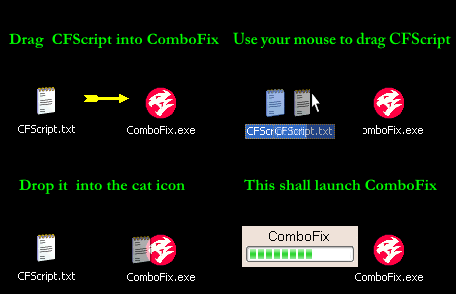
Step 1
1. Close any open browsers.
2. Close/disable all anti virus and anti malware programs so they do not interfere with the running of ComboFix.
3. Open notepad and copy/paste the text in the Codebox below into it:
-------------------------------------------------------------------------------------------------
KillAll::
File::
c:\windows\Rwosuvahoh.bin
c:\windows\Ctenubucam.dat
--------------------------------------------------------------------------------------------------
Save this as CFScript.txt, in the same location as ComboFix.exe
Refering to the picture above, drag CFScript into ComboFix.exe
When finished, it shall produce a log for you at C:\ComboFix.txt which I will require in your next reply.
Step 2
Uninstall the following from Add/Remove Programs via the Control Panel
Java(TM) 6 Update 6
Adobe Reader 6.0.1
Step 3
Your Adobe Acrobat Reader is out of date. Older versions are vulnerable to attack.
Please go to the link below to update.
Adobe Reader Untick the Free McAfee® Security Scan Plus (optional) unless you want it.
Step 4
Your Java is out of date. Older versions have vulnerabilities that malicious sites can use to exploit and infect your system. Please follow these steps to remove older version Java components and update:
Go to Start > Settings > Control Panel, double-click on Add/Remove Programs and remove all older versions of Java.
-- If using Windows Vista and the installer refuses to launch due to insufficient user permissions, then Run As Administrator.
-- If you choose to update via the Java applet in Control Panel, uncheck the option to install the Toolbar unless you want it.
-- The uninstaller incorporated in this release removes previous Updates 10 and above, but does not remove older versions, so they still need to be removed manually.
Note: The Java Quick Starter (JQS.exe) adds a service to improve the initial startup time of Java applets and applications.
To disable the JQS service if you don't want to use it:
Step 5
Run an online virus scan with Kaspersky from HERE. This scan is very thorough and may take several hours to run, please allow it to complete.
1. At the main page. Press on "Accept". After reading the contents.
2. At the next window Select Update. Allow the Database to update.
Note: If prompted to run or update your Java, then follow the prompts to do so. Kaspersky requires Java to run.
3. Once the Database has finished, under the Scan icon Select My Computer to start the scan.
4. Select Scan Report.
5. If any threats were found they will appear in the report
6. Select "Save error report as"
Then in the file name just type in kaspersky
Under "save as type" select text .txt
Save it to your Desktop.
Copy and post the results of the Kaspersky Online scan. If no threats were found then report that as well.
The following animation may help.
Kaspersky Gif
Post the logs from Combofix and Kaspersky in your reply please. Let me know of any specific issues Also has your AV program licence lapsed?
Kevin
carlmtu
13 Posts
0
September 7th, 2010 18:00
Hi Kevin! I removed Java and Abdobe like you mentioned and reloaded Java back onto the laptop. The combofix log is below. I was unable to run Kaspersky as I can not access the internet from the infected machine. I did not see a way to save the program to a memory stick for transfer to the infected machine...did I miss this?
THanks,
Carl
ComboFix 10-09-06.03 - Carl Schroeder 09/07/2010 19:53:35.6.1 - x86
Microsoft Windows XP Professional 5.1.2600.2.1252.1.1033.18.503.259 [GMT -4:00]
Running from: c:\documents and settings\Carl Schroeder\Desktop\ComboFix.exe
Command switches used :: c:\documents and settings\Carl Schroeder\Desktop\CFScript.txt
FILE ::
"c:\windows\Ctenubucam.dat"
"c:\windows\Rwosuvahoh.bin"
.
((((((((((((((((((((((((((((((((((((((( Other Deletions )))))))))))))))))))))))))))))))))))))))))))))))))
.
c:\windows\Ctenubucam.dat
c:\windows\Rwosuvahoh.bin
.
((((((((((((((((((((((((( Files Created from 2010-08-08 to 2010-09-08 )))))))))))))))))))))))))))))))
.
2010-09-05 02:42 . 2010-09-05 02:42 -------- d-----w- c:\documents and settings\Carl Schroeder\Application Data\Malwarebytes
2010-09-05 02:41 . 2010-04-29 19:39 38224 ----a-w- c:\windows\system32\drivers\mbamswissarmy.sys
2010-09-05 02:41 . 2010-09-05 02:41 -------- d-----w- c:\documents and settings\All Users\Application Data\Malwarebytes
2010-09-05 02:41 . 2010-04-29 19:39 20952 ----a-w- c:\windows\system32\drivers\mbam.sys
2010-09-05 02:41 . 2010-09-05 02:41 -------- d-----w- c:\program files\Malwarebytes' Anti-Malware
2010-09-05 02:33 . 2010-09-05 02:33 -------- d-----w- C:\_OTM
.
(((((((((((((((((((((((((((((((((((((((( Find3M Report ))))))))))))))))))))))))))))))))))))))))))))))))))))
.
2010-09-06 23:54 . 2006-02-15 05:40 -------- d-----w- c:\program files\Trend Micro
2010-09-04 03:00 . 2006-02-23 04:00 -------- d-----w- c:\documents and settings\Carl Schroeder\Application Data\Apple Computer
2010-07-20 22:18 . 2010-07-20 22:18 -------- d-----w- c:\documents and settings\NetworkService\Application Data\AdobeUM
2010-06-29 00:54 . 2010-06-21 00:20 439816 ----a-w- c:\documents and settings\Carl Schroeder\Application Data\Real\Update\setup3.10\setup.exe
2006-09-02 14:27 . 2006-09-02 14:27 5517312 ----a-w- c:\program files\SSHSecureShellClient.exe
2006-07-18 00:51 . 2006-03-12 01:43 104 --sh--r- c:\windows\system32\E7846EC5B9.sys
2006-08-19 17:25 . 2006-02-22 11:58 6528 --sha-w- c:\windows\system32\KGyGaAvL.sys
.
((((((((((((((((((((((((((((((((((((( Reg Loading Points ))))))))))))))))))))))))))))))))))))))))))))))))))
.
.
*Note* empty entries & legit default entries are not shown
REGEDIT4
[HKEY_CURRENT_USER\SOFTWARE\Microsoft\Windows\CurrentVersion\Run]
"DW4"="c:\program files\The Weather Channel FW\Desktop Weather\DesktopWeather.exe" [2005-11-07 601200]
"Creative Detector"="c:\program files\Creative\MediaSource\Detector\CTDetect.exe" [2004-12-02 102400]
"NCLaunch"="c:\windows\NCLAUNCH.EXe" [2007-01-13 40960]
"swg"="c:\program files\Google\GoogleToolbarNotifier\GoogleToolbarNotifier.exe" [2007-07-11 68856]
[HKEY_LOCAL_MACHINE\SOFTWARE\Microsoft\Windows\CurrentVersion\Run]
"ehTray"="c:\windows\ehome\ehtray.exe" [2005-09-29 67584]
"Apoint"="c:\program files\Apoint\Apoint.exe" [2004-09-13 155648]
"igfxtray"="c:\windows\system32\igfxtray.exe" [2005-10-15 94208]
"igfxhkcmd"="c:\windows\system32\hkcmd.exe" [2005-10-15 77824]
"igfxpers"="c:\windows\system32\igfxpers.exe" [2005-10-15 114688]
"IntelWireless"="c:\program files\Intel\Wireless\Bin\ifrmewrk.exe" [2004-10-30 385024]
"Dell QuickSet"="c:\program files\Dell\QuickSet\quickset.exe" [2005-09-01 684032]
"DVDLauncher"="c:\program files\CyberLink\PowerDVD\DVDLauncher.exe" [2005-02-23 53248]
"ISUSPM Startup"="c:\program files\Common Files\InstallShield\UpdateService\isuspm.exe" [2005-06-10 249856]
"ISUSScheduler"="c:\program files\Common Files\InstallShield\UpdateService\issch.exe" [2005-06-10 81920]
"MimBoot"="c:\progra~1\MUSICM~1\MUSICM~3\mimboot.exe" [2005-09-09 8192]
"MMTray"="c:\program files\Musicmatch\Musicmatch Jukebox\mm_tray.exe" [2005-09-09 110592]
"Google Desktop Search"="c:\program files\Google\Google Desktop Search\GoogleDesktop.exe" [2006-02-15 168448]
"HostManager"="c:\program files\Common Files\AOL\1140609900\ee\AOLSoftware.exe" [2006-05-10 50760]
"Pure Networks Port Magic"="c:\progra~1\PURENE~1\PORTMA~1\PortAOL.exe" [2004-04-05 99480]
"TkBellExe"="c:\program files\Common Files\Real\Update_OB\realsched.exe" [2006-05-12 180269]
"SunJavaUpdateSched"="c:\program files\Java\jre1.6.0_06\bin\jusched.exe" [2008-03-25 144784]
"EPSON Stylus CX4800 Series"="c:\windows\System32\spool\DRIVERS\W32X86\3\E_FATIADA.EXE" [2005-02-02 98304]
"Auto EPSON Stylus CX4800 Series on JESSICA"="c:\windows\System32\spool\DRIVERS\W32X86\3\E_FATIADA.EXE" [2005-02-02 98304]
"{0228e555-4f9c-4e35-a3ec-b109a192b4c2}"="c:\program files\Google\Gmail Notifier\gnotify.exe" [2005-07-15 479232]
"QuickTime Task"="c:\program files\QuickTime\qttask.exe" [2010-03-18 421888]
"iTunesHelper"="c:\program files\iTunes\iTunesHelper.exe" [2010-04-28 142120]
[HKEY_USERS\.DEFAULT\Software\Microsoft\Windows\CurrentVersion\RunOnce]
"RunNarrator"="Narrator.exe" [2006-10-04 53760]
c:\documents and settings\Carl Schroeder\Start Menu\Programs\Startup\
Adobe Gamma.lnk - c:\program files\Common Files\Adobe\Calibration\Adobe Gamma Loader.exe [2005-3-16 113664]
c:\documents and settings\All Users\Start Menu\Programs\Startup\
HotSync Manager.lnk - c:\program files\palmOne\Hotsync.exe [2004-6-9 471040]
Kodak EasyShare software.lnk - c:\program files\Kodak\Kodak EasyShare software\bin\EasyShare.exe [2003-12-13 630915]
Kodak software updater.lnk - c:\program files\Kodak\KODAK Software Updater\7288971\Program\backWeb-7288971.exe [2003-6-8 16432]
Microsoft Office.lnk - c:\program files\Microsoft Office\Office10\OSA.EXE [2001-2-13 83360]
[HKEY_LOCAL_MACHINE\software\microsoft\windows nt\currentversion\winlogon\notify\IntelWireless]
2004-09-07 22:08 110592 ----a-w- c:\program files\Intel\Wireless\Bin\LgNotify.dll
[HKLM\~\services\sharedaccess\parameters\firewallpolicy\standardprofile\AuthorizedApplications\List]
"%windir%\\system32\\sessmgr.exe"=
"c:\\Program Files\\America Online 9.0\\waol.exe"=
"c:\\Program Files\\Common Files\\AOL\\Loader\\aolload.exe"=
"c:\\Program Files\\Common Files\\AOL\\1140609900\\ee\\aolsoftware.exe"=
"c:\\Program Files\\Common Files\\AOL\\1140609900\\ee\\aim6.exe"=
"c:\\Program Files\\Messenger\\msmsgs.exe"=
"c:\\Program Files\\Kodak\\KODAK Software Updater\\7288971\\Program\\backWeb-7288971.exe"=
"c:\\Program Files\\Ruckus Player\\Ruckus.exe"=
"c:\\Program Files\\America Online 9.0a\\waol.exe"=
"c:\\Program Files\\Common Files\\AOL\\TopSpeed\\2.0\\aoltsmon.exe"=
"c:\\Program Files\\Common Files\\AOL\\TopSpeed\\2.0\\aoltpspd.exe"=
"c:\\Program Files\\Common Files\\AOL\\System Information\\sinf.exe"=
"c:\\Program Files\\Common Files\\AolCoach\\en_en\\player\\AOLNySEV.exe"=
"c:\\Program Files\\Macromedia\\Dreamweaver MX 2004\\Dreamweaver.exe"=
"c:\\Program Files\\Bonjour\\mDNSResponder.exe"=
"c:\\Program Files\\iTunes\\iTunes.exe"=
[HKLM\~\services\sharedaccess\parameters\firewallpolicy\standardprofile\GloballyOpenPorts\List]
"3389:TCP"= 3389:TCP:@xpsp2res.dll,-22009
.
Contents of the 'Scheduled Tasks' folder
2010-05-10 c:\windows\Tasks\AppleSoftwareUpdate.job
- c:\program files\Apple Software Update\SoftwareUpdate.exe [2009-10-22 15:50]
.
.
------- Supplementary Scan -------
.
uStart Page = hxxp://forecast.weather.gov/MapClick.php?CityName=Defiance&state=OH&site=IWX&textField1=41.2812&textField2=-84.3619
uInternet Connection Wizard,ShellNext = hxxp://www.google.com/ig/dell?hl=en
uInternet Settings,ProxyOverride = localhost;
uSearchAssistant = hxxp://www.google.com/ie
uSearchURL,(Default) = hxxp://www.google.com/search?q=%s
IE: &AOL Toolbar search - c:\program files\AOL Toolbar\toolbar.dll/SEARCH.HTML
IE: E&xport to Microsoft Excel - c:\progra~1\MICROS~4\Office10\EXCEL.EXE/3000
Trusted Zone: aol.com\free
Trusted Zone: musicmatch.com\online
DPF: {193C772A-87BE-4B19-A7BB-445B226FE9A1} - hxxp://downloads.ewido.net/ewidoOnlineScan.cab
.
**************************************************************************
catchme 0.3.1398 W2K/XP/Vista - rootkit/stealth malware detector by Gmer, http://www.gmer.net
Rootkit scan 2010-09-07 20:07
Windows 5.1.2600 Service Pack 2 NTFS
scanning hidden processes ...
scanning hidden autostart entries ...
scanning hidden files ...
scan completed successfully
hidden files: 0
**************************************************************************
.
--------------------- DLLs Loaded Under Running Processes ---------------------
- - - - - - - > 'winlogon.exe'(1020)
c:\program files\Intel\Wireless\Bin\LgNotify.dll
- - - - - - - > 'explorer.exe'(2612)
c:\windows\system32\WININET.dll
c:\docume~1\CARLSC~1\LOCALS~1\TempIadHide3.dll
c:\windows\system32\browselc.dll
c:\windows\system32\ieframe.dll
c:\windows\system32\webcheck.dll
.
------------------------ Other Running Processes ------------------------
.
c:\program files\Intel\Wireless\Bin\EvtEng.exe
c:\program files\Intel\Wireless\Bin\S24EvMon.exe
c:\program files\Intel\Wireless\Bin\WLKeeper.exe
c:\windows\system32\LEXBCES.EXE
c:\windows\system32\LEXPPS.EXE
c:\program files\Intel\Wireless\Bin\ZcfgSvc.exe
c:\progra~1\Intel\Wireless\Bin\1XConfig.exe
c:\windows\system32\igfxsrvc.exe
c:\program files\Google\Google Desktop Search\GoogleDesktopIndex.exe
c:\program files\Apoint\Apntex.exe
c:\program files\Common Files\AOL\TopSpeed\2.0\aoltsmon.exe
c:\program files\Common Files\Apple\Mobile Device Support\AppleMobileDeviceService.exe
c:\program files\Common Files\AOL\TopSpeed\2.0\aoltpspd.exe
c:\program files\Bonjour\mDNSResponder.exe
c:\windows\system32\CTsvcCDA.EXE
c:\windows\eHome\ehRecvr.exe
c:\windows\eHome\ehSched.exe
c:\program files\Common Files\Intuit\Update Service\IntuitUpdateService.exe
c:\windows\system32\drivers\KodakCCS.exe
c:\program files\Dell\NICCONFIGSVC\NICCONFIGSVC.exe
c:\program files\Intel\Wireless\Bin\RegSrvc.exe
c:\windows\system32\ScsiAccess.EXE
c:\windows\ehome\mcrdsvc.exe
c:\program files\iPod\bin\iPodService.exe
c:\windows\system32\dllhost.exe
c:\windows\system32\wscntfy.exe
c:\windows\eHome\ehmsas.exe
.
**************************************************************************
.
Completion time: 2010-09-07 20:15:05 - machine was rebooted
ComboFix-quarantined-files.txt 2010-09-08 00:15
ComboFix2.txt 2010-09-07 00:42
ComboFix3.txt 2008-07-02 03:31
ComboFix4.txt 2008-07-01 00:31
ComboFix5.txt 2010-09-07 21:50
Pre-Run: 6,190,260,224 bytes free
Post-Run: 6,175,260,672 bytes free
- - End Of File - - CD0DDF0C96DF8E7B4ACCC0E51CE8B88B
kevinf80_1d0ac6
1.1K Posts
0
September 8th, 2010 01:00
Hiya Carl,
I misread your initial post about the lack of connection, apologies. Did you reset the Proxy setting in Explorer, can you recheck please.
Internet Explorer:
Tools Menu -> Internet Options -> Connections Tab -> Lan Settings > uncheck "use a proxy server" and check to "Automatically detect settings". ok and apply.
Kaspersky is an online scanner so obviously needs an internet connection to work
What exactly happens when you try to connect? If you right click on the wireless icon next to the clock do you get an option to Repair connection or rebuild adapter?
Have you tried connecting wired? see if that works.
I`m stating the obvious here, is there a switch on your lappy for the wireless function, i`ve seen these get turned off inadvertently
Kevin
carlmtu
13 Posts
0
September 8th, 2010 14:00
Hi Kevin! No worries! I checked the proxy settings and it was set to automatically detect. When I try to connect the lap top to the wireless network it connects but says their is limited or no connectivity. I tried the repair option and it could not complete the task as it could not renew the IP address. I connected the lap top directly to the router and the yellow light did not shine on the lap top input jack. When I plugged it into the jack on another computer the yellow light came on.
Any Thoughts? THanks,
Carl
kevinf80_1d0ac6
1.1K Posts
0
September 8th, 2010 15:00
Hiya Carl,
I`m a bit out of my comfort zone with this issue, i`m more malware removal. try the following:
Select start > control panel > network & internet connections > network connections. Do you see your connections? LAC & LAN. Right click on LAN do you get options to enable, repair
You could ask about the issue here http://en.community.dell.com/support-forums/network-internet-wireless/default.aspx its the Networking, Internet and Wireless section. I`m sure the guys there will have an answer. Link back to this thread. So they know whats gone on.
If they get your connection sorted, come back here and we`ll continue with the Kaspersky scan. Dont remove any of the tools we`ve used, especially Combofix.
Kevin
carlmtu
13 Posts
0
September 9th, 2010 04:00
Sounds good Kevin..Ill do that...thanks for all your help! Carl
kevinf80_1d0ac6
1.1K Posts
0
September 9th, 2010 05:00
OK Carl, dont forget to come back when you get your connection sorted, we still need to run an online AV and clean up our tools etc....
Kevin