

Unsolved
This post is more than 5 years old
1 Rookie
•
14 Posts
0
5432
September 7th, 2016 21:00
BitLocker (on second drive?) preventing 7510 BIOS update
I have a Precision Mobile Workstation 7510 running WIndows 10 with two drives. I have Bitlocker enabled on both drives.
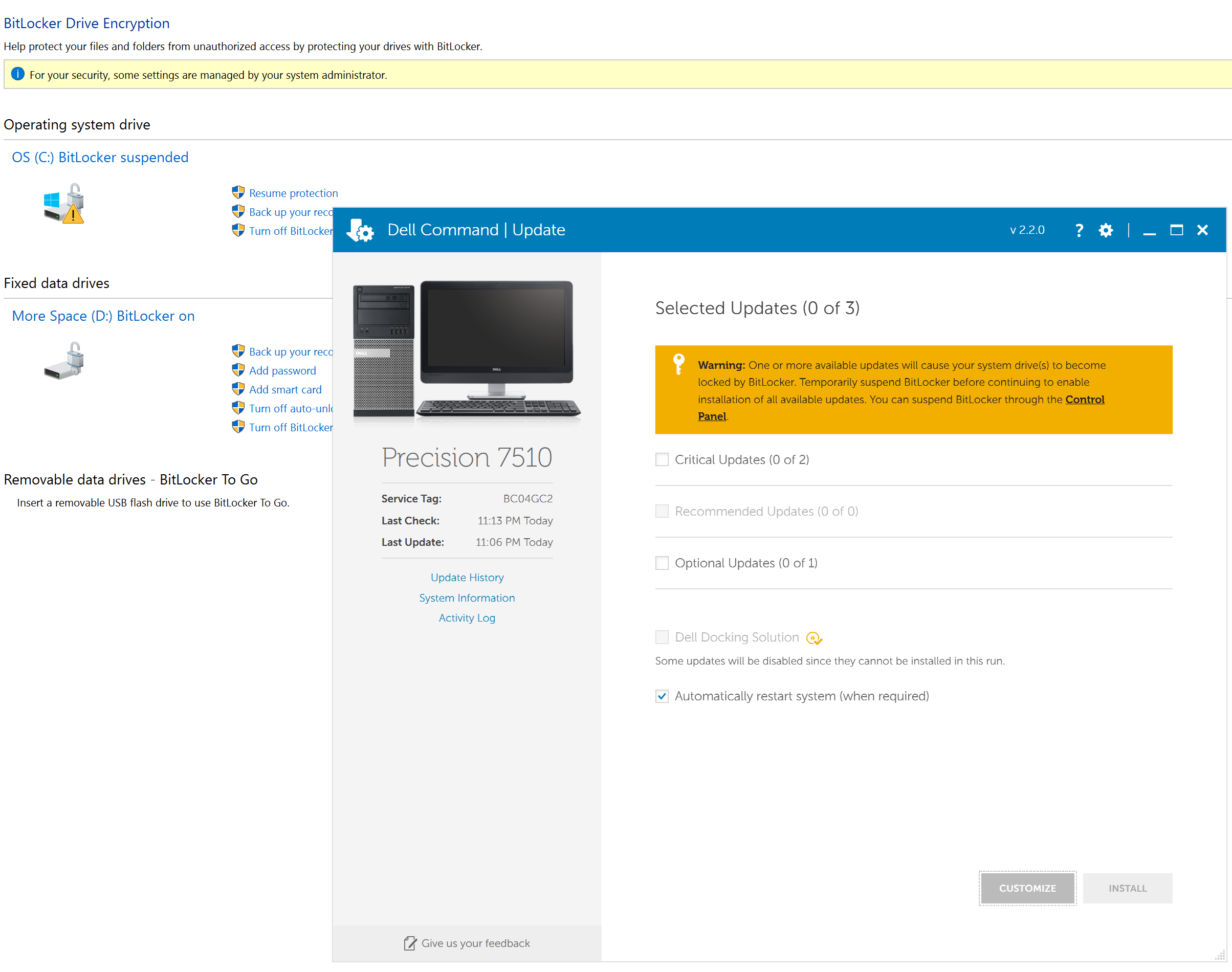
Dell Command Update recently notified me of a BIOS update but warned me that I must suspend BitLocker protection to perform the update.
I suspended BitLocker on the OS drive, but it appears that Windows 10 does not allow me to suspend BitLocker on the second drive. My only option to turn BitLocker off on the secondary drive is to do a full volume decryption, which takes hours (it's a 2GB drive).
Turning BitLocker off on the OS drive does not seem to convince Dell Command Update that things are ready for the update. I suspect that it is the fact BitLocker is still enabled on the secondary drive that is causing Dell Command Update to balk.
So, questions:
1) Am I deducing the problem correctly? Is it the fact that the secondary drive has BitLocker still enabled that is stopping Dell Command Update from updating?
2) Is there any way to convince Dell Command Update to proceed with the update?
3) If I manually install the update (bypassing Dell Command Update) without completely disabling BitLocker on the secondary drive, will there be any adverse effects (such as being unable to access data on my secondary drive)?
4) Is there a way to get around #3 without completely decrypting and then later re-encrypting the secondary drive? Can I remove it from my computer while the BIOS update runs and add it back later fir a seamless transition? Or can I save the recovery key to the secondary drive somewhere and use it to access the drive after the update and change/fix the recovery key without a full decrypt/encrypt process?
Thanks. Screenshot attached.


DELL-Jesse L
Moderator
•
17.9K Posts
•
69K Points
0
September 14th, 2016 07:00
alaskanjackal,
Click the link below to see if the information posted will help you with bitlocker on your second hard drive.
BitLocker and Windows 10
Nick Walt
3 Posts
0
April 12th, 2017 22:00
I've come to this thread with the same problem outlined by Alaskan Jackel. I have a DELL Precision 4800 with two SSDs, both encrypted with bitlocker. The system drive can be suspended and the fixed data drive cannot. Bitlocker can only be turned off on the fixed data drive.
Unfortunately, the link in the answer provided by Jesse is to turn off the auto-unlock feature and does nothing to address the original problem posted by Alaskan Jackel.
My response is to ask why the DELL Command Update does not provide ANY feedback regarding bitlocker when the user SUSPENDS the system drive but leaves the fixed data drive encrypted. This is just poor UX on DELL's part and this issue is made even more inexcusable because this is a common issue for people with two-drive bitlocker encryption.
The other response I have is why the heck hasn't DELL mitigated the problem by making Command Update more intelligent? Seriously, are we still in the Windows XP era of seriously dumb application design? Why isn't Command Update satisfied when it sees that the system drive is suspended?
Can someone from DELL please address all of these points in a comprehensive reply here in this forum thread - PLEASE. I want to get on and just install this damned BIOS update and BE DONE!
hiddeneyes02
1 Message
0
November 25th, 2017 14:00
Same problem here, please an answer.
KBolderman
8 Posts
2
April 19th, 2018 01:00
You need to suspend protection on the second hard drive using elevated powershell.
So let's assume the second drive is E: than use this command;
Suspend-Bitlocker -MountPoint "E:"
Then afterwards you need to activate the protection again, can be done via GUI in the same way as C:.
Cheers
holyshnikiesbatman
1 Message
0
November 1st, 2018 12:00
This worked for me, great solution. Thank you!!