


Unsolved
1 Rookie
•
1 Message
2
5283
March 30th, 2024 21:44
Dell.DCF.UA.Bradbury.API.SubAgent.exe
Hi,
The reliability monitor repeatedly reports the following errors
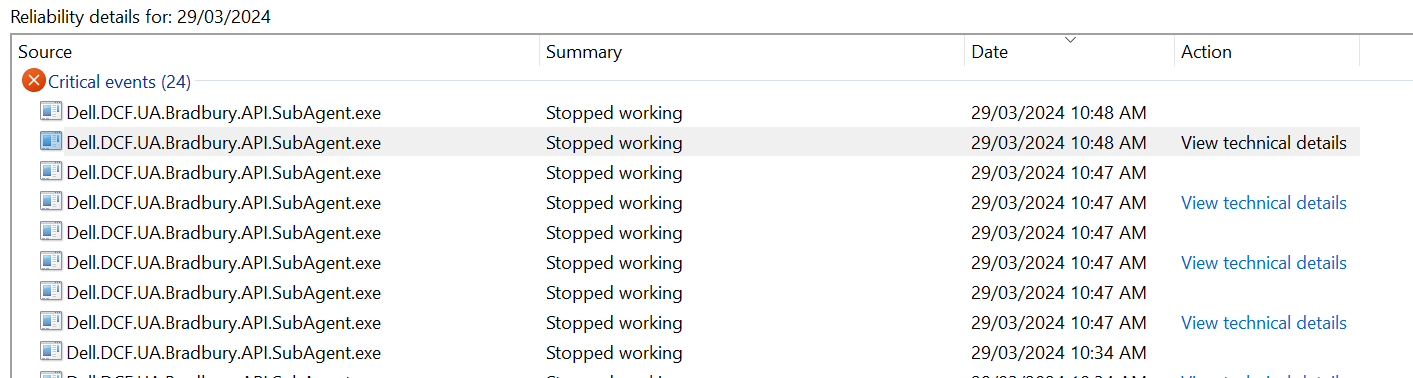
Description
Faulting application name: Dell.DCF.UA.Bradbury.API.SubAgent.exe, version: 5.2.0.66, time stamp: 0xdd50393e
Faulting module name: KERNELBASE.dll, version: 10.0.22621.3235, time stamp: 0x2b72307b
Exception code: 0xe0434352
Fault offset: 0x0000000000065b0c
Faulting process id: 0x0x4BD4
Faulting application start time: 0x0x1DA816A57F3D196
Faulting application path: C:\Program Files (x86)\Dell\UpdateService\DCF\Dell.DCF.UA.Bradbury.API.SubAgent.exe
Faulting module path: C:\Windows\System32\KERNELBASE.dll
Report Id: 85476104-bd94-4ff2-927b-d8da81a80f62
Faulting package full name:
Faulting package-relative application ID:
Windows 11, Dell Inspiron 16 Plus 7630
If anyone has any thoughts on how to fix this I would greatly appreciate it.
Thank you.
zenTech_
1 Rookie
•
1 Message
1
April 12th, 2024 21:19
Same for brand new Alienware M16
corsicanajoe
1 Rookie
•
1 Message
0
April 14th, 2024 08:45
Gleiches Problem beim Inspiron 5630, tauchte erstmals auf bei Installation der neuen Version von MyDell vom 01.04.24. Habe wieder die alte Version installiert. Problem dann aber auch bei Neuinstallation von Dell SupportAssist mit gleichen Meldungen. Habe jetzt SupportAssist deinstalliert
Kiwi Matey
1 Rookie
•
1 Message
0
April 16th, 2024 09:46
Dell.DCF.UA.Bradbury.API.SubAgent.exe
Hi,
I have same problem.
Reliability Monitor and Event Viewer logging multiple errors:
Event Viewer:
Source: Application Error
Event ID: 1000
Faulting application name: Dell.DCF.UA.Bradbury.API.SubAgent.exe, version: 5.2.0.66, time stamp: 0xdd50393e
Faulting module name: KERNELBASE.dll, version: 10.0.22621.3447, time stamp: 0x3d876852
Exception code: 0xe0434352
Fault offset: 0x00000000000653ac
Faulting process id: 0x0x1FA4
Faulting application start time: 0x0x1DA8F8C3CF368B9
Faulting application path: C:\Program Files (x86)\Dell\UpdateService\DCF\Dell.DCF.UA.Bradbury.API.SubAgent.exe
Faulting module path: C:\Windows\System32\KERNELBASE.dll
Report Id: 802157b0-5222-4819-9cf4-3174e011f139
Faulting package full name:
Faulting package-relative application ID:
Event Viewer:
Source: .NET Runtime
Event ID: 1026
Application: Dell.DCF.UA.Bradbury.API.SubAgent.exe
Framework Version: v4.0.30319
Description: The process was terminated due to an unhandled exception.
Exception Info: System.IO.FileLoadException
at Dell.Client.Framework.Common.LoggingSystem..ctor(System.Collections.Generic.IEnumerable`1<Dell.Client.Framework.Common.ILogWriter>, System.Collections.Generic.IEnumerable`1<Dell.Client.Framework.Common.IManifestWriter>)
at Dell.Client.Framework.Agent.Agent..ctor(Dell.Client.Framework.Common.IAgentConfig)
at Dell.DCF.UA.Bradbury.API.SubAgent.BradburyAPISubAgent.StartSubAgent()
at Dell.DCF.UA.Bradbury.API.SubAgent.Starter.Program.Main(System.String[])
Inspirion 27-7720, Windows 11
Anny suggestions how to fix it? Thank you in advance.
Kiwi Matey
Jnilou
1 Rookie
•
5 Posts
0
April 17th, 2024 10:25
I have the same problem on Dell Inspiron 16 Plus 7630. Blue screen this night with this problem.
daemon01
1 Rookie
•
1 Message
0
April 25th, 2024 20:49
I too have this problem, it started 2024/04/15, running Hyper-V or Virtualbox will cause it every time on my XPS 17 9730
The latest bluescreen:
Source
Dell.DCF.UA.Bradbury.API.SubAgent.exe
Summary
Stopped working
Date
4/25/2024 14:12
Status
Report sent
Description
Faulting Application Path: C:\Program Files (x86)\Dell\UpdateService\DCF\Dell.DCF.UA.Bradbury.API.SubAgent.exe
Problem signature
Problem Event Name: CLR20r3
Problem Signature 01: XHLGVRNBOY0CJYH2QCUKS05YSRD15PLY
Problem Signature 02: 5.2.0.66
Problem Signature 03: dd50393e
Problem Signature 04: DCF.Agent
Problem Signature 05: 6.3.23.3
Problem Signature 06: d7274b31
Problem Signature 07: 13
Problem Signature 08: 4de
Problem Signature 09: System.IO.FileLoadException
OS Version: 10.0.22631.2.0.0.256.48
Locale ID: 1033
Additional Information 1: 728b
Additional Information 2: 728be731a71f2d2a2a15bedcfb021cee
Additional Information 3: f45a
Additional Information 4: f45a85855f004d1c2fc22ee0a90f64f8
Extra information about the problem
Bucket ID: 81d598e0344174f04d8301658abc600d (0)
--EOF--
Pascaltgeo
1 Rookie
•
1 Message
0
May 18th, 2024 18:57
Dell do you sleep?
(edited)
Ciypher
1 Rookie
•
1 Message
0
May 22nd, 2024 23:21
Bioukh
1 Message
0
August 20th, 2024 14:47
Same issue.
I stopped service Alienware Client Management Service and removed the C:\Program Files (x86)\dell folder.
This should not happen anymore.
irivera74
1 Rookie
•
1 Message
0
August 29th, 2024 15:31
Nombre de la aplicación con errores: Dell.DCF.UA.Bradbury.API.SubAgent.exe, versión: 5.4.0.36, marca de tiempo: 0xd6cdd4f7
Nombre del módulo con errores: KERNELBASE.dll, versión: 10.0.22621.4111, marca de tiempo: 0x03c619d0
Código de excepción: 0xe0434352
Desplazamiento de errores: 0x000000000005fabc
Identificador del proceso con errores: 0x0x4FD0
Hora de inicio de la aplicación con errores: 0x0x1DAFA26B2215326
Ruta de acceso de la aplicación con errores: C:\Program Files (x86)\Dell\UpdateService\DCF\Dell.DCF.UA.Bradbury.API.SubAgent.exe
Ruta de acceso del módulo con errores: C:\Windows\System32\KERNELBASE.dll
Identificador del informe: cac2dbc0-eb21-4db0-8683-95c244395010
Nombre completo del paquete con errores:
Identificador de aplicación relativa del paquete con errores:
mikl1986
1 Rookie
•
30 Posts
0
October 4th, 2024 11:24
App crash name:Dell.DCF.UA.Bradbury.API.SubAgent.exe, Publisher:null, Version:5.4.0.13
Happening on a Dell Latitude 7455 with ARM CPU :)
Luiz Paulo Veiga
1 Rookie
•
1 Message
0
October 5th, 2024 16:12
Same issue.
Faulting application name: Dell.DCF.UA.Bradbury.API.SubAgent.exe, version: 5.4.0.36, time stamp: 0xd6cdd4f7
Faulting module name: KERNELBASE.dll, version: 10.0.22621.4249, time stamp: 0x0cf64c6a
Exception code: 0xe0434352
Fault offset: 0x000000000005fe4c
Faulting process id: 0x0x5B6C
Faulting application start time: 0x0x1DB173B7A620FCB
Faulting application path: C:\Program Files (x86)\Dell\UpdateService\DCF\Dell.DCF.UA.Bradbury.API.SubAgent.exe
Faulting module path: C:\WINDOWS\System32\KERNELBASE.dll
Report Id: 858bc89f-dafc-4771-993c-2cb0ffa1b63d
Faulting package full name:
Faulting package-relative application ID:
DELL, any solution about it ?
dinglydellhatesme
1 Rookie
•
2 Posts
1
October 25th, 2024 11:16
did anyone find a fix for this?
barbara2351
1 Rookie
•
23 Posts
0
November 30th, 2024 04:36
@Bioukh Have you restarted the service? Is this solution still working?
barbara2351
1 Rookie
•
23 Posts
0
November 30th, 2024 04:57
Same for brand new Latitude 3550
Description
Faulting Application Path: C:\Program Files (x86)\Dell\UpdateService\DCF\Dell.DCF.UA.Bradbury.API.SubAgent.exe
Problem Event Name: CLR20r3
TomVA2
1 Rookie
•
4 Posts
0
December 2nd, 2024 01:20
I am getting the same thing on a new precision 3591. Also getting repeated errors with a source file of.
Source File: C:\jenkins\workspace\dptf\Src\DPTF\Sources\Manager\WorkItem.cpp @ line 204