This post is more than 5 years old
1 Rookie
•
4 Posts
0
24503
February 14th, 2019 17:00
Black Screen. Driver off.
I have a Dell XPS 9550-100 laptop, running windows 10. It has both Intel 530 and an Nvidia graphics driver. When I turned on the computer today, it displayed only a black screen. I was able to get into the computer by attaching an external monitor and logging on, and found that it was calling the external monitor display #2, and both that and the laptop screen (black) were being driven by the intel 530 driver. I updated the driver, but that didn't help. I then tried disabling the Nvidia driver, but that didn't seem to change anything. So I turned that back on and disabled the intel driver, hoping maybe the Nvidia one would work properly. Now I have a black screen on the laptop and a "no signal" indicator on the external monitor. Halp!
(cross posted at https://forums.intel.com/s/question/0D50P00004EWzgnSAD/is-there-a-way-to-enable-the-intel-530-driver-without-seeing-the-screen)
danderso8
1 Rookie
•
4 Posts
0
February 17th, 2019 12:00
Ben, Robert,
Thanks for the replys. One of my friends who does IT suggested I try to boot windows or Linus from a USB stick to see if that would help (I only had one for windows--it did not.) His other suggestion was to take apart the computer and remove the battery and the CMOS battery. This did work. I found instructions for a very similar disassembly (though I found that I didn't need to remove the fans & heatsink to remove the motherboard) here...
https://www.parts-people.com/blog/2016/04/19/dell-xps-15-9550-p56f001-cmos-battery-removal-and-installation/
After re-assembly, all seems to be working fine, although I'm still not certain it's running off the Nvidia graphics card. The Nvidia GE Force control panel seems to show I've got the latest driver, and describes "your rig" correctly, but the windows conrol panel shows "Display 1: Connected to Intel HD Graphics 530".
I believe my failure came after a windows update, and based on the timing of yours being so similar, that reinforces my belief that that was probably the cause.
Hope this helps!
Robert P (retired)
6 Operator
•
9.4K Posts
0
February 15th, 2019 04:00
Hi danderso8,
Thanks for posting. Apologies that your system is not performing as expected.
Here is information from the Dell knowledge base you may find helpful:
How to Troubleshoot Display or Video Issues on Dell Laptop LCD Panel
If you still require assistance and the system is under warranty, you may contact me privately. Be sure to include your personal information (name, address, telephone, email) and your computer's service tag number in your message. Thanks.
If there is no warranty, then you could contact our Out of Warranty team to get a quote for a paid service request.
benhoyt
1 Rookie
•
3 Posts
0
February 17th, 2019 09:00
xtrakool777
1 Message
1
June 2nd, 2019 18:00
Dell has significant problems with the Intel Drivers knocking out the internal monitor. I have a 17 inch Inspiron laptop. I can only use it with an external monitor. I reinstalled the system and it worked for a while using the generic video driver. But somehow during a windows update the Dell/Intel driver was installed and again my internal monitor was knocked out , and I only see a black screen. But it works fine with an external monitor. I know it is the drivers as there is no hardware issues at all. The thing that makes me mad is Dell wants to charge folks for fixing a problem their software caused in the first place. A video update should not cause your internal monitor to be unusable. I am using it for now as I am a student and poor. But this is it for me with Dell. I called several times, and all they talk about is trying to get money from me. I updated this computer many ways all from the Dell site, and their video drivers are a mess.
JRM11
1 Rookie
•
3 Posts
•
2 Points
0
September 13th, 2025 10:58
I had a similar issue and want to share a fix for future readers, as it took me a lot of time reading many posts to find this.
Credit goes to another fellow on another forum, which was the needle in the haystack.
Context: Dell XPS 15-7559 laptop. Screen would go black when I opened certain Excel documents or software like PingPlotter. Connecting an external cable worked fine, so the screen was on but just black.
I also had trouble starting up, where the screen would stay black. I'd have to open and close the lid and try a few times to get the Dell logo to show. Tried all the regularly suggested fixes.
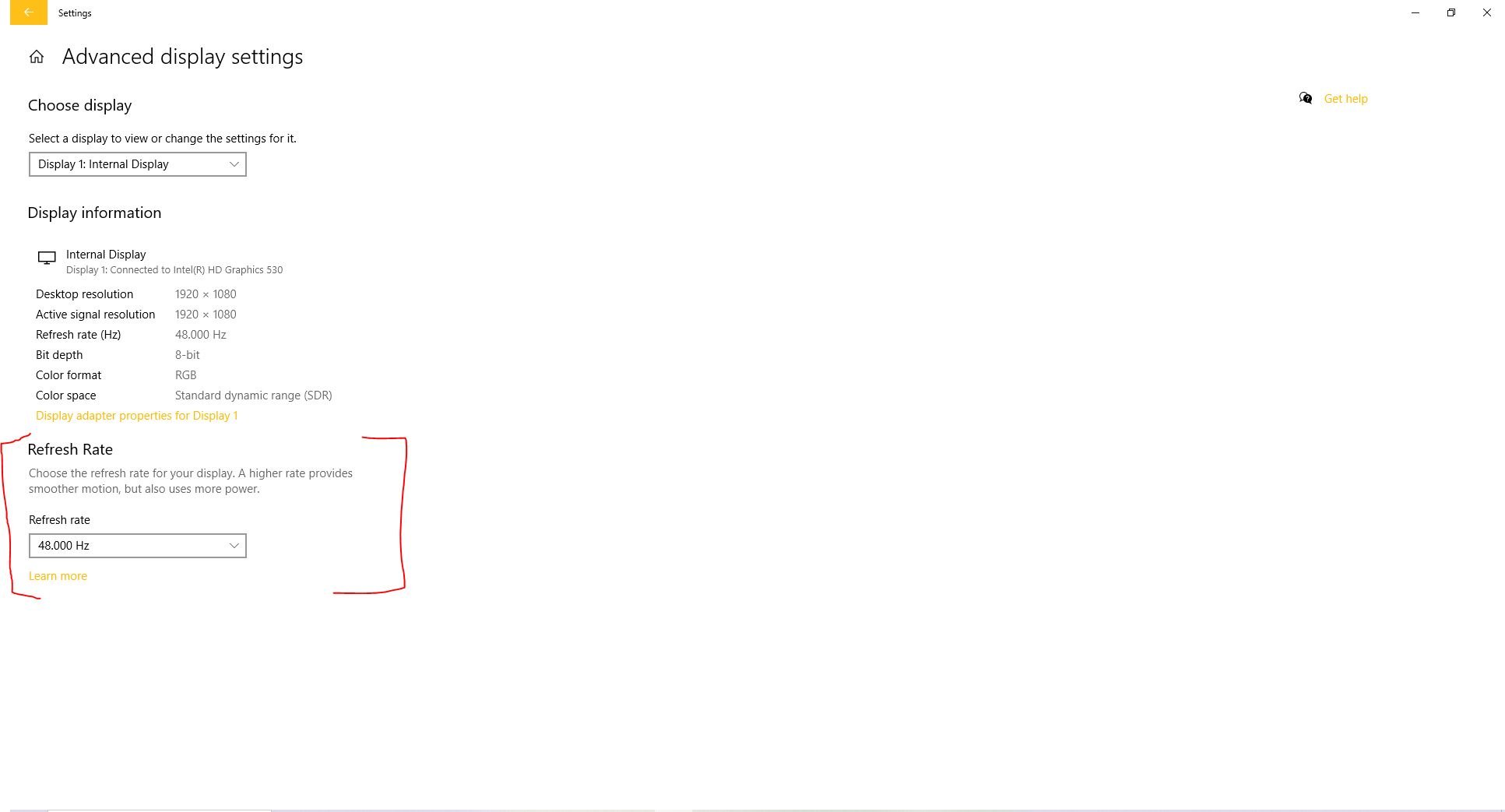
Fix that worked: Lower the screen refresh rate. Settings --> System --> Display --> Advanced Display Settings --> Lower the Refresh Rate.
Since doing this, I've had zero boot issues and zero black-screen events in 3 days. I know that's not a long time, but I was getting these 2-3 times a day. Hope this helps someone.