

Unsolved
4 Posts
0
740
November 10th, 2023 17:10
IPV4 Boot Help Dell XPS
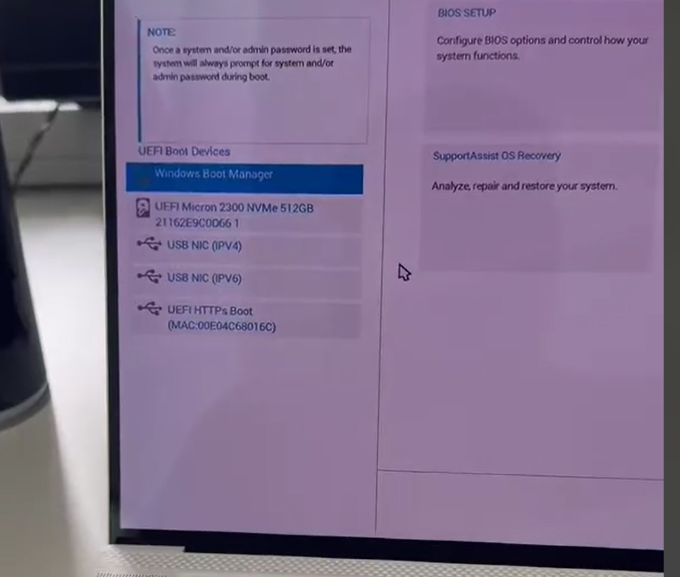
I cannot get these new Dell XPS to load on the boot menu. This IPV 4 via USB setting. What bios setting do I need to toggle on or off for this to appear?
Probably tried everything to get this to appear on some of these newer dells on their updated bios.
No Events found!
ejn63
12 Elder
•
31K Posts
•
153.7K Points
0
November 10th, 2023 19:35
There are multiple possible issues -- see here:
https://www.dell.com/support/kbdoc/en-us/000150882/how-to-implement-pxe-booting-from-usb-c-and-thunderbolt-ethernet-adapters
rogii_mike
4 Posts
0
November 10th, 2023 20:20
@ejn63 That interface shows the old BIOS settings and I have older laptops that work, but these newer XPS series do not for some reason.
ejn63
12 Elder
•
31K Posts
•
153.7K Points
0
November 10th, 2023 22:16
What model XPS do you have, and what network adapter? And is your PXE boot image UEFI-compliant?
rogii_mike
4 Posts
0
November 13th, 2023 17:46
@ejn63
XPS 15 (9530)
Killer 1650/AX211,B,A,FIORAN seem to be wireless card
If the other laptop worked, it should be compliant
ejn63
12 Elder
•
31K Posts
•
153.7K Points
0
November 13th, 2023 18:50
Most imaging is done over a wired connection -- wireless imaging is another matter entirely. What was "the other model" system?
Have you tried connecting a USB-C to Ethernet adapter to see if the UEFI boot sequence detects the PXE image?
rogii_mike
4 Posts
0
November 21st, 2023 18:43
As of now, I've only tested the overwired connection, but it does not work.
We don't have any wireless imaging incorporated. The issue is I can't get the PXE to show up on the boot manager.