
UNSOLVED
m18 R1, AWCC 6.6.14.0 not working
When I brought my M18 R1 a year ago, the Alien FX lights worked a treat.
The following update stopped the chassis lights from working - they were stuck on a red colour - but keyboard could be changed to whatever I wished
Today, another update to version 6.6.14.0, and now I cannot run Alien FX lights at all - the area within the command centre for this is greyed out - I cannot amend the colours at all, nor the style of pattern. I'm stuck with the default blue.
Running games does automatically change the colours, but I still have no control over what colour etc.
I've uninstalled and reinstalled - to no effect.
Ideally I'd like to downgrade, but cant even find the files required.
Any ideas?
(edited)
0
0
Posted February 20th, 2025 13:42
Well, I found version 5.7.3.0, but when I install it, I'm still told that version 6.6.14.0 is installed!
I really dont want to complete a full factory restore as with the luck I have, nothing will alter
0
0
Posted February 21st, 2025 04:16
Hello,
We acknowledge your request for assistance.
If you require our support, please initiate a direct message with us, and we will be pleased to provide you with the necessary assistance.
#IWork4Dell
For all non-technical issues that require your private data, we must communicate via a private Direct Message
Dell Partner GEM Program, Out of Warranty Support Options, BIS (Bureau of Indian Standards) certificate, Get a copy of your Dell invoice0
0
Posted March 13th, 2025 05:15
Hello @wombler,
I hope you're doing well.
Could you please confirm if the issue has been resolved? Are you now able to change the chassis lights? If the issue persists, have you raised a support ticket? If so, please share the details for further investigation.
We attempted to reproduce this use case but were unable to observe the same issue—we were able to change the lights successfully. Could you let us know which version you upgraded from before installing AWCC 6.6.14? Additionally, please share details about the build you installed and its source.
For reference, we tested using the full installer on an m18 R1 system with AWCC 6.6.14.0.
Looking forward to your update.
(edited)
Best regards,
Karthik V912
#IWork4Dell0
0
Posted March 13th, 2025 15:45
Thank you.
I cannot tell you what version I had prior to 6.6.14.0, but it has always been in line with what support agent says. I always keep the system updated.
The keyboard lights can change, but the chassis light are stick on the default "blue" - they will obviously switch off when the lid is closed, but when the lid is open, they remain on blue.
There is no option within AWCC to change this. Only the keyboard settings are visible.
I have uninstalled and reinstalled using the full installer for 6.6.14.0. I have also attempted repair but this records nothing to amend.
I did manage to find a former version which after removing 6.6.14.0 I installed. This did offer chassis light adjustment. I cannot remember what version it was, but i believe it would be version 5 or something. Very old.
I then upgraded to the latest version, but the option thus disappeared again.
If you cannot replicate, then it would appear that I have some software that is interfering.
I don't wish to return to factory settings as there is a lot on my system to reinstall afterwards
0
0
Posted March 15th, 2025 17:36
@Karthik V912 My Dell Applications ....

0
0
Posted April 1st, 2025 06:45
Hi @wombler ,
I tried to replicate your scenario by installing the same FW versions. But everything keeps working fine to me.
There is a new BIOS update could u please update to latest and try once. Share the application screen shot how it looks when you say its not able to set is that greyed out ? Lets have a look at it . Also checked with AWCC validation team on this regard. These features are thoroughly tested not seen any of this kind so far. It would be helpful if u can share a short video of your system when AWCC app is opened . It will help our team to debug more.
(edited)
Best regards,
Karthik V
#IWork4Dell0
0
Posted April 1st, 2025 11:47
Hi @wombler
Here are a few quick steps to debug the issue, Please perform these 2 steps mentioned below:
SupportAssist Version Issue
Your system currently has two versions of SupportAssist, but only one should be present.
Uninstall both existing versions and reinstall the correct one from Dell Support site.
No need to worry about your subscription—it will be linked to your service tag, and your existing policy will apply.
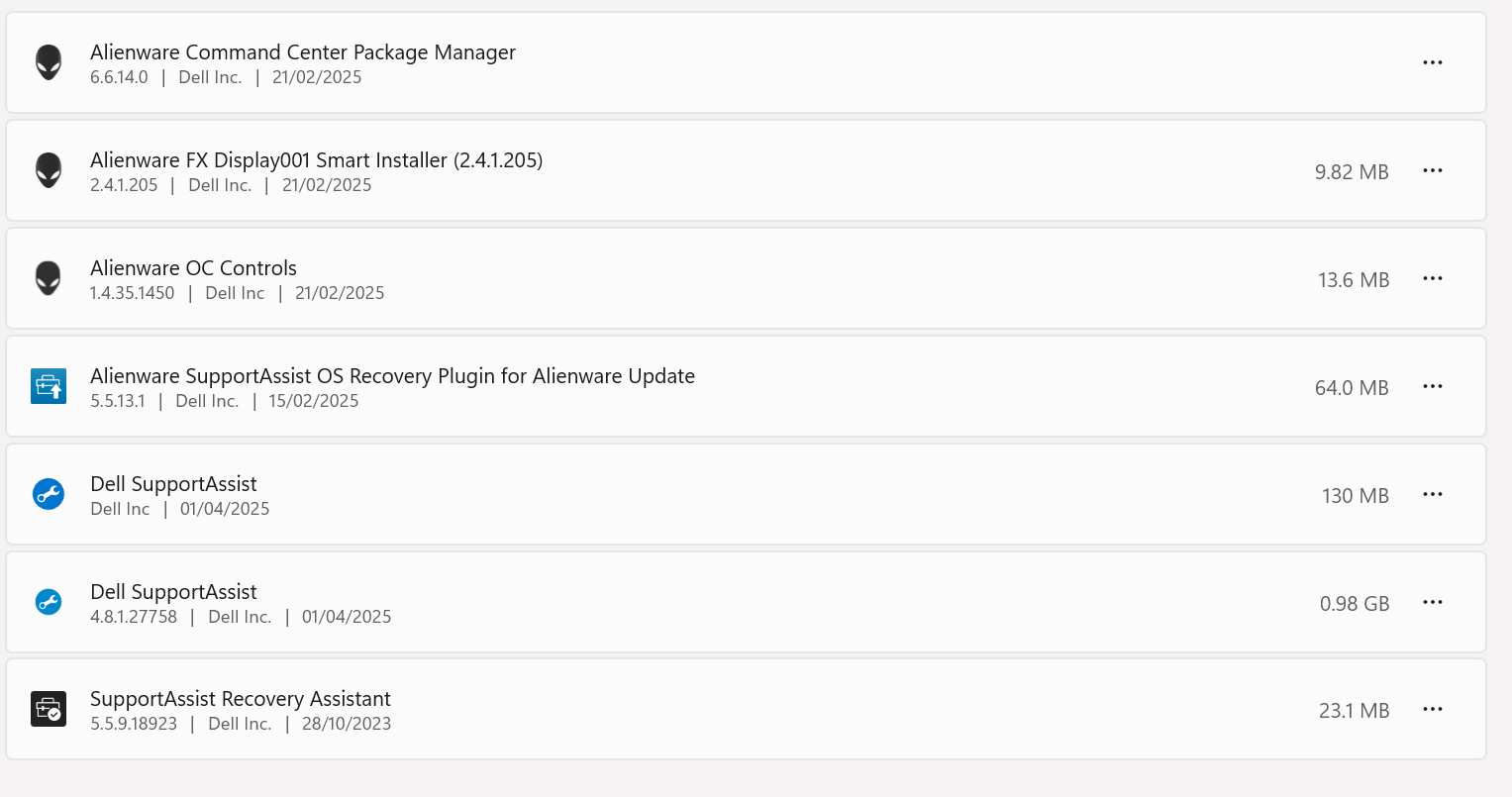
Once reinstalled, pull the latest SupportAssist updates and update all Alienware apps (some are outdated per your screenshot, with versions from 2023 and early 2024).
Repair AWCC Application
Ensure your charger and internet are connected.
Go to Control Panel → Right-click AWCC app → Change → Select Repair → Check all options → Click Repair.
This should solve the issue. If not please share the screen shot of the greyed out screen from AWCC app to debug on this. ( Video will be better and easy to debug).
(edited)
Best regards,
Karthik V
#IWork4Dell0
0
Posted April 2nd, 2025 06:45
So, I have removed Support assistant, rebooted, reinstalled, rebooted and checked for updates ..... none available.
Please see image "after deleting" which shows all dell software installed after I removed support assist.

Please now see image after I re-installed support agent

This image shows the result after I "repaired" AWCC
This image confirms no updates available

Regretfully I forgot to take an image of AWCC showing only changes for keyboard lights - the option to change chassis lights is not an option. It is not listed in any way on the app.
Interesting though - I tried to "repair" Alienware OC controls, and got the error log as shown below.

Log file is below
[70A0:1B28][2025-04-01T19:28:00]i001: Burn v3.14.1.8722, Windows v10.0 (Build 26100: Service Pack 0), path: C:\ProgramData\Package Cache\{185670a8-8636-4c8c-9cf9-c8dacb321676}\AlienwareOCControlsInstaller.exe
[70A0:1B28][2025-04-01T19:28:00]i009: Command Line: '"-burn.clean.room=C:\ProgramData\Package Cache\{185670a8-8636-4c8c-9cf9-c8dacb321676}\AlienwareOCControlsInstaller.exe" -burn.filehandle.attached=584 -burn.filehandle.self=592 /modify'
[70A0:1B28][2025-04-01T19:28:00]i000: Setting string variable 'WixBundleLog' to value 'C:\Users\Fat-M\AppData\Local\Temp\Alienware_OC_Controls_20250401192800.log'
[70A0:1B28][2025-04-01T19:28:00]i000: Setting string variable 'WixBundleManufacturer' to value 'Dell Inc'
[70A0:6DF0][2025-04-01T19:28:00]i000: Setting numeric variable 'WixStdBALanguageId' to value 1033
[70A0:6DF0][2025-04-01T19:28:00]i000: Setting version variable 'WixBundleFileVersion' to value '1.4.35.1450'
[70A0:6DF0][2025-04-01T19:28:00]e000: Failed to load file into license richedit control from path '(null)' manifest value: (null)
[70A0:1B28][2025-04-01T19:28:00]i100: Detect begin, 6 packages
[70A0:1B28][2025-04-01T19:28:00]i000: Registry value not found. Key = 'SOFTWARE\Alienware\Alienware Command Center', Value = 'InstallPath'
[70A0:1B28][2025-04-01T19:28:00]i000: Setting numeric variable 'AlienwareCommandCenterExist' to value 0
[70A0:1B28][2025-04-01T19:28:00]i000: Setting numeric variable 'MSVisCPP2017x64RedistExist' to value 1
[70A0:1B28][2025-04-01T19:28:00]i000: Setting string variable 'SystemProductName' to value 'Alienware m18 R1'
[70A0:1B28][2025-04-01T19:28:00]i000: Setting numeric variable 'MSVisCPP2017x86RedistExist' to value 1
[70A0:1B28][2025-04-01T19:28:00]i000: Setting string variable 'CpuIdentifier' to value 'Intel64 Family 6 Model 191 Stepping 2'
[70A0:1B28][2025-04-01T19:28:00]i101: Detected package: MSVisCPP2017x64Redist, state: Absent, cached: None
[70A0:1B28][2025-04-01T19:28:00]i101: Detected package: MSVisCPP2017x86Redist, state: Absent, cached: None
[70A0:1B28][2025-04-01T19:28:00]i101: Detected package: Alienware_RyzenV22.msi, state: Absent, cached: None
[70A0:1B28][2025-04-01T19:28:00]i101: Detected package: Alienware_RyzenV16.msi, state: Absent, cached: None
[70A0:1B28][2025-04-01T19:28:00]i101: Detected package: Alienware_OC_xtu.msi, state: Present, cached: Complete
[70A0:1B28][2025-04-01T19:28:00]i101: Detected package: Alienware.msi, state: Absent, cached: None
[70A0:1B28][2025-04-01T19:28:00]i052: Condition '(AlienwareCommandCenterExist OR WixBundleAction=3)' evaluates to false.
[70A0:1B28][2025-04-01T19:28:00]e000: Alienware Command Center is not found. You should install Alienware Command Center before install Alienware OC Controls.
[70A0:1B28][2025-04-01T19:28:00]e000: Error 0x81f40001: Bundle condition evaluated to false: (AlienwareCommandCenterExist OR WixBundleAction=3)
[70A0:1B28][2025-04-01T19:28:00]i199: Detect complete, result: 0x0

Mortbrad
1 Rookie
•
3 Posts
0
0
Posted February 20th, 2025 05:46
I have an R5 and this software also doesn't work, just complaining I have no AlienFX devices - worse still uninstall fails and I can't re-install. Have followed Dell's instructions but the failing uninstall isn't covered in their documentation, and various third-party methods have failed, and I have spent hours messing around with it.
Worst still my 3 years of "premium" support has ended so Dell won't even support software that is part of the fundamental functioning of the machine...
(edited)