Executed both tests, and results were green across the board for the Intel HD graphics card. Nothing was shown for the nVidia that I want working, however.
If the above steps do not fix the issue then please send me a private message with your name and computer's service tag and I will check what can be done. To send a private message, click on my name and select start conversation.



DELL-Ravi Ch
7 Technologist
•
7.1K Posts
0
April 28th, 2013 03:00
Hi wraithewulfe,
Please follow the steps below to run the diagnostics for the ‘Video card’.
wraithewulfe
4 Posts
0
April 28th, 2013 10:00
Ravi,
Executed both tests, and results were green across the board for the Intel HD graphics card. Nothing was shown for the nVidia that I want working, however.
-J
DELL-Ravi Ch
7 Technologist
•
7.1K Posts
0
April 30th, 2013 08:00
Hi wraithewulfe,
I would like to know the exact error message you recieve when you try to install the nvidia video card drivers.
wraithewulfe
4 Posts
0
April 30th, 2013 09:00
Ravi,
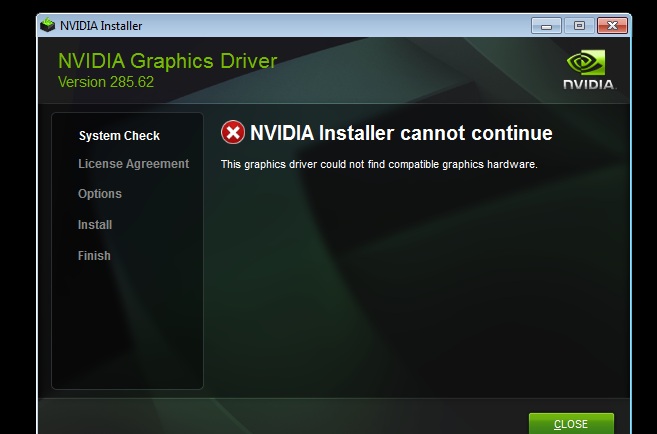
Attached is a screenshot of the error message.
-J
DELL-Ravi Ch
7 Technologist
•
7.1K Posts
0
May 2nd, 2013 00:00
Hi wraithewulfe,
I would advise you to install the video card driver from the Dell website below.
http://dell.to/YobXBL
Please let me know if this helps.
wraithewulfe
4 Posts
0
May 2nd, 2013 10:00
Ravi,
Tried your suggestion, ran into the exact same error message I posted earlier.
-J
DELL-Ravi Ch
7 Technologist
•
7.1K Posts
0
May 2nd, 2013 11:00
Hi wraithewulfe,
I would advise you to update the BIOS on your system and then try reinstalling the video card driver to check for issue resolution.
Inspiron N5110 BIOS A11 : http://dell.to/1524gEb
NVidia Geforce GT 525M : http://dell.to/YobXBL
If the above steps do not fix the issue then please send me a private message with your name and computer's service tag and I will check what can be done. To send a private message, click on my name and select start conversation.
Please let me know if this helps.