1. I already checked the BIOS on this machine and it does not have the option to enable/disable the on-board video,
2. so it looks like the R7 autodetects whatever video card is installed in the PCI slot.
3. So do I have to physically remove the Geforce 1080 Ti card in my machine to switch to the Intel 630 on board?
4. The reason why I want to do this is at 1980x1080, where I prefer to run, the text on the Geforce 1080 Ti is the usual fuzzy **bleep** that I remember in 2005, when I quit overclocking computers and built my own machines.
5. Nvidia makes good gaming cards, but their text resolution was always poor at 1980x1080, and it surprises me that they never made inroads in this area.
6. Back then, if you wanted a good dual purpose gaming/office machine, the way to go was AMD Radeon cards.
7. Ideally I'd like to switch between the Intel 630 for e-mail and web browsing and use the 1080 Ti for gaming or benchmarking.
1. Correct
2. Sure it does, otherwise Windows could not use it
3. Yes, that would work. I think you can also do it a less distruptive way, but I can't say I've ever tried. Like, what's the point.
4. No, I have never seen that on any Nvidia card ever. Whether, it's a desktop or laptop ... now-days (with Windows-10) you run the display panel at it's full native resolution. If the text is too small (like on a new laptop maybe), you use Windows Scaling to scale it up a bit.
5. Still, I have no idea what you are talking about. Sounds like something is mis-configured.
6. To each his own. AMD is fine, but definitely not perfect and many people with AMD-Switchable-Graphics and cards like Radeon-5870 know that (as they tried to upgrade to Windows-10/64bit). While I have switched to Green-Team for several Windows machines, I still have some AMD around here (laptops and HTPC/Kodi box).
7. I think there is some control. Check Nvidia and Intel-Graphics Control Panels. However, with a desktop (unlimited AC power) there is no reason not to use the installed dedicated video card for everything.
If you require further assistance, please post your exact system specs (with processor and video-card models), what LCD-Monitor you are using, and what kind of interface-cable you are using (DisplayPort, HDMI, etc.).
dell /aleiinware block me from opening the intel control panel I can pull it up on file explorer but when I click to open it it does nothing I called them and they said I don't need it they were very rude I just want to open it on my dell laptop I can open it with my neivida control panel and intel but on the r7 I cant open intel it makes no sense please help. why would dell block that
On my Aurora the Intel 630 seems to be fully available. Unfortunately they are using last years driver which does not support Blu-ray UHD. They only reason I tried it out.
Good luck with the onboard video... I've had 5+ Aurora R7's and none of the onboard display ports worked. If I did get a picture, it would flash and disappear every few seconds. Dell acknowledged the issue but refused to fix and/or compensate for false advertisement. Bub
There is a display port on the back among all those USB ports, you can connect your monitor to this display port (use display port to HDMI adapter if your monitor has only HDMI ports such as my monitor). Then in the windows display settings, you can change multiple display settings to "display only on 2" to use the intel GPU, change back to "display only on 1" to go back to Nvidia GPU.
Works just fine on my R7. Simply unplugged the display port cable from the back of my 1080 and plugged into the display port on the rear IO panel. In fact, the moment I plugged it in, the Intel control panel became available by right clicking on the desktop. Showed up next to the NVIDIA control panel.
Another AMD ad -- fabulize a statement that AMD's competitor, be it intel or nVidia, has some deficiency, and then claim AMD is good at it, without any tangential data evidence. Just believe it; fact doesn't matter. Tired of it. Is this the only way AMD can figure out to compete in the market?



Tesla1856
8 Wizard
•
17.3K Posts
0
March 3rd, 2018 10:00
1. Correct
2. Sure it does, otherwise Windows could not use it
3. Yes, that would work. I think you can also do it a less distruptive way, but I can't say I've ever tried. Like, what's the point.
4. No, I have never seen that on any Nvidia card ever. Whether, it's a desktop or laptop ... now-days (with Windows-10) you run the display panel at it's full native resolution. If the text is too small (like on a new laptop maybe), you use Windows Scaling to scale it up a bit.
5. Still, I have no idea what you are talking about. Sounds like something is mis-configured.
6. To each his own. AMD is fine, but definitely not perfect and many people with AMD-Switchable-Graphics and cards like Radeon-5870 know that (as they tried to upgrade to Windows-10/64bit). While I have switched to Green-Team for several Windows machines, I still have some AMD around here (laptops and HTPC/Kodi box).
7. I think there is some control. Check Nvidia and Intel-Graphics Control Panels. However, with a desktop (unlimited AC power) there is no reason not to use the installed dedicated video card for everything.
If you require further assistance, please post your exact system specs (with processor and video-card models), what LCD-Monitor you are using, and what kind of interface-cable you are using (DisplayPort, HDMI, etc.).
0341motormen
1 Message
0
May 6th, 2018 23:00
dell /aleiinware block me from opening the intel control panel I can pull it up on file explorer but when I click to open it it does nothing I called them and they said I don't need it they were very rude I just want to open it on my dell laptop I can open it with my neivida control panel and intel but on the r7 I cant open intel it makes no sense please help. why would dell block that
tns19
1 Rookie
•
4 Posts
0
November 3rd, 2018 13:00
On my Aurora the Intel 630 seems to be fully available. Unfortunately they are using last years driver which does not support Blu-ray UHD. They only reason I tried it out.
BubBowen
635 Posts
0
November 9th, 2018 12:00
digital life
1 Message
0
November 13th, 2018 05:00
There is a display port on the back among all those USB ports, you can connect your monitor to this display port (use display port to HDMI adapter if your monitor has only HDMI ports such as my monitor). Then in the windows display settings, you can change multiple display settings to "display only on 2" to use the intel GPU, change back to "display only on 1" to go back to Nvidia GPU.
amstel78
2 Intern
•
402 Posts
0
January 30th, 2019 17:00
Works just fine on my R7. Simply unplugged the display port cable from the back of my 1080 and plugged into the display port on the rear IO panel. In fact, the moment I plugged it in, the Intel control panel became available by right clicking on the desktop. Showed up next to the NVIDIA control panel.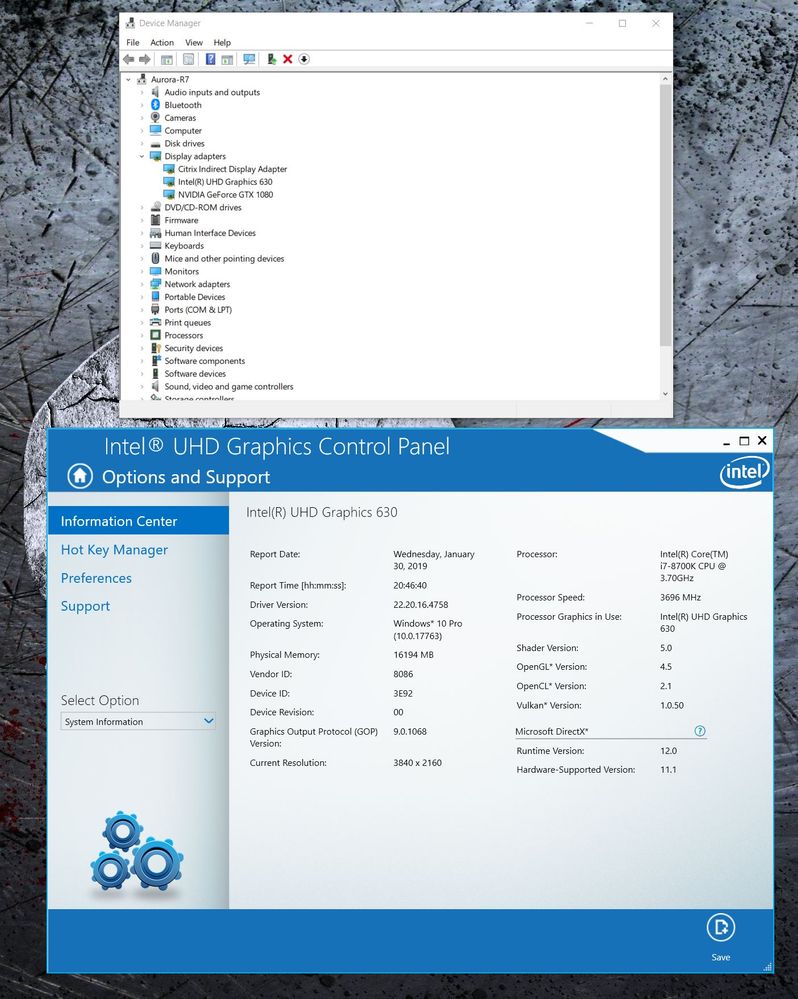
Heng Zhou
1 Message
0
December 30th, 2021 17:00
Another AMD ad -- fabulize a statement that AMD's competitor, be it intel or nVidia, has some deficiency, and then claim AMD is good at it, without any tangential data evidence. Just believe it; fact doesn't matter. Tired of it. Is this the only way AMD can figure out to compete in the market?