SC Storage Customer Notification: Consistency snapshots fail when volume(s) in Recycle Bin
Summary: A deleted volume left in recycle bin that was part of a snapshot consistency group will cause the remaining volumes to abort taking future snapshots.
This article applies to
This article does not apply to
This article is not tied to any specific product.
Not all product versions are identified in this article.
Symptoms
Issue
When working with Consistency Groups and volumes, Storage Center may alert that a Consistency Group has aborted processing. When this occurs new snapshots for volumes within the Consistency Group are not created. When this occurs the following or similar message will be displayed under the Alerts tab:

Cause
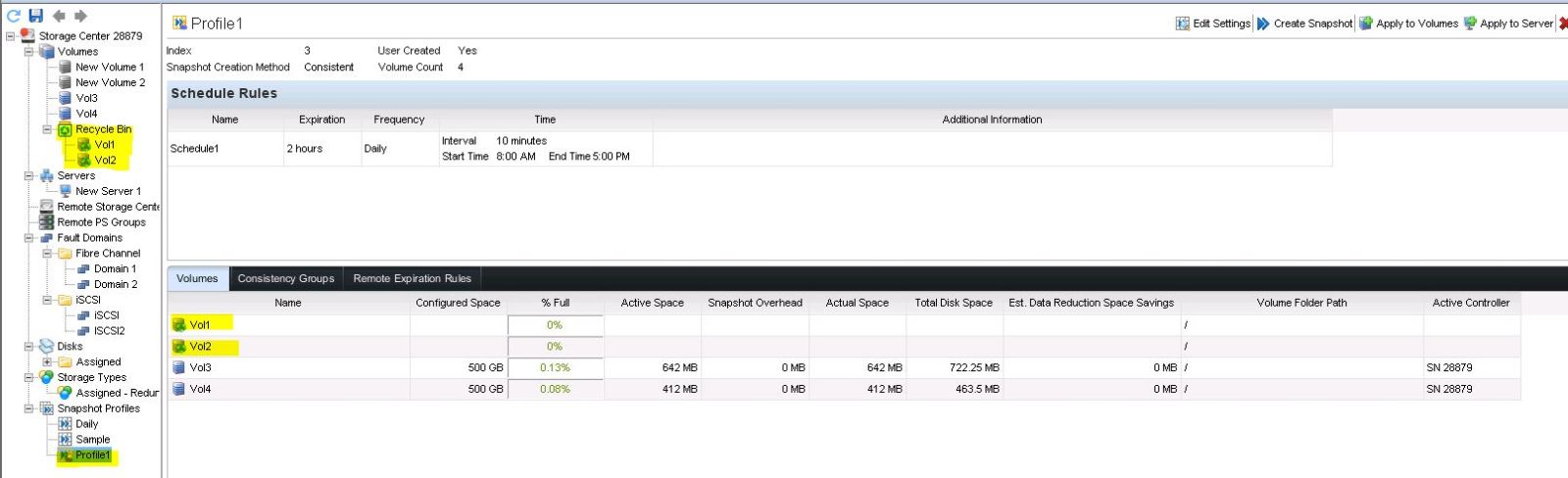
The above issue can be caused by deleting volumes in a Consistency Group and leaving them in the Recycle Bin. Use the screen shot below to confirm.
Consistency Group containing volumes in the Recycle Bin:
Resolution
Solution
Emptying the Recycle Bin of any volumes in a Consistency Group should clear the error and allow new snapshots to be taken. If this is not the case please contact Dell Storage Technical Support.
Affected Products
Compellent (SC, SCv & FS Series), Dell Compellent SC4020, Dell Storage SC8000, Dell Compellent Series 40, Dell Storage SCv2000, Dell Storage SCv2020, Dell Storage SCv2080, Dell Storage SC5020, Dell Storage SC7020, Dell Storage SC9000
, Dell Storage SCv3000
...
Article Properties
Article Number: 000139625
Article Type: Solution
Last Modified: 01 May 2026
Version: 4
Find answers to your questions from other Dell users
Support Services
Check if your device is covered by Support Services.