Dell Networking OS6: How To Save Configuration Using the Web Interface
Summary: How to save the running configuration on a Dell N series switch running OS6 using the Web Interface.
This article applies to
This article does not apply to
This article is not tied to any specific product.
Not all product versions are identified in this article.
Instructions
Save your configuration using the Web Interface

Use the Save button to save the running configuration to the startup configuration. Clicking Apply saves changes to the running configuration. When the switch boots up, it loads the startup configuration. Any changes to the running configuration that were not saved to the startup configuration are lost across a power cycle.
Back up your configuration to an external device using the Web Interface
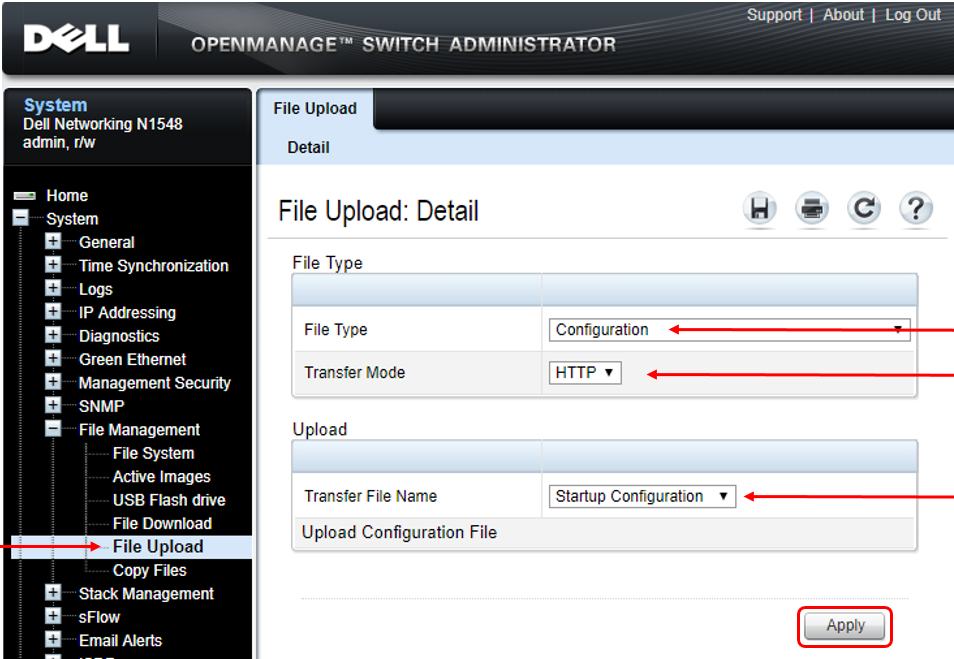
The file is being uploaded from the switch to the end device, such as your desktop. From the desktop's perspective, the file is being downloaded, but from the switch's perspective, this is an upload. Use the "File Upload" on the switch to copy the file.
To upload a file from the switch to a remote system:
- Open the File Upload page.
- Select the type of file to download to the remote server, in this case configuration.
- Select the transfer mode, in this case HTTP or HTTPS. If the selected transfer mode needs authentication, additional fields appear in the Upload section. If the HTTP method is used, some of the fields are hidden.
- To upload by using HTTP, click Apply. A dialog box prompts to open or save the file.
If you are using HTTPS to manage the switch, the download method is HTTPS.
Affected Products
PowerSwitch N1100-ON Series, PowerSwitch N1500 Series, PowerSwitch N2000 Series, PowerSwitch N2100 Series, PowerSwitch N2200-ON Series, PowerSwitch N3000 Series, PowerSwitch N3000E-ON Series, PowerSwitch N3100 Series, PowerSwitch N4000 SeriesArticle Properties
Article Number: 000120088
Article Type: How To
Last Modified: 01 Dec 2025
Version: 6
Find answers to your questions from other Dell users
Support Services
Check if your device is covered by Support Services.