Premier: Software and Peripherals
Summary: This article provides instructions on how to access Electronics and Accessories within your Dell Premier page.
This article applies to
This article does not apply to
This article is not tied to any specific product.
Not all product versions are identified in this article.
Instructions
This article provides instructions on how to access a large selection of software, electronics, and accessories from multiple manufacturers within your Dell Premier page.
Table of Contents
Access Electronics and Accessories
To access your catalog, click "Shop" in the masthead and then select "PC Accessories" in the secondary navigation. If "PC Accessories" are selected, a third-level navigation bar allows you to narrow your selection.
For faster selection, access from the quick access bar on your Premier home page. (Figure 1: Access PC Accessories)
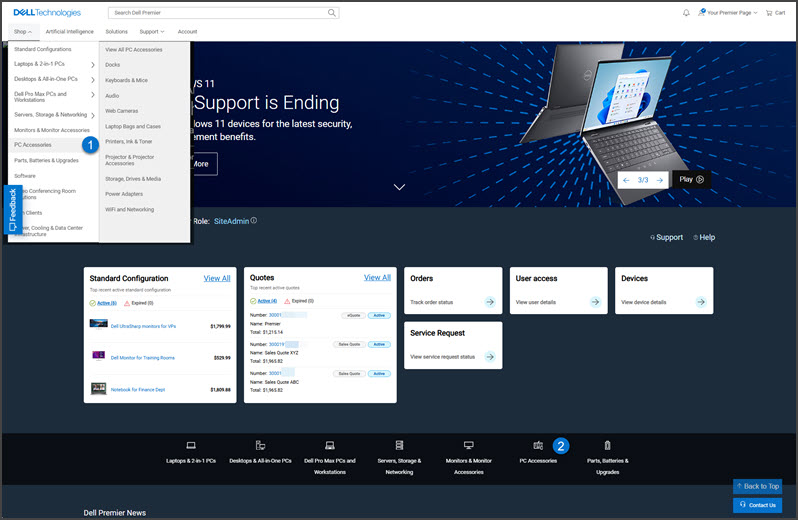
Figure 1: Access Software, Electronics, and Accessories
Explore and find Electronics and Accessories
Shop and purchase software, electronics, and accessories at our best online price (relative to Dell.com) across the entire commercial portfolio.
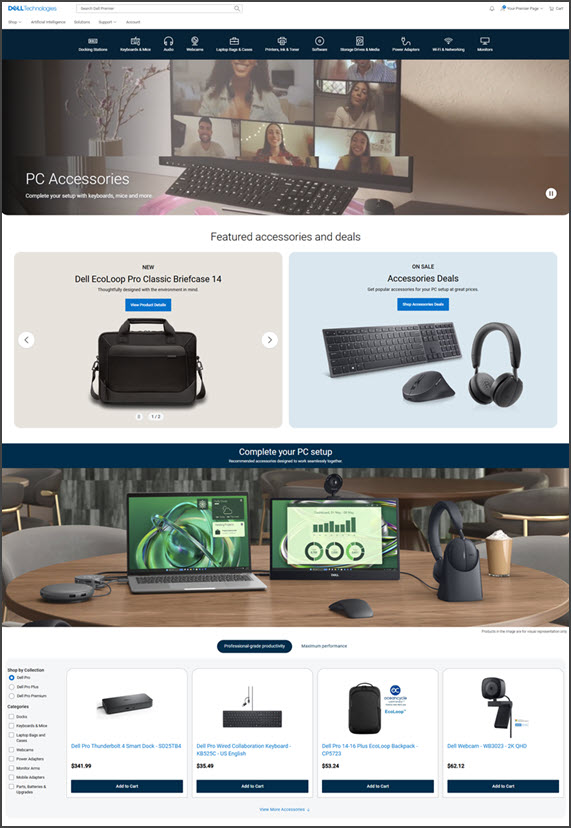
Figure 2: Explore and find Electronics and Accessories
If you have questions or need assistance, engage the Premier Support Teams.
Affected Products
SoftwareArticle Properties
Article Number: 000106593
Article Type: How To
Last Modified: 29 Sep 2026
Version: 8
Find answers to your questions from other Dell users
Support Services
Check if your device is covered by Support Services.