Deployment KB: How to validate vSan encryption for Cloudlink.
Résumé: This article explains how to validate vSan encryption for Cloudlink.
Cet article concerne
Cet article ne concerne pas
Cet article n’est associé à aucun produit spécifique.
Toutes les versions du produit ne sont pas identifiées dans cet article.
Instructions
How to monitor vSAN encryption using vCenter:
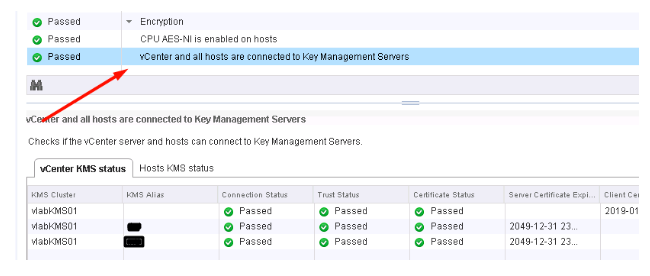
- Check vCenter and KMS server s connection status.
If connection statue is not Normal, make sure vCenter is connected to KMS and there are no trust related issues.

- Select ESXi Cluster where you have enabled vSAN Encryption. vSAN Health plugin see the KMS connectivity status and Disk Encryption status. If you have enabled Encryption then Encryption links are displayed in vSAN Health plugin.

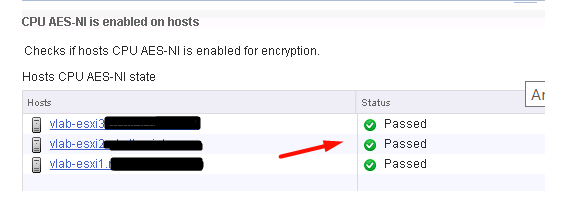
b. Check KMS and vCenter status
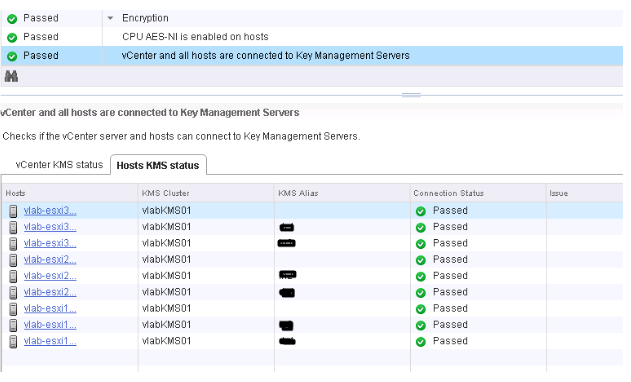
c. Check KMS and ESXi Host Connection Status
Informations supplémentaires
It is recommended to watch the VMworld session below if you are looking to Implement VM Encryption or vSAN Encryption:
VMworld 2017 - SER1392BU - Honey, Where Are My Keys? Understanding and Avoiding Common Issues with Virtual Machine Encryption
https://www.youtube.com/watch?v=I5gR_dVqfz0&feature=youtu.be
VMworld 2017 - SER1392BU - Honey, Where Are My Keys? Understanding and Avoiding Common Issues with Virtual Machine Encryption
https://www.youtube.com/watch?v=I5gR_dVqfz0&feature=youtu.be
Produits concernés
CloudLinkProduits
CloudLinkPropriétés de l’article
Numéro d’article: 000022200
Type d’article: How To
Dernière modification: 23 avr. 2021
Version: 3
Trouvez des réponses à vos questions auprès d’autres utilisateurs Dell
Services de support
Vérifiez si votre appareil est couvert par les services de support.