Configurazione di rete non convergente di Dell Azure Stack HCI
Riepilogo: Esempio di come configurare una rete non convergente per un host cluster Dell EMC Solutions Microsoft Azure Stack HCI. Questo esempio non include una rete di backup o una configurazione di network shaping come documentato nella Guida utente. Le informazioni per questo articolo sono tratte dalla Guida di riferimento "Dell EMC Solutions for Microsoft Azure Stack HCI – Network Integration and Host Network Configuration Options". ...
Questo articolo si applica a
Questo articolo non si applica a
Questo articolo non è legato a un prodotto specifico.
Non tutte le versioni del prodotto sono identificate in questo articolo.
Istruzioni
La schermata seguente è una vista del diagramma hardware della configurazione di una rete non convergente di Azure Stack HCI utilizzando un team di rete SET per la comunicazione di rete di gestione:
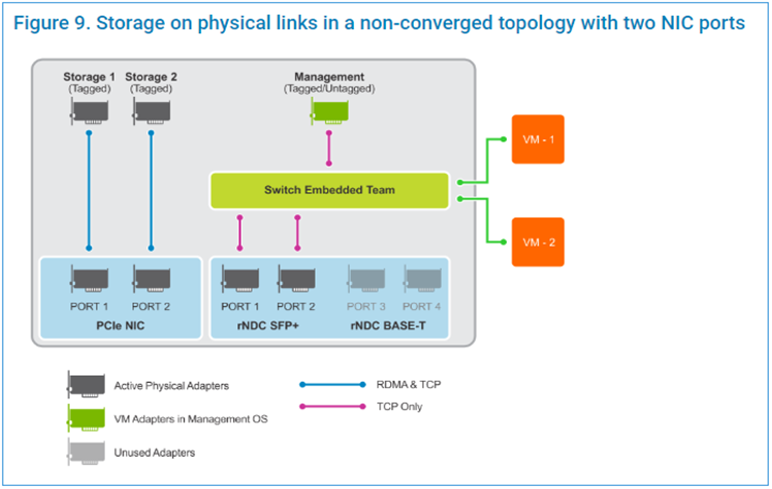
Le istruzioni di script riportate di seguito vengono eseguite in una finestra Administrative PowerShell:
Le istruzioni di script riportate di seguito vengono eseguite in una finestra Administrative PowerShell:
$ErrorActionPreference = 'Stop'

#region Variables for the scenario

## Management Adapter
$ManagementSwitchName = 'Management'
$ManagementNetAdapterName = @('NIC1','NIC2')
$ManagementAdapterName = 'Management'

# VLAN ID for host management traffic; if no VLAN is preferred set this to 0
$ManagementVlanId = 102

# Management Gateway address
$ManagementGateway = '10.0.0.1'

# DNS Server Address
$ManagementDns = '10.0.0.15'

# Set this to a string 'DHCP' for a dynamic IP address
$ManagementIPAddress = '10.0.0.51'

# Management address prefix (24 translates to subnet mask 255.255.255.0)
$ManagementAddressPrefix = 24

## Storage Adapters
### You must specify 2 or 4 network adapter port names
$StorageNetAdapterName = @('SLOT 2 PORT 1', 'SLOT 2 PORT 2')

### You must specify 1 or 2 or 4 VLANIDs
### Specify 0 if you want the network not tagged with any VLAN
$StorageVlanId = @(103, 104)

### You must specify 2 or 4 IP Addresses
### DHCP as a value is accepted if you want dynamically assigned IP addresses
$StorageIPAddress = @('172.16.101.1', '172.16.102.1')

### You can specify 1 or 2 or 4 prefix length values (24 translates to subnet mask
255.255.255.0)
$StorageAddressPrefix = @(24)
#endregion

## Create a VM switch for management
$null = New-VMSwitch -Name $ManagementSwitchName -AllowManagementOS 0 -NetAdapterName
$ManagementNetAdapterName -MinimumBandwidthMode Weight -Verbose

## Add VM Network Adapters and configure VLANs and IP addresses as needed
### Configure Management Adapter
$managementAdapter = Add-VMNetworkAdapter -SwitchName $ManagementSwitchName
-ManagementOS -Passthru -Name $ManagementAdapterName -Verbose
if ($ManagementVlanId -and ($ManagementVlanId -ne 0))
{
# Set VM Network adapter VLAN only if the VLAN ID specified is other than 0
Set-VMNetworkAdapterVlan -VMNetworkAdapter $managementAdapter -Access -VlanId
$ManagementVlanId -Verbose
Start-Sleep -Seconds 5
}
if ($ManagementIPAddress -ne 'DHCP')
{
$null = New-NetIPAddress -InterfaceAlias "vEthernet ($ManagementAdapterName)"
-IPAddress $ManagementIPAddress -DefaultGateway $ManagementGateway -PrefixLength
$ManagementAddressPrefix -Verbose
Set-DnsClientServerAddress -InterfaceAlias "vEthernet ($ManagementAdapterName)"
-ServerAddresses $ManagementDns -Verbose
}
{
# if there is a single VLAN for storage use the first and only element
if ($storageVlanId.Count -eq 1)
{
$storageVlan = $storageVlanId[0]
}
else
{
# else use the right index to get the VLAN ID
$storageVlan = $storageVlanId[$i]
}
# Check if only one prefix is provided
if ($StorageAddressPrefix.Count -eq 1)
{
$StoragePrefix = $StorageAddressPrefix[0]
}
else
{
# if more than one, use the right index to get the address prefix
$StoragePrefix = $StorageAddressPrefix[$i]
}
if ($storageVlan -and ($storageVlan -ne 0))
{
# Set VM Network adapter VLAN only if the VLAN ID specified is other than 0
Set-NetAdapterAdvancedProperty -Name $StorageNetAdapterName[$i] -DisplayName
'VLAN ID' -DisplayValue $storageVlan -Verbose
Start-Sleep -Seconds 5
}
if ($StorageIPAddress[$i] -ne 'DHCP')
{
$null = New-NetIPAddress -InterfaceAlias $StorageNetAdapterName[$i] -IPAddress
$StorageIPAddress[$i] -PrefixLength $StoragePrefix -Verbose
}
}
Video
Prodotti interessati
Dell EMC Cloud For Microsoft Azure Stack, Enterprise Hybrid CloudProdotti
Enterprise Hybrid CloudProprietà dell'articolo
Numero articolo: 000200052
Tipo di articolo: How To
Ultima modifica: 05 set 2025
Versione: 10
Trova risposta alle tue domande dagli altri utenti Dell
Support Services
Verifica che il dispositivo sia coperto dai Servizi di supporto.