NetWorker: Unable to Launch NetWorker Management Console UI, Verified that the NetWorker Authentication Service is Running
摘要: NetWorker Management Console login failure with message "Could not resolve host: NetWorker_ServerName."
本文适用于
本文不适用于
本文并非针对某种特定的产品。
本文并非包含所有产品版本。
症状
Error while launching NetWorker Management Console (NMC) user interface (UI):
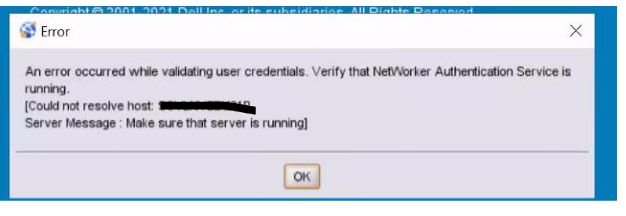
Figure 1: NMC UI Error Message
The authentication service is running.
The NMC server package is installed on its own stand-alone system separate from the NetWorker server.
The NMC server configuration file gstd.conf leads to the correct authentication server:
An error occured while validating user credentials. Verify that the NetWorker Authentication service is running
[Could not resolve host  <NetWorker server>
Server message Make sure the server is running]
Figure 1: NMC UI Error Message
The authentication service is running.
The NMC server package is installed on its own stand-alone system separate from the NetWorker server.
The NMC server configuration file gstd.conf leads to the correct authentication server:
- Linux: /opt/lgtonmc/etc/gstd.conf
- Windows: C:\Program Files\EMC NetWorker\Management\GST\etc\gstd.conf
- Ping and nslookup return the correct hostnames and IP addresses
原因
Failure to launch was due to an error in the NMC Launcher window. In the "Connect to NMC server, enter NMC server or IP address," the hostname of the NetWorker server was selected instead of the NMC server.
解决方案
Enter the NMC server hostname in the NetWorker Runtime Environment (NRE) launcher window.
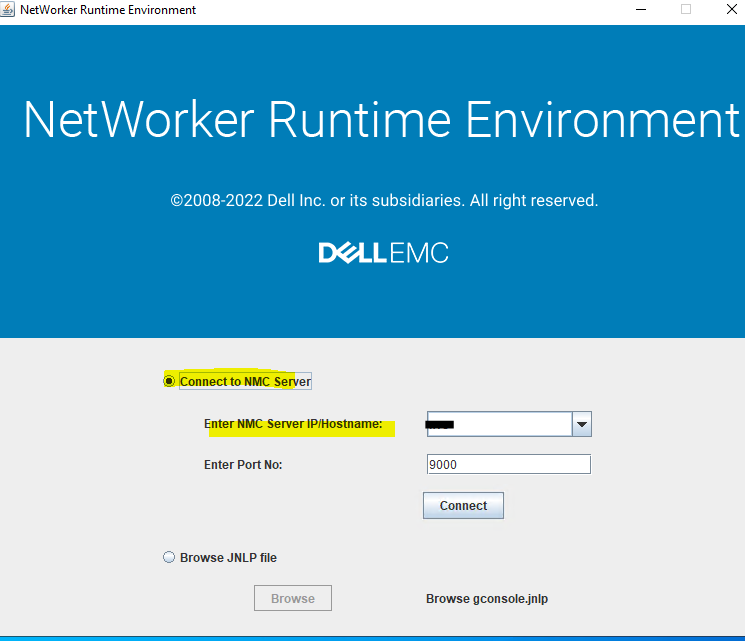
Figure 2: NRE Launcher Window
Entering a host in this field stores it in the NRE host lists file. This can be cleared by renaming or deleting the C:\Program Files\NRE\config\hostlists file.
Figure 2: NRE Launcher Window
Entering a host in this field stores it in the NRE host lists file. This can be cleared by renaming or deleting the C:\Program Files\NRE\config\hostlists file.
受影响的产品
NetWorker, NetWorker Management Console产品
NetWorker Family, NetWorker Series文章属性
文章编号: 000211065
文章类型: Solution
上次修改时间: 27 7月 2023
版本: 4
从其他戴尔用户那里查找问题的答案
支持服务
检查您的设备是否在支持服务涵盖的范围内。