Solutions Enabler: How to check light levels of SFPs associated to the FA ports in a PowerMax array
Summary: How to check light levels of SFPs associated to the FA ports in a PowerMax array
This article applies to
This article does not apply to
This article is not tied to any specific product.
Not all product versions are identified in this article.
Instructions
Symcli command
Can be used to check the RX and TX powers (light levels) of the SFPs associated with the FA port.
This command reports the receive and transmit power levels in mW for FA ports on PowerMax arrays running PowerMaxOS 5978 Q1 21 SR and above.
Below are the FA port to SFP mappings for Front-End I/O Modules in a PowerMax 2000 and 8000 arrays:
IOM-2
Port 4 - SFP-0
Port 5 - SFP-1
Port 6 - SFP-2
Port 7 - SFP-3
IOM-3
Port 8 - SFP-0
Port 9 - SFP-1
Port 10 - SFP-2
Port 11 - SFP-3
IOM-8
Port 24 - SFP-0
Port 25 - SFP-1
Port 26 - SFP-2
Port 27 - SFP-3
IOM-9
Port 28 - SFP-0
Port 29 - SFP-1
Port 30 - SFP-2
Port 31 - SFP-3
Below are the OR ports to SFP mappings for the Fron-End I/O Modules in PowerMax 2500 and 8500
IOM-1
Port 0 - SFP-0
Port 1 - SFP-1
Port 2 - SFP-2
Port 3 - SFP-3
IOM-2
Port 4 - SFP-0
Port 5 - SFP-1
Port 6 - SFP-2
Port 7 - SFP-3
IOM-3
Port 8 - SFP-0
Port 9 - SFP-1
Port 10 - SFP-2
Port 11 - SFP-3
IOM-4
Port 12 - SFP-0
Port 13 - SFP-1
Port 14 - SFP-2
Port 15 - SFP-3
symcfg [-sid <SymmID>] list -dir <#|ALL> -port [-p <#>] -power_level
Can be used to check the RX and TX powers (light levels) of the SFPs associated with the FA port.
This command reports the receive and transmit power levels in mW for FA ports on PowerMax arrays running PowerMaxOS 5978 Q1 21 SR and above.
Below are the FA port to SFP mappings for Front-End I/O Modules in a PowerMax 2000 and 8000 arrays:
IOM-2
Port 4 - SFP-0
Port 5 - SFP-1
Port 6 - SFP-2
Port 7 - SFP-3
IOM-3
Port 8 - SFP-0
Port 9 - SFP-1
Port 10 - SFP-2
Port 11 - SFP-3
IOM-8
Port 24 - SFP-0
Port 25 - SFP-1
Port 26 - SFP-2
Port 27 - SFP-3
IOM-9
Port 28 - SFP-0
Port 29 - SFP-1
Port 30 - SFP-2
Port 31 - SFP-3
Below are the OR ports to SFP mappings for the Fron-End I/O Modules in PowerMax 2500 and 8500
IOM-1
Port 0 - SFP-0
Port 1 - SFP-1
Port 2 - SFP-2
Port 3 - SFP-3
IOM-2
Port 4 - SFP-0
Port 5 - SFP-1
Port 6 - SFP-2
Port 7 - SFP-3
IOM-3
Port 8 - SFP-0
Port 9 - SFP-1
Port 10 - SFP-2
Port 11 - SFP-3
IOM-4
Port 12 - SFP-0
Port 13 - SFP-1
Port 14 - SFP-2
Port 15 - SFP-3
Additional Information
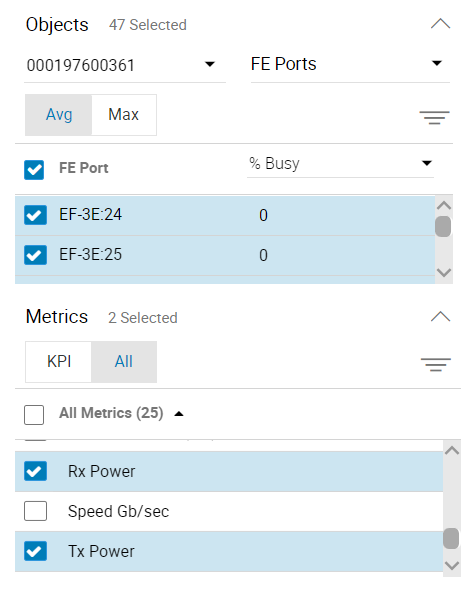
Can also generate a light power report in Unisphere (last 4 hours):
Affected Products
PowerMax, PowerMax 2000, PowerMax 2500, PowerMax 8000, PowerMax 8500, PowerMaxOS 10, PowerMaxOS 5978, VMAX 250F, VMAX 450F, VMAX 850F, VMAX 950F, VMAX All Flash, VMAX3 SeriesArticle Properties
Article Number: 000211359
Article Type: How To
Last Modified: 06 Aug 2025
Version: 5
Find answers to your questions from other Dell users
Support Services
Check if your device is covered by Support Services.