NMC GUI hangs at 5% when opening the properties of a client resource on NMC
Summary: NMC GUI hangs at 5% when opening the properties of a client resource on NMC.
This article applies to
This article does not apply to
This article is not tied to any specific product.
Not all product versions are identified in this article.
Symptoms
NMC GUI hangs at 5% when opening the properties of a client resource on NMC.
NetWorker Version 19.7
OS: Windows
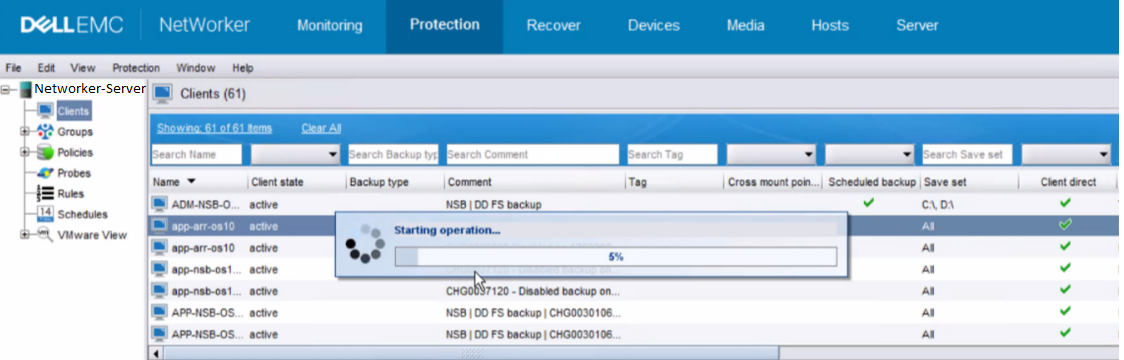
When trying to open the properties of any client resource on NMC GUI, it hangs at 5% with a pop up " Starting Operation ".
Screenshot:
NetWorker Version 19.7
OS: Windows
When trying to open the properties of any client resource on NMC GUI, it hangs at 5% with a pop up " Starting Operation ".
Screenshot:
Cause
Two Networker Servers are managed under one NMC server. One of the two NetWorker servers was retired from this NMC console but it was never removed from the NMC - Enterprise GUI Unable to remove this second Networker Server from this NMC Enterprise GUI window.
The NMC gst logs showed both the NetWorker server names:
NWserver1-FQDN gstd NSR notice 06/27/23 12:38:04.730448 ERROR generated: "Unable to set user privileges based on user token for SYSTEM on NWserver1-FQDN: Failed to validate security token." in file "D:/views/nw/19.7.1/nsrwebui/modules/nsm/gt_server.c" line #170
NWserver2-FQDN nsrd AUTHC critical Unable to set user privileges based on user token for SYSTEM on NWserver1-FQDN: Failed to validate security token.
The NMC gst logs showed both the NetWorker server names:
NWserver1-FQDN gstd NSR notice 06/27/23 12:38:04.730448 ERROR generated: "Unable to set user privileges based on user token for SYSTEM on NWserver1-FQDN: Failed to validate security token." in file "D:/views/nw/19.7.1/nsrwebui/modules/nsm/gt_server.c" line #170
NWserver2-FQDN nsrd AUTHC critical Unable to set user privileges based on user token for SYSTEM on NWserver1-FQDN: Failed to validate security token.
Resolution
1. Uninstall NMC package.
2. Rename the \EMC Networker\Management folder.
3. Install NMC Server and add only the one NetWorker Server currently being managed under this NMC host.
2. Rename the \EMC Networker\Management folder.
3. Install NMC Server and add only the one NetWorker Server currently being managed under this NMC host.
Article Properties
Article Number: 000215607
Article Type: Solution
Last Modified: 18 مايو 2026
Version: 4
Find answers to your questions from other Dell users
Support Services
Check if your device is covered by Support Services.