Network Does Not Work When Using Ethernet Port on a Dell Universal Dock UD22
Summary: Learn how to use the Ethernet port on a Dell Universal Dock UD22.
Acest articol se aplică pentru
Acest articol nu se aplică pentru
Acest articol nu este legat de un produs specific.
Acest articol nu acoperă toate versiunile de produs existente.
Symptoms
Network on the computer may not work when connected to a Dell Universal Dock UD22 using its Ethernet port. The Ethernet device of UD22 has a yellow bang in Device Manager.
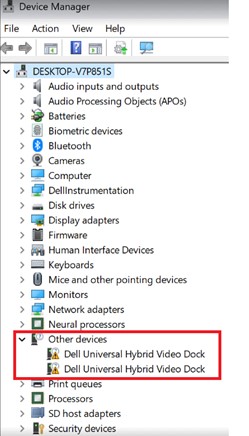
Affected Dock:
- Dell Universal Dock UD22
Cause
Ethernet port of UD22 works only after DisplayLink driver is installed.
Resolution
Note: Before starting the update, perform the following:
- Back up all personal data. For more information, refer to Back Up and Recovery.
- Connect the AC adapter if updates are being run on a laptop.
- Ensure that power remains connected if updates are being run on a desktop.
Updating the DisplayLink Dock Driver to version 11.3.5139.0, A06 or later on the computer resolves the issue. To download and install the driver, refer to the Driver Update Guide.
Produse afectate
Dell Universal Dock UD22Proprietăți articol
Article Number: 000223902
Article Type: Solution
Ultima modificare: 21 Jul 2026
Version: 5
Găsiți răspunsuri la întrebările dvs. de la alți utilizatori Dell
Servicii de asistență
Verificați dacă dispozitivul dvs. este acoperit de serviciile de asistență.