PowerEdge: 16G AMD-based servers have a CPPC setting that cannot be enabled
摘要: BIOS setting for Collaborative Processor Performance Control (CPPC) will remain disabled after attempting to enable it.
本文适用于
本文不适用于
本文并非针对某种特定的产品。
本文并非包含所有产品版本。
症状
Users that update to BIOS 1.10.0 or 1.11.0 can find a new option in the BIOS settings for CPPC.
- This setting is only found in the iDRAC setup under BIOS Settings - System Profile Settings
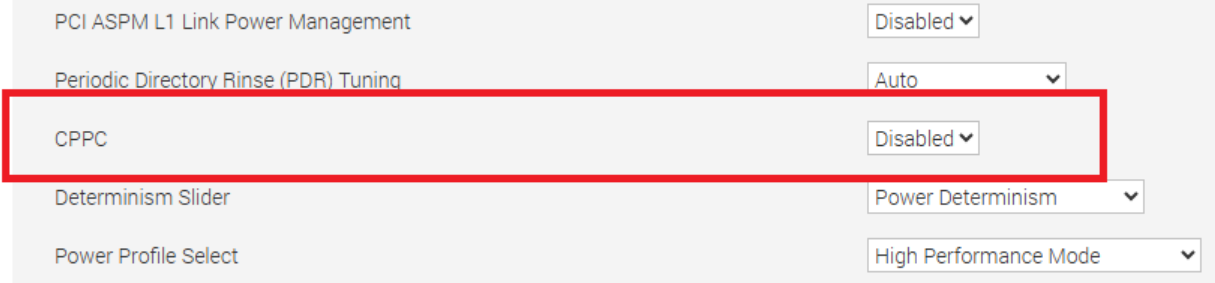
Setting this option to Enabled results in the setting reverting to Disabled after saving the change and rebooting.
This issue applies to R6615, R6625, R7615, and R7625.
原因
BIOS unintentionally opened a setting for OEM-based systems with ID Modules.
解决方案
This issue is resolved in BIOS 1.12.2 available in June 2025. The CPPC option is removed and not available on Standard PowerEdge servers. PowerEdge servers that require CPPC enablement should use OS DBPM as the CPU Power Management setting. This is configured under System Profile Settings. System Profile Settings are found through F2 system setup or in the iDRAC UI by selecting BIOS Settings under the Configuration tab.
Note: OEM-based servers and certain ID Modules retain the CPPC option.
受影响的产品
OEMR R6615, OEMR R6625, OEMR R7615, OEMR R7625, OEMR XL R6615, OEMR XL R6625, OEMR XL R7615, OEMR XL R7625, PowerEdge R6615, PowerEdge R6625, PowerEdge R7615, PowerEdge R7625, PowerFlex appliance R6625, PowerFlex appliance R7625
, PowerFlex custom node R6625, PowerFlex custom node R7625, Dell vSAN R6615 Ready Node, Dell vSAN R7615 Ready Node, Dell vSAN Ready Node R7625
...
文章属性
文章编号: 000293675
文章类型: Solution
上次修改时间: 15 5月 2025
版本: 2
从其他戴尔用户那里查找问题的答案
支持服务
检查您的设备是否在支持服务涵盖的范围内。