NetWorker: Backup of Windows 2012 Fails for DISASTER_RECOVERY With "save: Error occurred while saving disaster recovery save sets"
Summary: This article explains the failure of the DISASTER_RECOVERY:\ save set during Windows 2012 backups caused by a corrupted Windows WMI repository. NetWorker cannot retrieve system manufacturer data through WMI, resulting in the error. Fixing or rebuilding the WMI repository and updating the Windows client resolves the issue. ...
Symptoms
DISASTER_RECOVERY:\ fails to backup on a Windows 2012 machine.
All other save sets (such as drives, folders, or files) complete successfully.
The save sets WINDOWS ROLES AND FEATURES and Critical drives backup successfully.
The only error shown is
save: Error occured while saving disaster recovery save sets
The last entry in the save output is (no error shown):
create_ossr_info_file: Calling get_system_manufacturer_info
machine_name: WINDOWS ROLES AND FEATURES:\ level=full, 6636 KB 00:00:02     21 files
Completed savetime=1442493321
09/17/15 14:35:23.961661 Unregistered session id:2, fd:1420, idx:1, ssn_max_pollfd:1, 1(512)
09/17/15 14:35:23.992862 nsr/libwinclass/ossr_sysinfo_xml.cpp: NULL pointer passed to disk_free_list()
09/17/15 14:35:23.992862 nsr/libwinclass/ossr_sysinfo_xml.cpp: NULL pointer passed to pool_free_list()
09/17/15 14:35:23.992862 nsr/libwinclass/ossr_sysinfo_xml.cpp: NULL pointer passed to volume_free_list()
09/17/15 14:35:23.992862 nsr/libwinclass/ossr_sysinfo_xml.cpp: NULL pointer passed to partition_free_list()
09/17/15 14:35:23.992862 nsr/libwinclass/ossr_sysinfo_xml.cpp: NULL pointer passed to adapter_free_list()
86024:save: Error occured while saving disaster recovery save sets.
Cause
DISASTER_RECOVERY:\ backups, NetWorker uses the WMI (OS component) to get client machine information (like domain name, manufacturer, Machine name, and Physical Memory) which is then populated in the DISASTER_RECOVERY:\ metadata. In this, the machine's WMI is corrupted and NetWorker is not able to fetch the data from WMI which results in a backup failure.
The problem is with Windows WMI. The failure happens when NetWorker uses a WMI query to get the system manufacturer information to store with the
DISASTER_RECOVERY:\ save set metadata.
Get-WmiObject Win32_Computersystem from Powershell fails with an invalid operation message. To verify if WMI is corrupted or not, run the following command on Windows Powershell on that machine.
PS C:\> Get-WmiObject Win32_Computersystem

Domain         : emc.com
Manufacturer   : VMware, Inc.
Model          : VMware Virtual Platform
Name                : LIME
PrimaryOwnerName    : Windows User
TotalPhysicalMemory : 2146951168
If any other output comes, then it suggests that WMI is corrupt and is not able to respond to the OS calls. An example of a corrupt WMI is as follows:
PS C:\Users\Adam.Boesl> Get-WmiObject Win32_Computersystem
Get-WmiObject : Invalid class
At line:1 char:14
+ Get-WmiObject <<<<  Win32_Computersystem
    + CategoryInfo          : InvalidOperation: (:) [Get-WmiObject], ManagementException
    + FullyQualifiedErrorId : GetWMIManagementException,Microsoft.PowerShell.Commands.GetWmiObjectCommand
Resolution
Windows Server 2012 backups are listed as supported in the NetWorker Compatibility Guides. Review compatibility guides for your NetWorker version: E-Lab Interoperability Navigator 2.0-HOME (You must sign in with your Dell support account).
However, this issue is occurring on the Windows OS. Support capabilities are limited for OS-level issues on platforms no longer supported by their vendor.
Ensure that the client OS has the latest OS updates installed. If the Volume Shadow Copy Service (VSS) backups continue to fail, you can investigate the VSS components. The VSS component investigation and OS capabilities must be investigated by the system administrator.
If the OS issue cannot be resolved, perform File System data backups of the client without VSS.
- Configure the client's save operations to include
VSS:*=OFF: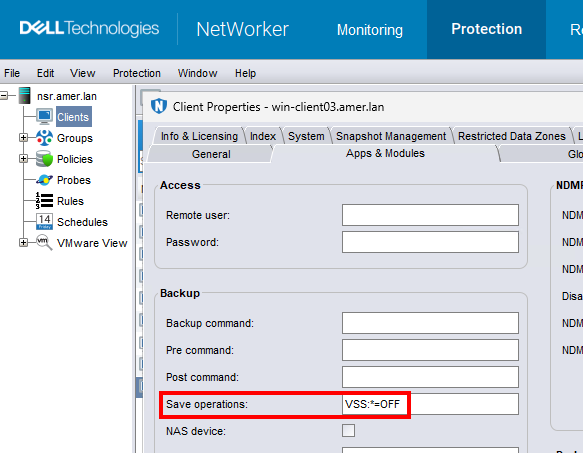 NOTE: View -> Diagnostic Mode must be enabled in the NMC to see the save operations setting.
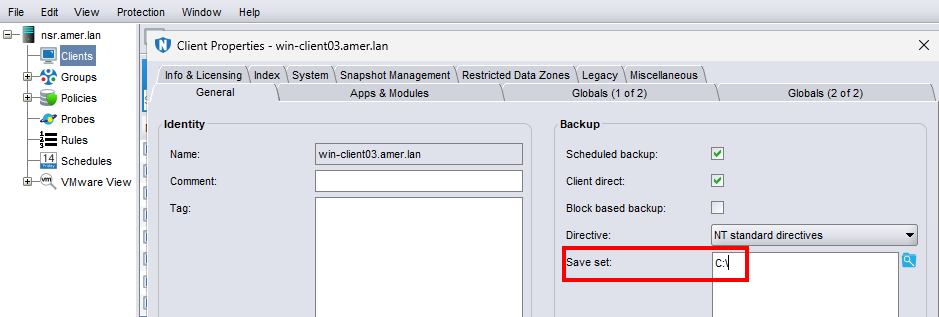
 - Update the client's save sets field to include files, folders, or volumes only. For example:
Additional Information
This applies to all versions of NetWorker and only to Windows 2012 and Windows 2012 R2 machines.
- NetWorker: Troubleshooting Backup Failures Due to VSS Issues
- NetWorker: File system Backup Failure "Insufficient storage available to create either the shadow copy storage file or other shadow copy data"
- NetWorker: Cannot back up the DISASTER RECOVERY save set because the initialization of VSS did not succeed
- VSS Tracing and Troubleshooting Options