Dell Unity: ESRS Readiness Check fails with invalid credentials error (Error Code:0x6400b82)
Summary: Dell Unity ESRS Integrated Support credential and support contract fail (User Correctable)
Symptoms
The support credential password has changed, and it now contains special characters at the start or end.
The support credential password for username which was used to configure Integrated ESRS, contained special characters (&, *, $, ?, and so on) at the starting or ending.
For Unity Operating Environment (OE) version 4.x or later
Unable to configure Support credential and support contract.
Alert:
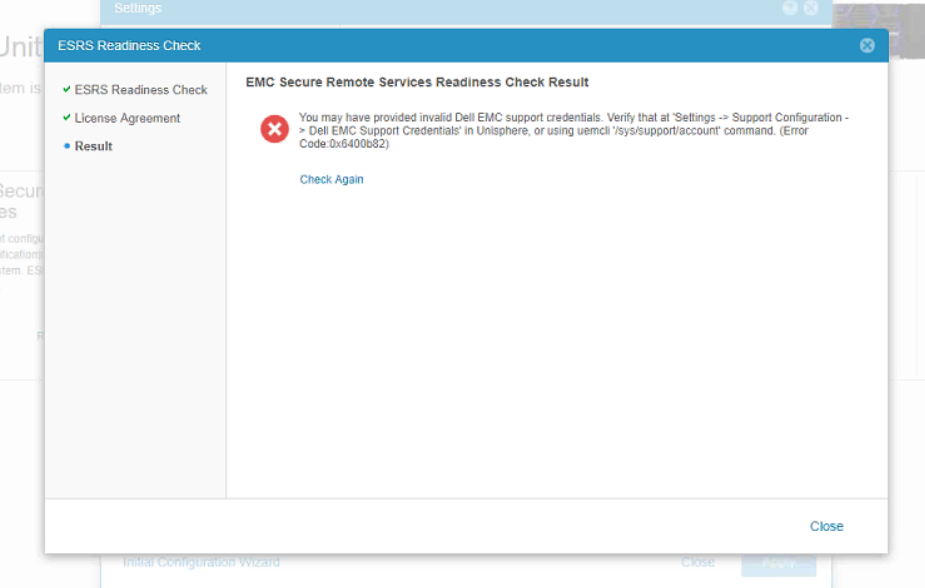
You may have provided invalid Dell EMC support credentials. Verify that at 'Settings -> Support Configuration -> Dell EMC Support Credentials' in Unisphere, or using uemcli '/sys/support/account' command. (Error Code:0x6400b82)
Cause
Support credentials have special characters like (&, *, $, ?, and so on) present at the start or end of the password.
This is being used to configure Integrated ESRS.
Special characters are not supported at the start or end of the Integrated ESRS password.
Resolution
Once the password is reset, follow the below steps:
- Log in to the support site [support.emc.com] with the new credentials
- From Unity Unisphere, update the support credentials
- Try to configure ESRS again.
In case the issue still persists after following the above procedure, contact DELL Technical Support for further assistance.