PowerScale: 감사 시스템 중단
Summary: 라이선스를 활성화하려고 할 때 "Audit system is down, request could not be fulfilled"라는 오류 메시지가 나타납니다(오프라인 또는 레거시 모드).
This article applies to
This article does not apply to
This article is not tied to any specific product.
Not all product versions are identified in this article.
Symptoms
메시지 오류 :
powerscale-3:  2026-06-03T15:34:28.375440-07:00 <3.3> powerscale3(id20) isi_papi_d[64129]: Cannot deliver audit event to the audit daemon. Event payload size (72521) + format length is greater than allowed size (65525)
powerscale-3:  2026-06-03T15:37:33.008372-07:00 <3.3> powerscale-3(id20) isi_papi_d[65089]: Cannot deliver audit event to the audit daemon. Event payload size (72521) + format length is greater than allowed size (65525)
powerscale-3:  2026-06-03T16:18:41.035297-07:00 <3.3> powerscale-3(id20)  isi_papi_d[50492]: STACK Audit system is down, request couldn't be fulfilled.     from --- (---:0):      isi_exception::isi_exception(int, char const*, __va_list_tag*) (OFFSET:134)     api_exception::api_exception(api_error_code, char const*, ...) (OFFSET:146)     uri_manager::execute_request(request&, response&, bool, bool, bool, bool, bool, bool) (OFFSET:2181)
UI에서 다음을 수행합니다.
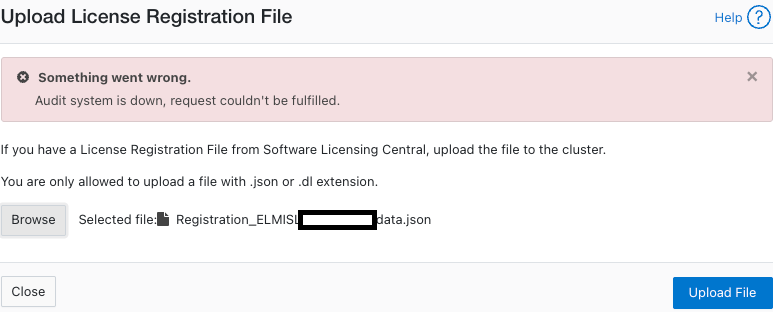
Cause
페이로드 크기가 제한을 초과하는 코드 결함입니다.
Resolution
엔지니어링 팀에서 이 문제를 인지하고 있으며 수정 작업을 진행 중입니다.
해결 방법:
- 구성 감사가 활성화되었는지 확인합니다.
powerscale-3# isi audit settings global view
     Protocol Auditing Enabled: Yes
                 Audited Zones: -
               CEE Server URIs:
                      Hostname:
       Config Auditing Enabled: Yes  <<<<<<<<<<<<<<<<<<<<<<<<<<<
         Config Syslog Enabled: No
         Config Syslog Servers: -
     Config Syslog TLS Enabled: No
  Config Syslog Certificate ID:
       Protocol Syslog Servers: -
   Protocol Syslog TLS Enabled: No
Protocol Syslog Certificate ID:
         System Syslog Enabled: No
         System Syslog Servers: -
     System Syslog TLS Enabled: No
  System Syslog Certificate ID:
          Auto Purging Enabled: No
              Retention Period: 180
       System Auditing Enabled: No
powerscale-3#
참고: 아니요로 설정된 경우 관련된 다른 문제가 있습니다. Dell Technologies 지원 부서에 문의하십시오.
- 구성 감사를 일시적으로 비활성화로 설정합니다.
powerscale-3# isi audit settings global modify --config-auditing-enabled=false
- 라이선스를 다시 적용한 다음 사용하도록 설정합니다.
powerscale-3# isi audit settings global modify --config-auditing-enabled=true
Article Properties
Article Number: 000486487
Article Type: Solution
Last Modified: 08 تموز 2026
Version: 1
Find answers to your questions from other Dell users
Support Services
Check if your device is covered by Support Services.