PowerScale:監査システムがダウンしている
Summary: ライセンスをアクティブ化しようとすると(オフライン モードまたはレガシー モードで)、エラー メッセージ「監査システムがダウンしているため、リクエストを満たすことができませんでした」が表示されます。
This article applies to
This article does not apply to
This article is not tied to any specific product.
Not all product versions are identified in this article.
Symptoms
メッセージのエラー:
powerscale-3:  2026-06-03T15:34:28.375440-07:00 <3.3> powerscale3(id20) isi_papi_d[64129]: Cannot deliver audit event to the audit daemon. Event payload size (72521) + format length is greater than allowed size (65525)
powerscale-3:  2026-06-03T15:37:33.008372-07:00 <3.3> powerscale-3(id20) isi_papi_d[65089]: Cannot deliver audit event to the audit daemon. Event payload size (72521) + format length is greater than allowed size (65525)
powerscale-3:  2026-06-03T16:18:41.035297-07:00 <3.3> powerscale-3(id20)  isi_papi_d[50492]: STACK Audit system is down, request couldn't be fulfilled.     from --- (---:0):      isi_exception::isi_exception(int, char const*, __va_list_tag*) (OFFSET:134)     api_exception::api_exception(api_error_code, char const*, ...) (OFFSET:146)     uri_manager::execute_request(request&, response&, bool, bool, bool, bool, bool, bool) (OFFSET:2181)
UIで、次の操作を実行します。
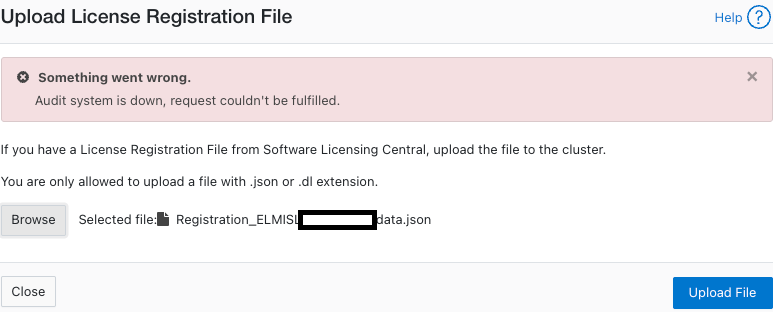
Cause
ペイロード サイズが制限を超えているコードの欠陥。
Resolution
エンジニアリング チームはこの問題を認識しており、修正に取り組んでいます。
対策:
- 構成監査が有効になっていることを確認します。
powerscale-3# isi audit settings global view
     Protocol Auditing Enabled: Yes
                 Audited Zones: -
               CEE Server URIs:
                      Hostname:
       Config Auditing Enabled: Yes  <<<<<<<<<<<<<<<<<<<<<<<<<<<
         Config Syslog Enabled: No
         Config Syslog Servers: -
     Config Syslog TLS Enabled: No
  Config Syslog Certificate ID:
       Protocol Syslog Servers: -
   Protocol Syslog TLS Enabled: No
Protocol Syslog Certificate ID:
         System Syslog Enabled: No
         System Syslog Servers: -
     System Syslog TLS Enabled: No
  System Syslog Certificate ID:
          Auto Purging Enabled: No
              Retention Period: 180
       System Auditing Enabled: No
powerscale-3#
メモ: これが [いいえ]に設定されている場合は、別の問題が関係しています。デル・テクノロジーズ サポートにお問い合わせください。
- 構成監査を一時的に無効に設定します。
powerscale-3# isi audit settings global modify --config-auditing-enabled=false
- ライセンスを再適用し、有効にします。
powerscale-3# isi audit settings global modify --config-auditing-enabled=true
Article Properties
Article Number: 000486487
Article Type: Solution
Last Modified: 08 تموز 2026
Version: 1
Find answers to your questions from other Dell users
Support Services
Check if your device is covered by Support Services.