PowerScale:稽核系統已關閉
Summary: 嘗試啟動授權 (離線或舊版模式) 時,會出現錯誤訊息「稽核系統已關閉,無法完成要求」。
This article applies to
This article does not apply to
This article is not tied to any specific product.
Not all product versions are identified in this article.
Symptoms
訊息中的錯誤:
powerscale-3:  2026-06-03T15:34:28.375440-07:00 <3.3> powerscale3(id20) isi_papi_d[64129]: Cannot deliver audit event to the audit daemon. Event payload size (72521) + format length is greater than allowed size (65525)
powerscale-3:  2026-06-03T15:37:33.008372-07:00 <3.3> powerscale-3(id20) isi_papi_d[65089]: Cannot deliver audit event to the audit daemon. Event payload size (72521) + format length is greater than allowed size (65525)
powerscale-3:  2026-06-03T16:18:41.035297-07:00 <3.3> powerscale-3(id20)  isi_papi_d[50492]: STACK Audit system is down, request couldn't be fulfilled.     from --- (---:0):      isi_exception::isi_exception(int, char const*, __va_list_tag*) (OFFSET:134)     api_exception::api_exception(api_error_code, char const*, ...) (OFFSET:146)     uri_manager::execute_request(request&, response&, bool, bool, bool, bool, bool, bool) (OFFSET:2181)
在 UI 中:
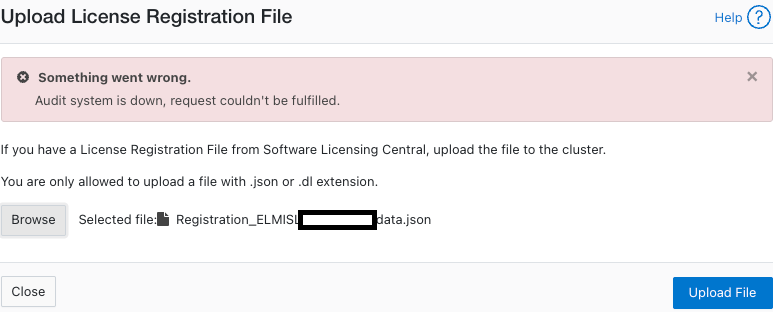
Cause
負載大小超過限制的代碼缺陷。
Resolution
工程部門已察覺到此問題,且正在進行修正。
因應措施:
- 確認組態稽核已啟用:
powerscale-3# isi audit settings global view
     Protocol Auditing Enabled: Yes
                 Audited Zones: -
               CEE Server URIs:
                      Hostname:
       Config Auditing Enabled: Yes  <<<<<<<<<<<<<<<<<<<<<<<<<<<
         Config Syslog Enabled: No
         Config Syslog Servers: -
     Config Syslog TLS Enabled: No
  Config Syslog Certificate ID:
       Protocol Syslog Servers: -
   Protocol Syslog TLS Enabled: No
Protocol Syslog Certificate ID:
         System Syslog Enabled: No
         System Syslog Servers: -
     System Syslog TLS Enabled: No
  System Syslog Certificate ID:
          Auto Purging Enabled: No
              Retention Period: 180
       System Auditing Enabled: No
powerscale-3#
注意: 如果此選項設為 「否」,則涉及不同的問題。請聯絡 Dell Technologies Support。
- 將設定稽核設定為暫時停用:
powerscale-3# isi audit settings global modify --config-auditing-enabled=false
- 重新套用授權,然後啟用:
powerscale-3# isi audit settings global modify --config-auditing-enabled=true
Article Properties
Article Number: 000486487
Article Type: Solution
Last Modified: 08 تموز 2026
Version: 1
Find answers to your questions from other Dell users
Support Services
Check if your device is covered by Support Services.