Dell Unity:レプリケーション転送の動作停止(ユーザー修正可能)
Summary: レプリケーション転送が停止したイベントに対処する方法。
This article applies to
This article does not apply to
This article is not tied to any specific product.
Not all product versions are identified in this article.
Symptoms
レプリケーションでRPOによる自動同期が設定されていても、転送は実行されず、最後の同期時刻は古いままです。
転送は進行中ではありませんが、同期状態はアイドル状態であり、正常性状態はOKです。
転送は進行中ではありませんが、同期状態はアイドル状態であり、正常性状態はOKです。
Cause
考えられる原因は次のとおりです。
(1)転送されるスナップショットに何らかの問題があります。
(2)手動同期でジョブのタスクをクリアする場合。
(1)転送されるスナップショットに何らかの問題があります。
(2)手動同期でジョブのタスクをクリアする場合。
Resolution
(1)Unisphere UIから問題のあるスナップショットを削除するには、次の手順を実行します。
レプリケーションの一時停止> スナップショットの削除 > レプリケーションの再開
(2)レプリケーションを一時停止して再開します。
レプリケーションの一時停止> スナップショットの削除 > レプリケーションの再開
メモ: いずれかの手順でエラーが発生した場合は、Dellテクニカル サポートにお問い合わせください。
(2)レプリケーションを一時停止して再開します。
Additional Information
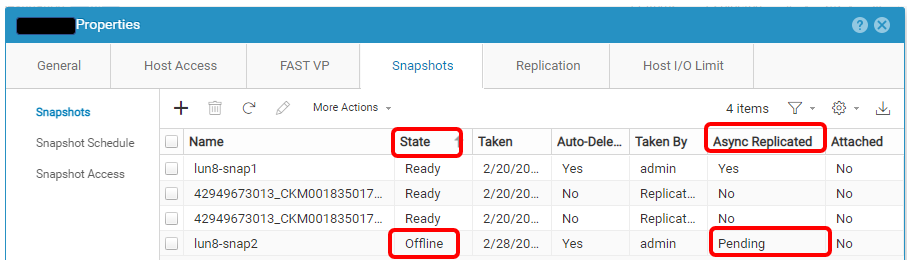
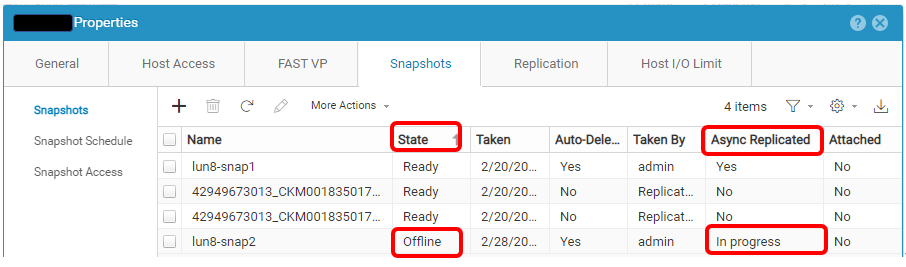
問題のあるスナップショットの例を次に示します。
Affected Products
Dell EMC Unity, Dell Unity 300, Dell EMC Unity 300F, Dell EMC Unity 350F, Dell EMC Unity XT 380, Dell EMC Unity XT 380F, Dell EMC Unity 400, Dell EMC Unity 400F, Dell EMC Unity 450F, Dell EMC Unity XT 480, Dell EMC Unity XT 480F, Dell EMC Unity 500
, Dell EMC Unity 500F, Dell EMC Unity 550F, Dell EMC Unity 600, Dell EMC Unity 600F, Dell EMC Unity 650F, Dell EMC Unity XT 680, Dell EMC Unity XT 680F, Dell EMC Unity XT 880, Dell EMC Unity XT 880F, Dell EMC Unity Family |Dell EMC Unity All Flash, Dell EMC Unity Family, Dell EMC Unity Hybrid, Dell EMC UnityVSA Professional Edition/Unity Cloud Edition
...
Article Properties
Article Number: 000210066
Article Type: Solution
Last Modified: 31 ديسمبر 2025
Version: 2
Find answers to your questions from other Dell users
Support Services
Check if your device is covered by Support Services.