Dell Unity:複寫傳輸停止運作 (可由使用者更正)
Summary: 如何處理複寫傳輸停止的事件。
This article applies to
This article does not apply to
This article is not tied to any specific product.
Not all product versions are identified in this article.
Symptoms
即使在複製中設定了 RPO 的自動同步,但不會執行傳輸,而且「Last Sync Time」仍已過時。
雖然傳輸正在進行中,同步狀態卻處於閒置狀態,且健全狀況狀態正常。
雖然傳輸正在進行中,同步狀態卻處於閒置狀態,且健全狀況狀態正常。
Cause
以下是可能的原因。
(1) 要傳輸的快照發生問題。
(2) 執行手動同步清除工作時。
(1) 要傳輸的快照發生問題。
(2) 執行手動同步清除工作時。
Resolution
(1) 執行下列步驟,從 Unisphere UI 刪除有問題的快照。
暫停複寫>在繼續複寫>刪除快照
(2) 暫停並恢復複寫。
暫停複寫>在繼續複寫>刪除快照
注意:如果在任何步驟中發生錯誤,請聯絡 Dell 技術支援部門。
(2) 暫停並恢復複寫。
Additional Information
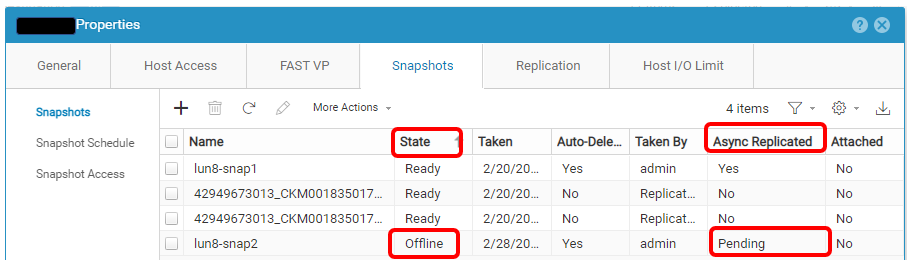
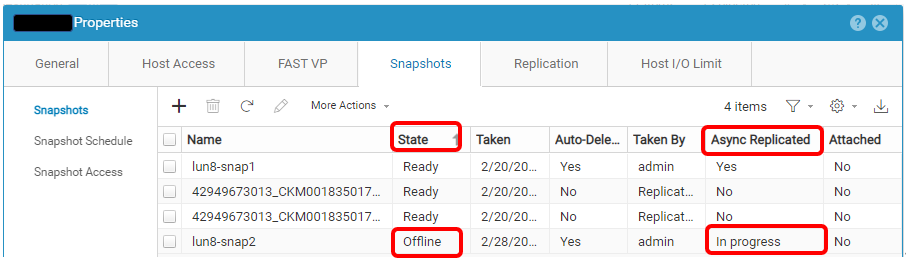
以下是有問題的快照範例。
Affected Products
Dell EMC Unity, Dell Unity 300, Dell EMC Unity 300F, Dell EMC Unity 350F, Dell EMC Unity XT 380, Dell EMC Unity XT 380F, Dell EMC Unity 400, Dell EMC Unity 400F, Dell EMC Unity 450F, Dell EMC Unity XT 480, Dell EMC Unity XT 480F, Dell EMC Unity 500
, Dell EMC Unity 500F, Dell EMC Unity 550F, Dell EMC Unity 600, Dell EMC Unity 600F, Dell EMC Unity 650F, Dell EMC Unity XT 680, Dell EMC Unity XT 680F, Dell EMC Unity XT 880, Dell EMC Unity XT 880F, Dell EMC Unity Family |Dell EMC Unity All Flash, Dell EMC Unity Family, Dell EMC Unity Hybrid, Dell EMC UnityVSA Professional Edition/Unity Cloud Edition
...
Article Properties
Article Number: 000210066
Article Type: Solution
Last Modified: 31 ديسمبر 2025
Version: 2
Find answers to your questions from other Dell users
Support Services
Check if your device is covered by Support Services.