Dell Unity:复制传输停止工作(用户可更正)
Summary: 如何处理复制传输停止的事件。
This article applies to
This article does not apply to
This article is not tied to any specific product.
Not all product versions are identified in this article.
Symptoms
即使在复制中设置了 RPO 的自动同步,但不会执行任何传输,并且上次同步时间仍然过时。
虽然传输未进行,但同步状态为空闲,运行状况为正常。
虽然传输未进行,但同步状态为空闲,运行状况为正常。
Cause
以下是可能的原因。
(1) 要传输的快照存在一些问题。
(2) 在手动同步中清除作业的任务时执行。
(1) 要传输的快照存在一些问题。
(2) 在手动同步中清除作业的任务时执行。
Resolution
(1) 执行以下步骤以从 Unisphere UI 中删除有问题的快照。
暂停复制>删除快照>恢复复制
(2) 暂停和恢复复制。
暂停复制>删除快照>恢复复制
提醒:如果在任何步骤中发生错误,请联系戴尔技术支持。
(2) 暂停和恢复复制。
Additional Information
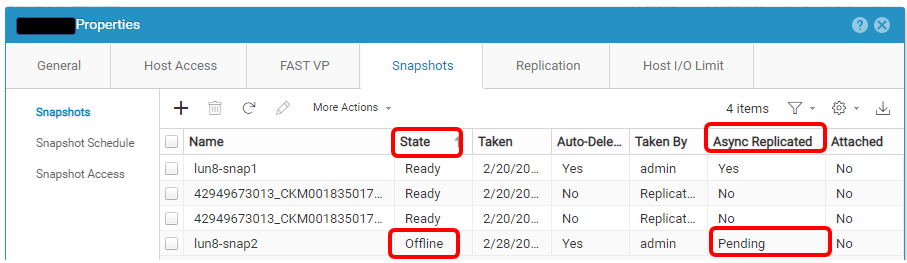
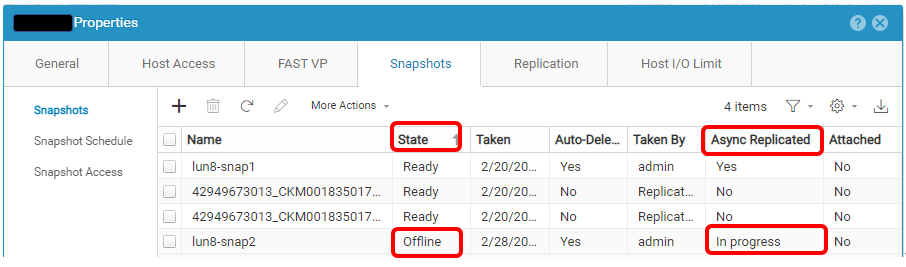
下面是有问题的快照的示例。
Affected Products
Dell EMC Unity, Dell Unity 300, Dell EMC Unity 300F, Dell EMC Unity 350F, Dell EMC Unity XT 380, Dell EMC Unity XT 380F, Dell EMC Unity 400, Dell EMC Unity 400F, Dell EMC Unity 450F, Dell EMC Unity XT 480, Dell EMC Unity XT 480F, Dell EMC Unity 500
, Dell EMC Unity 500F, Dell EMC Unity 550F, Dell EMC Unity 600, Dell EMC Unity 600F, Dell EMC Unity 650F, Dell EMC Unity XT 680, Dell EMC Unity XT 680F, Dell EMC Unity XT 880, Dell EMC Unity XT 880F, Dell EMC Unity Family |Dell EMC Unity All Flash, Dell EMC Unity Family, Dell EMC Unity Hybrid, Dell EMC UnityVSA Professional Edition/Unity Cloud Edition
...
Article Properties
Article Number: 000210066
Article Type: Solution
Last Modified: 31 ديسمبر 2025
Version: 2
Find answers to your questions from other Dell users
Support Services
Check if your device is covered by Support Services.