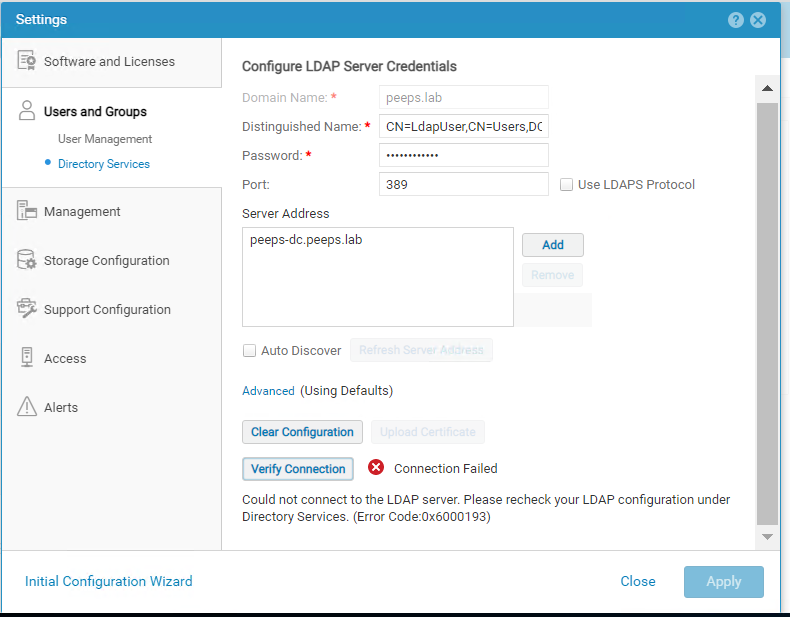
Dell Unity: Não foi possível se conectar ao servidor LDAP. Verifique novamente sua configuração LDAP em Directory Services. (Error Code: 0x6000193) [Corrigível pelo usuário]
Summary: Não é possível configurar o LDAP e o LDAPS — falha na verificação da conexão.
This article applies to
This article does not apply to
This article is not tied to any specific product.
Not all product versions are identified in this article.
Symptoms
Não foi possível se conectar ao servidor LDAP. Verifique novamente sua configuração LDAP em Directory Services. (Error Code: 0x6000193)
Cause
- Detalhes incorretos do servidor LDAP | Servidor LDAP inacessível
- Vincular dn e senha incorretas do usuário
- Certificado SSL incorreto do servidor LDAP se estiver usando LDAPS
Resolution
Detalhes do servidor LDAP
O servidor LDAP deve ser pingável a partir do Unity usando o hostname e o endereço IP.
C:\Users\user>nslookup
Server: lbs-dc.visors.lab - - - > > >peeps-dc é o nome do host || dns.labé o nome do
domínio Endereço: 5.6.xx.xx
Nome: gateways-dc.visors.lab
Endereço: 5.6.xx.xx
C:\Users\user>
Incorrect Bind user DN and Password
From your windows host machine which is joined to the AD run the below command in cmd and search for the username to find the Distinguished name for the user.
C:\Users\Administrator>setspn LdapUser
Registered ServicePrincipalNames for CN=LdapUser,CN=Users,DC=silvers,DC=lab
C:\Users\Administrator>CN=LdapUser,CN=Users,DC=silvers,DC=lab - - > > >
Esse é o nome do usuário vinculado incorreto do certificadoSSL do servidor LDAP se estiver usando LDAPS
Depois que o certificado SSL é carregado, verificando a conexão, a conexão falha, isso pode ser verificado a partir da saída ldapsearch.
Ldapsearch para testar a conexão LDAP
ldapsearch -x -d 1 -v -H ldap://ldapserver_name_or_IP:389 -b "CN=Users,dc=dims,dc=lab" -D "CN=Administrator,CN=Users,DC=visors,DC=lab" -w Senha
Parte bem-sucedida da pesquisa do resultado:
Nº de filtro: (objectclass=*)
Nº solicitando: TODOS
os res_errno
: 0, res_error: <<<<< uma pesquisa de vinculação ou uma pesquisa de usuário foi bem-sucedida.
ldap_free_request (origid 2, msgid 2)
Se a política no controlador de domínio for: "Controlador de domínio: Requisitos de assinatura do servidor LDAP" é definido como "Exigir assinatura", as conexões falham se não estiverem configuradas para usar sSL com a opção LDAPS no Unisphere.
Se o servidor LDAP exigir autenticação e você estiver tentando configurar o LDAP, e não o LDAPS sem fazer upload de SSL, abaixo está o resultado ldapsearch para verificar o mesmo.
Ldapsearch para testar a conexão LDAPS
O servidor LDAP deve ser pingável a partir do Unity usando o hostname e o endereço IP.
C:\Users\user>nslookup
Server: lbs-dc.visors.lab - - - > > >peeps-dc é o nome do host || dns.labé o nome do
domínio Endereço: 5.6.xx.xx
Nome: gateways-dc.visors.lab
Endereço: 5.6.xx.xx
C:\Users\user>
Incorrect Bind user DN and Password
From your windows host machine which is joined to the AD run the below command in cmd and search for the username to find the Distinguished name for the user.
C:\Users\Administrator>setspn LdapUser
Registered ServicePrincipalNames for CN=LdapUser,CN=Users,DC=silvers,DC=lab
C:\Users\Administrator>CN=LdapUser,CN=Users,DC=silvers,DC=lab - - > > >
Esse é o nome do usuário vinculado incorreto do certificadoSSL do servidor LDAP se estiver usando LDAPS
Depois que o certificado SSL é carregado, verificando a conexão, a conexão falha, isso pode ser verificado a partir da saída ldapsearch.
Ldapsearch para testar a conexão LDAP
ldapsearch -x -d 1 -v -H ldap://ldapserver_name_or_IP:389 -b "CN=Users,dc=dims,dc=lab" -D "CN=Administrator,CN=Users,DC=visors,DC=lab" -w Senha
Parte bem-sucedida da pesquisa do resultado:
Nº de filtro: (objectclass=*)
Nº solicitando: TODOS
os res_errno
: 0, res_error: <<<<< uma pesquisa de vinculação ou uma pesquisa de usuário foi bem-sucedida.
ldap_free_request (origid 2, msgid 2)
Se a política no controlador de domínio for: "Controlador de domínio: Requisitos de assinatura do servidor LDAP" é definido como "Exigir assinatura", as conexões falham se não estiverem configuradas para usar sSL com a opção LDAPS no Unisphere.
Se o servidor LDAP exigir autenticação e você estiver tentando configurar o LDAP, e não o LDAPS sem fazer upload de SSL, abaixo está o resultado ldapsearch para verificar o mesmo.
res_errno: 8, res_error: , res_matched:
Ldapsearch para testar a conexão LDAPS
env LDAPTLS_CACERT=/EMC/backend/CEM/LDAPCer/serverCertificate.cer ldapsearch -x -d 1 -v -H ldaps://ldapserver_name_or_IP:636 -b "CN=Users,dc=pqs,dc=lab" -D "CN=Administrator,CN=Users,DC=bytes,DC=lab" -w Senha
Resultado abaixo no ldapsearch para LDAPS se o SSL estiver incorreto.

Rastreamento de TLS: SSL_connect: SSLv3/TLS write client hello
Rastreamento de TLS: SSL_connect: servidor de leitura SSLv3/TLS Hello
Verificação de certificado TLS: profundidade: 1, err: 20, assunto: /DC=lab/DC=pqs/CN=issuer_name, emitidor: /CN=issuer_name
Verificação de certificado TLS: Erro, não foi possível obter o certificado do emitidor local
tls_write: want=7, written=7
  0000:  15 03 03 00 02 02 30                               ...... 0
Rastreamento de TLS: Gravação de alerta SSL3:fatal:UNKNOWN CA
Rastreamento de TLS: SSL_connect:erro no erro
TLS: can't connect: error:1416F086:SSL routines:tls_process_server_certificate:certificate verify failed (unable to get local issuer certificate).
ldap_err2string
ldap_sasl_bind (SIMPLES): Não é possível entrar em contato com o servidor LDAP (-1)
AVISO *** Shell de serviço do Unity ativado! AVISO***
root@hostname spa:/home/service/user#
Affected Products
Dell EMC Unity, Dell Unity 300, Dell EMC Unity 300F, Dell EMC Unity 350F, Dell EMC Unity 400, Dell EMC Unity 400F, Dell EMC Unity 450F, Dell EMC Unity 500, Dell EMC Unity 500F, Dell EMC Unity 550FProducts
Dell EMC Unity XT 380, Dell EMC Unity XT 380F, Dell EMC Unity XT 480, Dell EMC Unity XT 480F, Dell EMC Unity 600, Dell EMC Unity 600F, Dell EMC Unity 650F, Dell EMC Unity XT 680, Dell EMC Unity XT 680F, Dell EMC Unity XT 880, Dell EMC Unity XT 880F
, Dell EMC Unity Family |Dell EMC Unity All Flash, Dell EMC Unity Family, Dell EMC Unity Hybrid, Dell EMC UnityVSA Professional Edition/Unity Cloud Edition
...
Article Properties
Article Number: 000211909
Article Type: Solution
Last Modified: 12 ديسمبر 2025
Version: 3
Find answers to your questions from other Dell users
Support Services
Check if your device is covered by Support Services.