Company Administration Overview
Summary: Learn how to manage your individual and company preferences so you can get the most out of your support experience with Dell Technologies.
Instructions
This guide covers how to view and manage company registration settings, locations, and your organization’s userbase via two distinct user types: Company Administrators and Business Users.
Keeping your information up to date helps maintain security and ensures Dell Technologies can provide you with fast, accurate support.
Recommended administrative actions include:
-
Setting your location and asset preferences so we can deliver the right onsite service, replacement parts, and case management support to the appropriate contacts.
-
Managing your userbase by assigning who can access specific assets and locations, and by removing anyone who is no longer part of your organization.
-
Adjusting key security settings, such as default employee access and specifying overall location and asset visibility.
This article provides information about:
- Company Administration Overview
Related Resources:
Company Administration Overview
The section provides an overview of how to access and navigate Company Administration, request administrator rights, and understand the different customer roles and their capabilities.
What is a Company Administrator?
A Company Administrator is a customer responsible for managing their organization’s company information. This includes the ability to view and update company profile details, manage locations and assets, and oversee the userbase including any contact relationships. Company Administrators ensure that organizational information is accurate and that the appropriate individuals have the correct level of access within the online experience.
Company Administration Features
Company Administration in Dell’s Online Support provides a centralized view of your organization’s company and user information. It enables you to keep your support details up to date and helps make sure the right people have the right access to your online ecosystem.
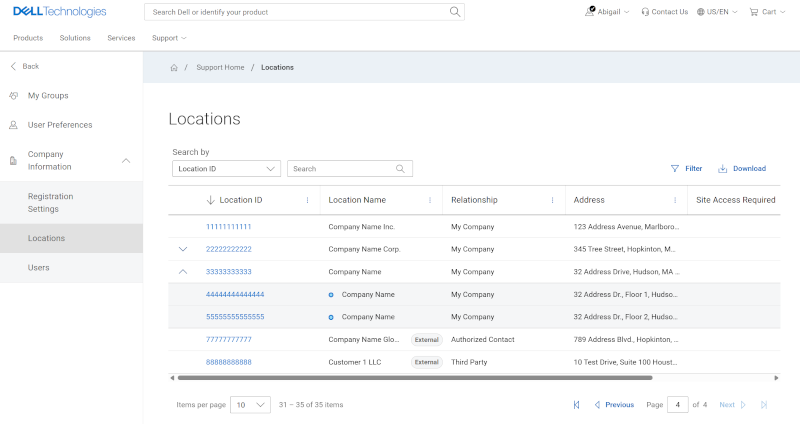
Figure 1: Manage Locations
Company Administration features provide users the ability to:
-
Manage Registration Settings (Company Administrators only)
-
View or Manage Locations (formerly Sites)
-
View or Manage Users (formerly Contacts)
User Types and Capabilities
This guide features two types of users:
-
Company Administrators - Have full access to manage company profile settings, locations, and the userbase for their organization.
-
Business Users - Can view locations and contacts associated with their organization based on the Company Administrators' visibility settings.
If you are designated as a Company Administrator, you will be able to view and manage locations, products, and users affiliated with your organization.
You can also update location preferences, assign specialized contact roles, and grant access rights to others.
Accessing Company Administration
To access Company Administration, select Manage Company Information from the  menu in the upper right corner of the Homepage.
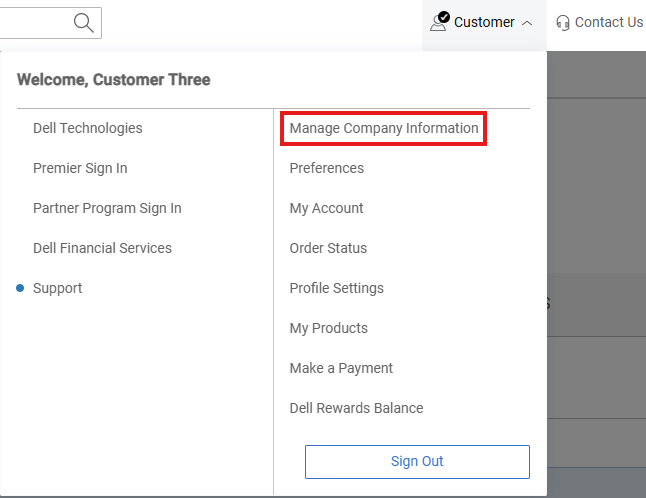
Figure 2: Company Administration Navigation
Alternatively, you can access Company Administration features by selecting Preferences which opens the Company Information drop-down in the left pane navigation area.
There are 3 main Company Administrations modules found under the Company Information drop-down in the left pane. Options may vary based on the defined role of Administrator vs Business users.
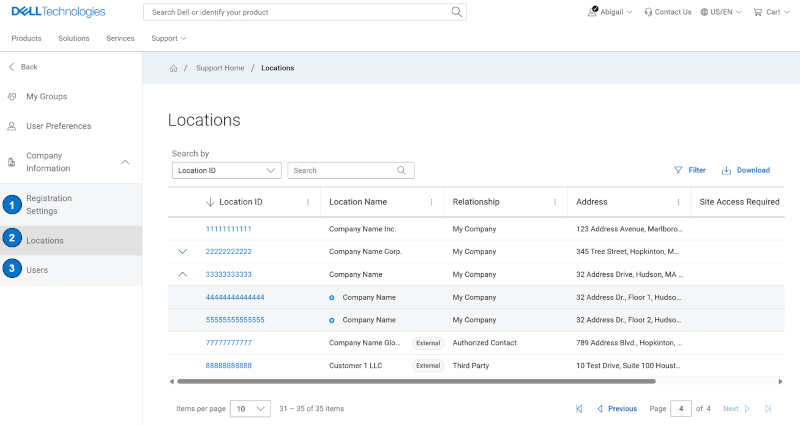
Figure 3: Company Administration Navigation
-
Registration Settings - includes settings that determine whether new users can automatically register and gain full access or if they must be invited by a Company Administrator.
-
Locations - related actions include setting location dial home contacts as well as assigning and editing location preferences (ex. Customer Replaceable Unit (CRU) preferences for a location).
-
Users - related actions include promoting and demoting Administrator users, removing users that have left your organization, and granting access rights.
Online Support help options
Need help? Get started from the Online Support links below. If applicable, contact your Service Account Manager or Customer Success Manager.
|
Topics |
Help Links Tip: Be sure to sign in to the Online Support site to view all available support options. |
|---|---|
|
Get Technical Support for your products.
|
|
|
Enterprise Online Account assistance View and manage company information, contacts, and service requests.
|
Administrative Support
|
|
Asset / Install Base management. Product registrations
|
|