PowerProtect Data Manager: File System Agent backup fails with "SQLite database initialization failed"
Summary: File System Agent backup fails with error "SQLite database initialization failed" and indicates a missing PLCTLP folder on the Data Domain.
Symptoms
PowerProtect Data Manager File System Agent backup fails because of an Agent issue with error SQLite database initialization failed. The Application Agent log shows:
"failedSources": [
                    {
                        "taskId": "af5ce774-d0a0-47ce-a43a-cddc9fed363b",
                        "name": "D:\\",
                        "status": "FAILURE",
                        "subStatus": "",
                        "errorCode": "",
                        "errorMessage": "SQLite database initialization failed",
                        "remediation": "",
                        "vendorSpecificErrorMessage": "",
                        "alertArguments": []
The ddfssv_cent log shows:
2026-04-17T13:01:06.135Z [TRACE_ID_87714f8f0c1af398_EXEC_ID_b694c97c2ccf7b27]0  12408 18308 0 ddfssv PowerProtect Data Manager notice DDP LOG: [18308:12408] ddp_stat() failed, Path //FS_Backup_TEST/PLCTLP-809cd829-eaa5-44d6-ab89-be8a61c7a293, Err: 5004-nfs lookup failed (nfs: No such file or directory)
2026-04-17T13:01:06.151Z [TRACE_ID_87714f8f0c1af398_EXEC_ID_b694c97c2ccf7b27]0  12408 18308 0 ddfssv PowerProtect Data Manager notice Unable to connect to data target: Retrieving statistics for '/FS_Backup_TEST/PLCTLP-809cd829-eaa5-44d6-ab89-be8a61c7a293' failed [5004] ([18308] [12408] Fri Apr 17 09:01:06 2026
	ddp_stat() failed, Path //FS_Backup_TEST/PLCTLP-809cd829-eaa5-44d6-ab89-be8a61c7a293, Err: 5004-nfs lookup failed (nfs: No such file or directory)
)..
The vmdm.log shows:
2026-04-19T07:00:05.315Z ERROR [] [https-jsse-nio-0.0.0.0-8447-exec-47] [00000000-0000-4000-a000-000000000000][][][TRACE_ID:b46dbf1aa2e28fc5;JOB_ID:8eb6926faaed5b17][] [c.e.b.s.u.CertificateUtils.checkExpiration(1391)] - Certificate is expired, state=EXPIRED
2026-04-19T07:00:05.315Z INFO [] [https-jsse-nio-0.0.0.0-8447-exec-47] [00000000-0000-4000-a000-000000000000][][][TRACE_ID:b46dbf1aa2e28fc5;JOB_ID:8eb6926faaed5b17][] [c.e.b.v.c.util.CommonUtils.getSSLThumbprint(245)] - Host DD_host.example.com thumbprint A747D9E2E98807A8F539A65354CA01AC287542D0
A new Protection Policy creation fails with:
replmgr.2026-04-18.3.log.gz: 2026-04-18T22:30:36.966Z INFO [] [pool-32-thread-1] [00000000-0000-4000-b000-000000000000][][][TRACE_ID:ad91816c2d71de66;JOB_ID:8b9b1fe73fac21e9][] c.e.b.d.c.r.connection.DdRestClient.dataDomainLogin(159) -  hostname=DD_host.example.com username=ppdm-ddboost url=https://DD_host.example.com:3009/rest/v1.0/auth
replmgr.2026-04-18.3.log.gz: 2026-04-18T22:30:37.066Z ERROR [] [pool-32-thread-1] [00000000-0000-4000-b000-000000000000][][][TRACE_ID:ad91816c2d71de66;JOB_ID:8b9b1fe73fac21e9][] c.e.b.s.utils.CertificateUtils.checkExpiration(1391) -  Certificate is expired, state=EXPIRED
replmgr.2026-04-18.3.log.gz: 2026-04-18T22:30:37.067Z ERROR [] [pool-32-thread-1] [00000000-0000-4000-b000-000000000000][][][TRACE_ID:ad91816c2d71de66;JOB_ID:8b9b1fe73fac21e9][] c.e.b.d.c.r.connection.DdRestClient.executeDataDomainAuthRequest(213) -  Exception when trying to login, PowerProtect DD System = DD_host.example.com, username = ddboo error = NotAfter: Mon Mar 23 11:06:43 EST 2026
replmgr.2026-04-18.3.log.gz: 2026-04-18T22:30:37.067Z ERROR [] [pool-32-thread-1] [00000000-0000-4000-b000-000000000000][][][TRACE_ID:ad91816c2d71de66;JOB_ID:8b9b1fe73fac21e9][] c.e.b.d.s.s.StorageUnitRestImpl.login(480) -  Exception when logging in PowerProtect DD System, error:
com.emc.brs.datadomain.common.rest.connection.DdRestClientException: NotAfter: Mon Mar 23 11:06:43 EST 2026
Cause
Attempts to log in to the Data Domain UI fail with invalid login errors. Connecting to the Data Domain over SSH to check certificates shows that the https certificate is expired.
sysadmin@DD_host# adminaccess certificate show
Subject           Type            Application   Valid From                 Valid Until                Fingerprint
---------------   -------------   -----------   ------------------------   ------------------------   -----------------------------------------------------------
DD_host.example.com   host            https         Sun Jul 02 00:20:44 2023   Thu Mar 23 07:20:45 2026   5E:E6:C8:B2:76:8D:C1:96:15:E3:51:7B:86:35:5D:25:1F:91:A5:3B
DD_host.example.com   ca              trusted-ca    Mon Jul 03 07:20:44 2023   Sun Jul 01 07:20:44 2029   A6:48:F6:0E:D3:29:23:89:2C:6C:D8:E5:2B:84:2B:F9:01:62:C7:E7
Resolution
The renewal of the Data Domain certificate must be performed, and then the certificate must be updated in PowerProtect Data Manager. Follow the instructions in Data Domain: Web UI Inaccessible Due to Expired https Certificateto renew the Data Domain https certificate.
Once the certificate is renewed on the Data Domain, renew the certificate in PowerProtect Data Manager.
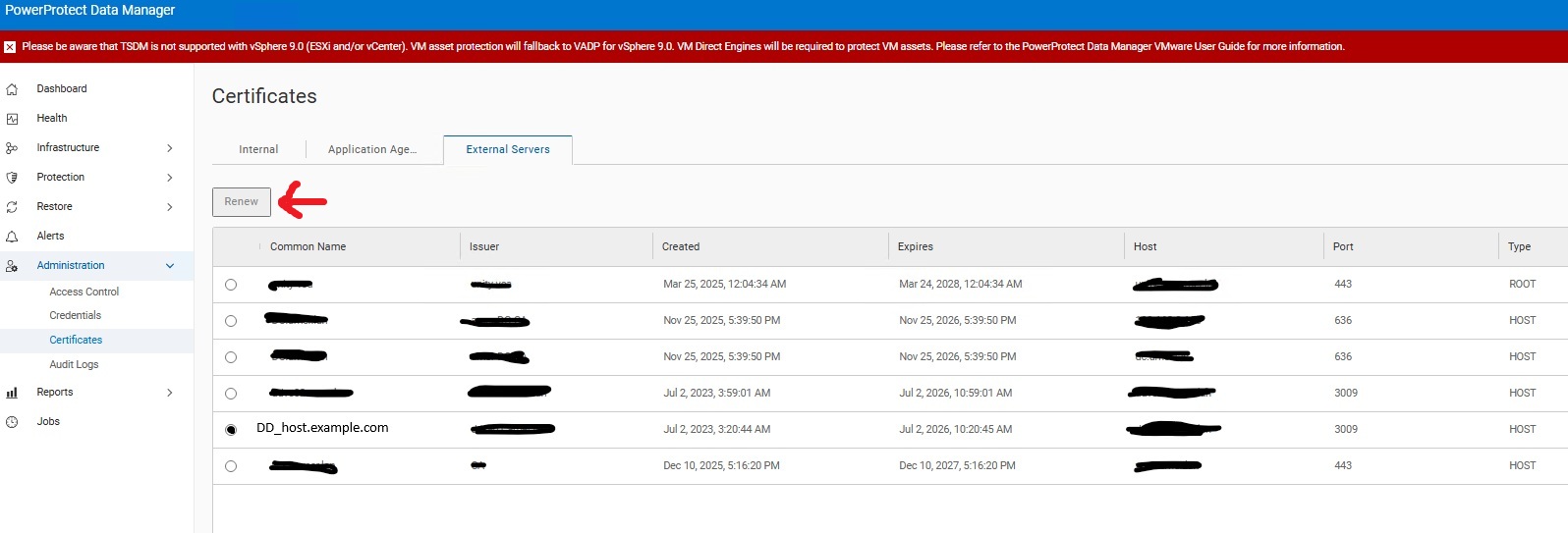
The affected policy must have the failed configuration job restarted in order to allow Data Domain to create the missing folder.
