DBCC CHECKDB Troubleshooting SQL Server Database Corruption
Shrnutí: DBCC is a native tool of Microsoft SQL Server designed to check and repair Microsoft SQL Server Databases. This article discusses the DBCC CHECKDB command and options in checking database logical and physical integrity. ...
Příznaky
Microsoft SQL Server database is corrupt and needs to be repaired to maintain stability and consistency.
Příčina
Řešení
DBCC CHECKDB (Transact-SQL):

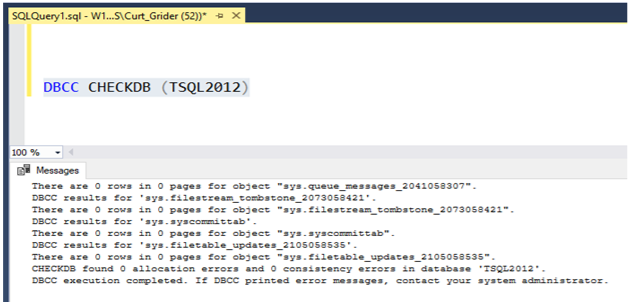
Steps to run DBCC CHECKDB:
- Open SQL Server Studio Management
- Open a query window
- Type in "DBCC CHECKDB (Database Name)"
DBCC Repair Options
- REPAIR_REBUILD: Command below puts the database in a mode allowing repair.
USE Master;
GO
ALTER DATABASE TSQL2012
SET SINGLE_USER
WITH ROLLBACK IMMEDIATE;
GO
DBCC CHECKDB (TSQL2012, REPAIR_REBUILD)
GO
ALTER DATABASE TSQL2012
SET MULTI_USER;
GO
Copy the command below and paste to the query session putting in the correct database name:
--Command below performs a Database repair not allowing Data loss

USE Master;
GO
ALTER DATABASE TSQL2012
SET SINGLE_USER
WITH ROLLBACK IMMEDIATE;
GO
DBCC CHECKDB (TSQL2012,REPAIR_REBUILD)
GO
ALTER DATABASE TSQL2012
SET MULTI_USER;
GO
2. REPAIR_ALLOW_DATA_LOSS: Command below performs database repair and may result in data loss to complete the repair process.
--Command below performs a database repair that may result in data loss,
 --replace TSQL2012 with the database name of database being repaired
USE Master
GO
ALTER DATABASE TSQL2012
SET SINGLE_USER
WITH ROLLBACK IMMEDIATE
GO
DBCC CHECKDB (TSQL2012, REPAIR_ALLOW_DATA_LOSS)
GO
ALTERDATABASE TSQL2012
SET MULTI_USER
GO
Copy the command below and paste to the query session putting in the correct database name:
Commands below are useful if database physical disk space is running low.
--Command below estimates the size TEMPDB must be to complete the DBCC CHECKDB job
USE Master;
GO
ALTER DATABASE TSQL2012
SET SINGLE_USER
WITH ROLLBACK IMMEDIATE;
GO
DBCC CHECKDB (TSQL2012, REPAIR_REBUILD)
WITH ESTIMATEONLY;
GO
ALTER DATABASE TSQL2012
SET MULTI_USER
GO
Copy the command below and paste to the query session putting in the correct database name:
--Command below estimates the size TEMPDB must be to complete the DBCC CHECKDB job

USE Master;
GO
ALTER DATABASE TSQL2012
SET SINGLE_USER
WITH ROLLBACK IMMEDIATE;
GO
DBCC CHECKDB (TSQL2012, REPAIR_REBUILD)
WITH ESTIMATEONLY;
GO
ALTER DATABASE TSQL2012
SET MULTI_USER
GO
--Command below will run DBCC CHECKDB without using TEMDB and creating a DB
--snapshot. When not using TEMPDB with a DB snapshot all data will be checked in
-- the live database not not a database snapshot.

USE Master;
GO
ALTER DATABASE TSQL2012
SET SINGLE_USER
WITH ROLLBACK IMMEDIATE;
GO
DBCC CHECKDB (TSQL2012, REPAIR_REBUILD)
WITH TABLOCK;
GO
ALTER DATABASE TSQL2012
SET MULTI_USER
GO
Copy the command below and paste to query session and put in the correct database name:
--Command below will run DBCC CHECKDB without using TEMPDB and creating a DB
--snapshot. When not using TEMPDB with a DB snapshot all data will be checked in ---the live database not a database snapshot.

USE Master;
GO
ALTER DATABASE TSQL2012
SET SINGLE_USER
WITH ROLLBACK IMMEDIATE;
GO
DBCC CHECKDB (TSQL2012, REPAIR_REBUILD)
WITH TABLOCK;
GO
ALTER DATABASE TSQL2012
SET MULTI_USER
GO