Latitude 7400: Visuelle Anleitung für den Computer
Zusammenfassung: Der folgende Artikel enthält eine visuelle Anleitung zu Ihrem Latitude 7400-Laptop und listet die externen Anschlüsse und Funktionen des Laptops auf.
Dieser Artikel gilt für
Dieser Artikel gilt nicht für
Dieser Artikel ist nicht an ein bestimmtes Produkt gebunden.
In diesem Artikel werden nicht alle Produktversionen aufgeführt.
Symptome
Hinweis: Eine detailliertere Beschreibung zu jedem Ort finden Sie in den Systemhandbüchern unter www.dell.com/support
Inhaltsverzeichnis:
- Vorderseite
- Ansicht von oben
- Unterseite
- Ansicht von links
- Rechte Seitenansicht
- AC-Adapteransicht
- Ergänzende Informationen:
Ursache
Vorderseite
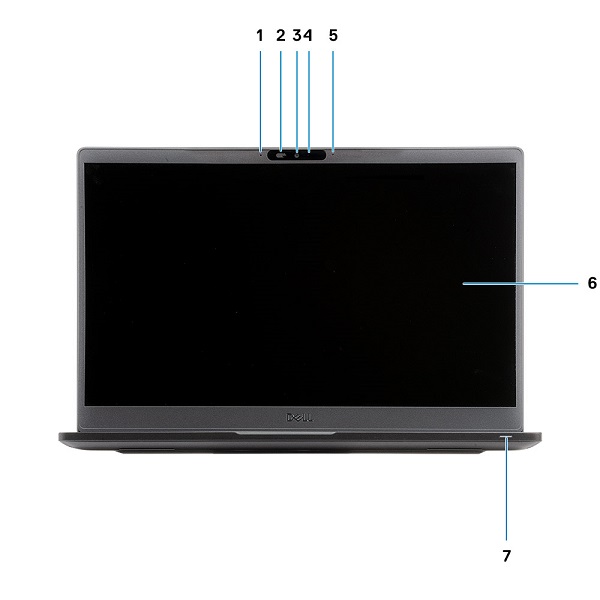
(Abb. 1 Vorderseite)
| 1 | Mikrofon-Array | 2 | SafeView Switch |
| 3 | Kamera | 4 | Kamerastatus-LED |
| 5 | Mikrofon | 6 | Bildschirm |
| 7 | LED-Akkuanzeige |
Ansicht von oben
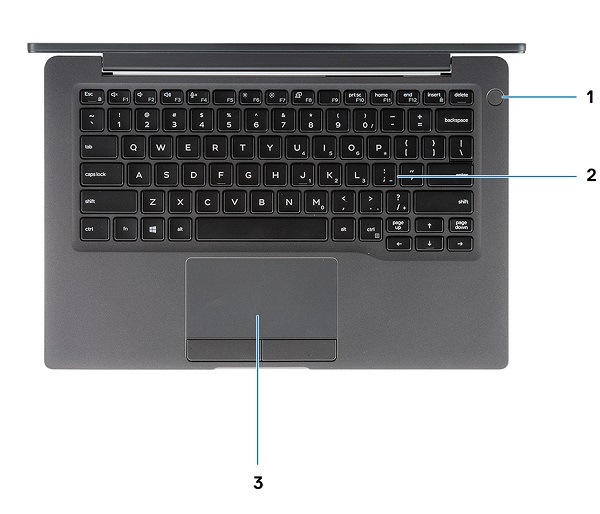
(Abb. 2 Ansicht von oben)
| 1 | Netzschalter mit Fingerabdruckleser (optional) | 2 | Tastatur |
| 3 | Touchpad |
Unterseite
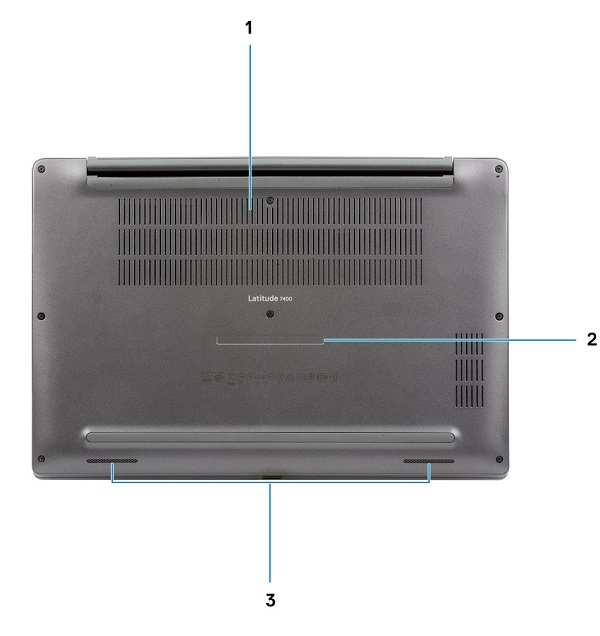
(Abb. 3 Ansicht von unten)
| 1 | Thermischer Abzug | 2 | Service-Tag-Etikett |
| 3 | Lautsprecher |
Ansicht von links
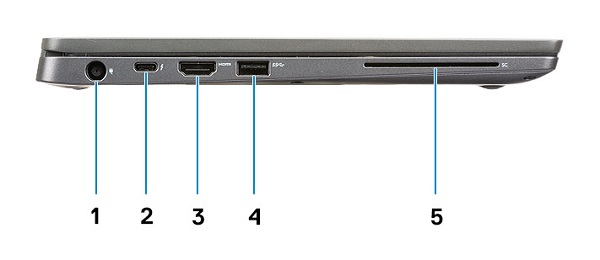
(Abb. 4 Seitenansicht von links)
| 1 | Netzadapteranschluss | 2 | USB Typ C 3.1 Gen2 Anschluss (Thunderbolt) |
| 3 | HDMI 1.4 a-Anschluss | 4 | USB Typ A 3.1 Gen1 Anschluss |
| 5 | Smartcard-Steckplatz |
Rechte Seitenansicht
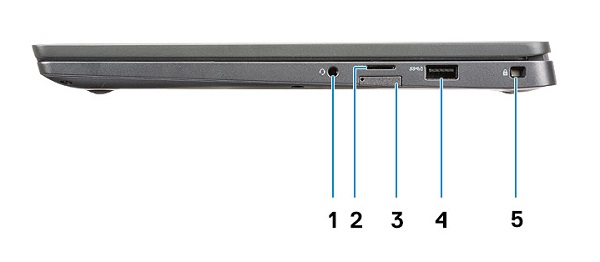
(Abb. 5 Seitenansicht von rechts)
| 1 | Universeller Audioanschluss | 2 | microSD-4.0-Speicherkartenleser |
| 3 | SIM Card-Steckplatz | 4 | USB Typ A 3.1 Gen1 Anschluss (PowerShare-fähig) |
| 5 | Steckplatz für Noble Wedge-Sicherheitskabel |
AC-Adapteransicht
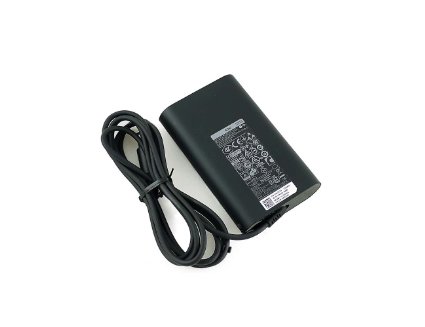
(Abb. 7 65 W-Netzadapter)
| Typ 65 W E5 Serie | Beschreibung |
| Eingangsspannung | 100 bis 240 V Wechselstrom |
| Ausgangsstrom | 3,34 A (konstante Stromabgabe) |
| Ausgangsleistung | 65 W |
| Ausgangsspannung | 19,5 V Gleichspannung |
Lösung
Ergänzende Informationen:
- Latitude 7400: Handbuch zum Zerlegen und Entnehmen von vom Kunden austauschbaren Einheiten (CRUs, Customer Replaceable Units)
- Dell Latitude 7400 – Servicehandbuch
Betroffene Produkte
Latitude 7400Artikeleigenschaften
Artikelnummer: 000125981
Artikeltyp: Solution
Zuletzt geändert: 19 Apr. 2026
Version: 9
Antworten auf Ihre Fragen erhalten Sie von anderen Dell NutzerInnen
Support Services
Prüfen Sie, ob Ihr Gerät durch Support Services abgedeckt ist.